
Ill-defined component
Figma shows warnings or errors for a Figma component.
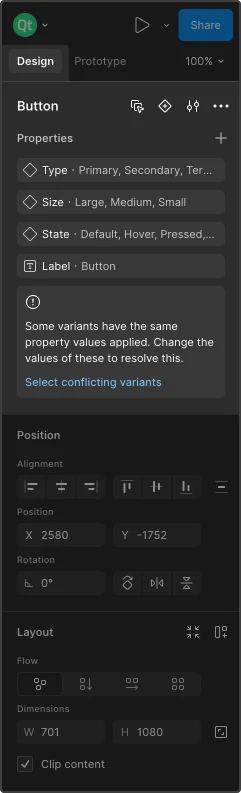
Example of an ill-defined component.
To fix the component in Figma:
- Go to the main component that causes the error.
- Select the component set on the canvas.
- See the Properties panel for more information about how to fix the component.
See also Fix conversion issues and Components.
© 2026 The Qt Company Ltd. Documentation contributions included herein are the copyrights of their respective owners. The documentation provided herein is licensed under the terms of the GNU Free Documentation License version 1.3 as published by the Free Software Foundation. Qt and respective logos are trademarks of The Qt Company Ltd in Finland and/or other countries worldwide. All other trademarks are property of their respective owners.
