
Qt Quick 3D - Simple RuntimeLoader Example
Demonstrates loading a 3D asset at runtime and querying its scene objects.
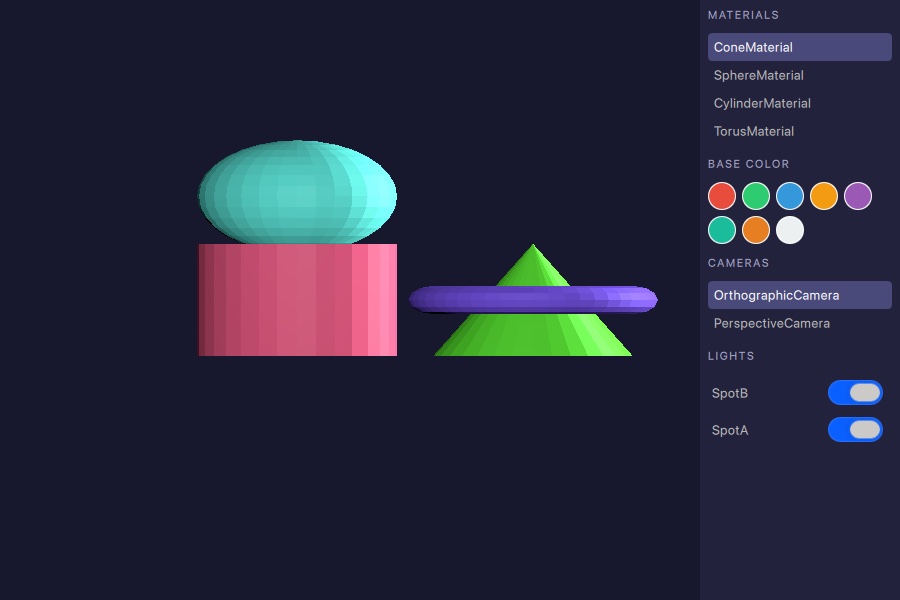
This example shows how to use RuntimeLoader to load a 3D asset at runtime and how to use query functions to discover the materials, cameras, and lights contained in the loaded scene.
Loading the Asset
The RuntimeLoader item loads a glTF 2.0 asset and creates the corresponding Qt Quick 3D objects as its children. The source property points at the asset file:
RuntimeLoader {
    id: loader
    source: "torus_and_cone.glb"

    onStatusChanged: {
        if (status !== RuntimeLoader.Success)
            return
        root.sceneMaterials = loader.queryAll(RuntimeLoader.Materials)
        root.sceneCameras = loader.queryAll(RuntimeLoader.Cameras)
        root.sceneLights = loader.queryAll(RuntimeLoader.Lights)
        if (root.sceneCameras.length > 0)
            view3d.camera = root.sceneCameras[0]
        if (root.sceneMaterials.length > 0)
            root.selectedMaterial = root.sceneMaterials[0]
    }
}
Once the status changes to RuntimeLoader.Success the scene is ready and the query functions can be called.
Querying Scene Objects
After a successful load, queryAll() returns a list of all scene objects that match a given QueryFilter. The example retrieves materials, cameras, and lights in one go:
root.sceneMaterials = loader.queryAll(RuntimeLoader.Materials)
root.sceneCameras = loader.queryAll(RuntimeLoader.Cameras)
root.sceneLights = loader.queryAll(RuntimeLoader.Lights)
The returned lists are plain JavaScript arrays of QQuick3DObject references. They can be assigned directly to a ListView model or used to set active scene properties such as View3D.camera.
Interacting with Scene Objects
Materials
Each entry in the material list can be selected to apply one of the colour swatches to it. The helper function casts the returned object to the correct material type before writing to the colour property:
function applyColorToSelected(color) {
    if (!root.selectedMaterial)
        return
    if (root.selectedMaterial instanceof PrincipledMaterial)
        (root.selectedMaterial as PrincipledMaterial).baseColor = color
    else if (root.selectedMaterial instanceof SpecularGlossyMaterial)
        (root.selectedMaterial as SpecularGlossyMaterial).albedoColor = color
}
Cameras
Clicking a camera entry in the side panel assigns it to View3D.camera, switching the active viewpoint immediately.
Lights
Each light in the side panel has a toggle that sets the light's visible property, enabling or disabling it without removing it from the scene:
Switch {
    checked: modelData.visible
    onToggled: modelData.visible = checked
}© 2026 The Qt Company Ltd. Documentation contributions included herein are the copyrights of their respective owners. The documentation provided herein is licensed under the terms of the GNU Free Documentation License version 1.3 as published by the Free Software Foundation. Qt and respective logos are trademarks of The Qt Company Ltd. in Finland and/or other countries worldwide. All other trademarks are property of their respective owners.
