
Qt Canvas Painter - Gallery Example
Demonstrates the QCanvasPainter features in a Qt Quick application.
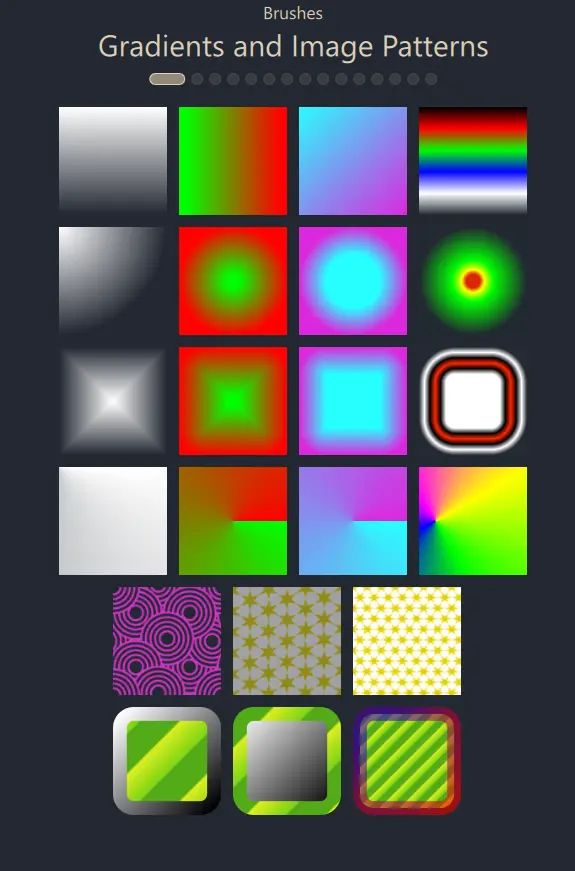
Gallery example is a Qt Quick application, showcasing a wide variety of features offered by QCanvasPainter.
The user interface is essentially a ListView, where the delegate is GalleryItem, a type implemented in C++ and exposed to QML.
class GalleryItem : public QCanvasPainterItem
{
    Q_OBJECT
    QML_NAMED_ELEMENT(GalleryItem)
    Q_PROPERTY(int galleryView READ galleryView WRITE setGalleryView NOTIFY galleryViewChanged)
    Q_PROPERTY(float animationTime READ animationTime WRITE setAnimationTime NOTIFY animationTimeChanged)
    Q_PROPERTY(float animationSine READ animationSine WRITE setAnimationSine NOTIFY animationSineChanged)
    Q_PROPERTY(float animState READ animState WRITE setAnimState NOTIFY animStateChanged)
With Qt 5 and OpenGL, GalleryItem could have been a subclass of QQuickPaintedItem. With Qt 6 and Canvas Painter, we will subclass QCanvasPainterItem, which provides accelerated rendering via QCanvasPainter, instead of using plain software rendering of QQuickPaintedItem and QPainter.
The GalleryItem implementation is simple. Reimplementing the virtual function createItemRenderer(), we create an instance of GalleryItemRenderer, which subclasses QCanvasPainterItemRenderer.
GalleryItem::GalleryItem(QQuickItem *parent)
:  QCanvasPainterItem(parent)
{
}

QCanvasPainterItemRenderer* GalleryItem::createItemRenderer() const
{
    return new GalleryItemRenderer();
}
The actual drawing is implemented in this class:
class GalleryItemRenderer : public QCanvasPainterItemRenderer
{
public:
    explicit GalleryItemRenderer();
    ~GalleryItemRenderer();

    void initializeResources(QCanvasPainter *painter) override;
    void synchronizeData(QCanvasPainterItem *item) override;
    void paint(QCanvasPainter *painter) override;
initializeResources() registers images, loaded via QImage, and shaders for the custom brushes.
void GalleryItemRenderer::initializeResources(QCanvasPainter *painter)
{
    QCanvasPainter::ImageFlags flags = QCanvasPainter::ImageFlag::Repeat | QCanvasPainter::ImageFlag::GenerateMipmaps;
    m_patternImage = painter->addImage(QImage(":/images/pattern1.png"), flags);
    m_patternImage2 = painter->addImage(QImage(":/images/pattern2.png"), flags);
    m_patternImage3 = painter->addImage(QImage(":/images/pattern3.png"), flags);
    m_testImage = painter->addImage(QImage(":/images/qt_development_white.png"));
    m_gradientImage1 = painter->addImage(QImage(":/images/gradient1.png"));
    m_gradientImage2 = painter->addImage(QImage(":/images/gradient2.png"));
    m_gradientImage3 = painter->addImage(QImage(":/images/gradient3.png"));
    image3Gray = painter->addImage(QImage(":/images/face-smile-bw.png"));
    image3Plain = painter->addImage(QImage(":/images/pattern2.png"));
    image3Nearest = painter->addImage(QImage(":/images/pattern2.png"),
                                        QCanvasPainter::ImageFlag::Nearest);
    image3Mips = painter->addImage(QImage(":/images/pattern2.png"),
                                     QCanvasPainter::ImageFlag::GenerateMipmaps);
    image3NearestMips = painter->addImage(QImage(":/images/pattern2.png"),
                                            QCanvasPainter::ImageFlag::Nearest | QCanvasPainter::ImageFlag::GenerateMipmaps);
    m_customBrush.setFragmentShader(":/qcgalleryexample/brush1.frag.qsb");
    m_customBrush2.setFragmentShader(":/qcgalleryexample/brush2.frag.qsb");
    m_customBrush3.setFragmentShader(":/qcgalleryexample/brush3.frag.qsb");
    m_customBrush3.setVertexShader(":/qcgalleryexample/brush3.vert.qsb");
    m_customBrush4.setFragmentShader(":/qcgalleryexample/brush4.frag.qsb");
    // Enable iTime animations
    m_customBrush.setAnimationRunning(true);
    m_customBrush2.setAnimationRunning(true);
    m_customBrush3.setAnimationRunning(true);
    m_customBrush4.setAnimationRunning(true);
}
synchronizeData() takes care of copying GalleryItem data so that it can be safely accessed on the Qt Quick scene graph's render thread later on:
void GalleryItemRenderer::synchronizeData(QCanvasPainterItem *item)
{
    // Setting values here synchronized
    GalleryItem *realItem = static_cast<GalleryItem*>(item);
    if (realItem) {
        m_animationTime = realItem->animationTime();
        m_animationSine = realItem->animationSine();
        m_animState = realItem->animState();
        m_viewIndex = realItem->galleryView();
        if (!qFuzzyCompare(m_previousWidth, width()) ||
            !qFuzzyCompare(m_previousHeight, height())) {
            m_sizeChanged = true;
            m_previousWidth = width();
            m_previousHeight = height();
        } else {
            m_sizeChanged = false;
        }
        loadTigerPath();
    }

}
The paint() implementation renders using QCanvasPainter, depending on the current index provided by the ListView:
void GalleryItemRenderer::paint(QCanvasPainter *painter)
{
    Q_UNUSED(painter)

    // Views not currently centered to have reduced
    // alpha and saturation.
    m_viewAlpha = 0.2 + 0.8 * m_animState;
    m_viewSaturation = m_animState;
    painter->setGlobalAlpha(m_viewAlpha);
    painter->setGlobalSaturation(m_viewSaturation);
    m_topMargin = height() * 0.02f;
    switch (m_viewIndex) {
    case 0:
        drawRectsWithLinearGradient();
        drawRectsWithRadialGradient();
        drawRectsWithBoxGradient();
        drawRectsWithConicalGradients();
        drawRectsWithImagePattern();
        drawRectsWithBrushStroke();
        break;
    case 1:
        drawImages();
        break;
    case 2:
        drawGridPatterns();
        break;
The functions invoked from here use the QCanvasPainter API to perform the rendering. For example:
void GalleryItemRenderer::drawRectsWithBrushStroke()
{
    int rects = 3;
    float margin = width()*0.02f;
    float border = margin + margin * m_animationSine;
    float w = (width() - margin) / (rects+2) - margin;
    float w2 = w - border;
    float posX = w + 2 * margin + border/2;
    float posY = m_topMargin + 5*(w+margin) + border/2;

    QRectF rect1(posX,posY,w2,w2);
    painter()->setLineWidth(border);
    painter()->setFillStyle(QCanvasImagePattern(m_patternImage3));
    QCanvasLinearGradient g1(posX, posY, posX+w2, posY+w2);
    g1.setStartColor("#ffffff");
    g1.setEndColor("#000000");
    painter()->setStrokeStyle(g1);
    painter()->beginPath();
    painter()->roundRect(rect1, border);
    painter()->fill();
    painter()->stroke();
    posX += w + margin;
Check the full example source code linked below for details.
© 2026 The Qt Company Ltd. Documentation contributions included herein are the copyrights of their respective owners. The documentation provided herein is licensed under the terms of the GNU Free Documentation License version 1.3 as published by the Free Software Foundation. Qt and respective logos are trademarks of The Qt Company Ltd. in Finland and/or other countries worldwide. All other trademarks are property of their respective owners.
