
Window Hosting Example
A demonstration of how to host non-Qt UI elements in Qt applications.
Qt offers a wide range of UI controls for both Qt Widget and Qt Quick-based applications, but sometimes it may be desirable to use controls from other UI toolkits, such as the platform's native UI toolkit.
To integrate these controls, we build upon the QWindow abstraction in Qt, by creating a QWindow representation of the native UI control, that can then be hosted within the Qt UI. A window created in this manner is known in Qt as a foreign window, as it represents a control created by a foreign (to Qt) UI toolkit.
Creating a foreign window
To create the QWindow representation we use QWindow::fromWinId(), passing a reference to a native window handle, represented by the opaque WId type.
Each platform defines what native type the WId opaque type maps to.
| Platform | WId type |
|---|---|
| macOS | NSView* |
| Windows | HWND |
| X11 | xcb_window_t |
| iOS | UIView* |
| Android | View |
| WebAssembly | emscripten::val* |
The result is a QWindow that represents the native window handle.
Note: Qt does not take (exclusive) ownership of the native window handle when creating a foreign window, so the application is responsible for keeping the native window alive for the lifetime of the foreign QWindow.
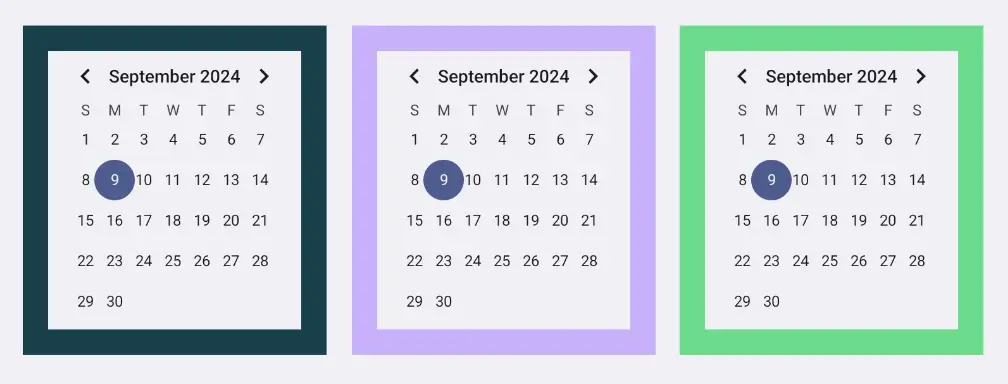
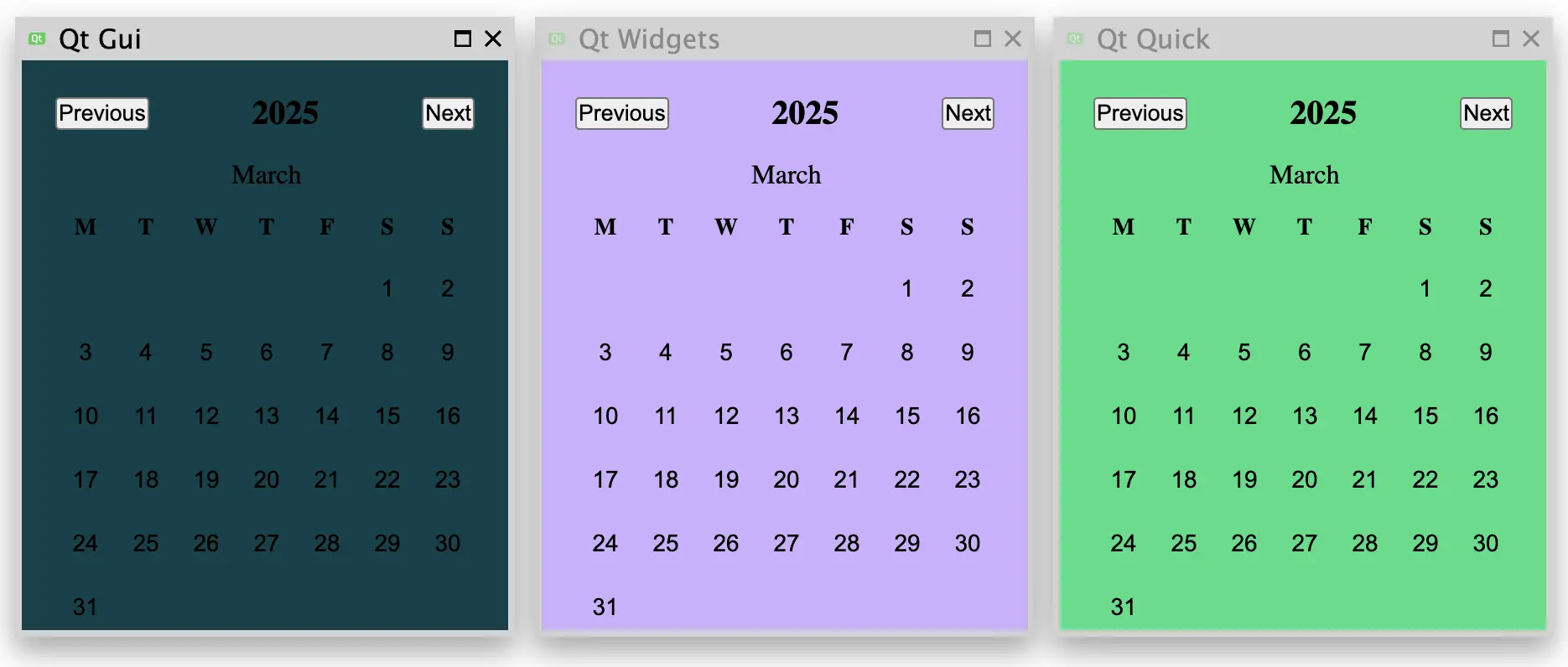
Now, before we can create a QWindow using QWindow::fromWinId() we need a native window handle. In this example, we will host a month calendar control, as most platforms have it in their native UI toolkits, or otherwise readily available. The specifics of how to create the calendar on each platform are shown in the code snippets below.
To ensure that the native handle stays alive, but is also cleaned up properly on application exit, we maintain a list of cleanup functions that we execute before returning from main().
In addition to creating the native window handle and turning that into a QWindow, we also set a minimum size on the resulting QWindow, based on what the native toolkit reports as the preferred minimum size of the calendar control. This allows
Qt to lay out the hosted foreign window properly.
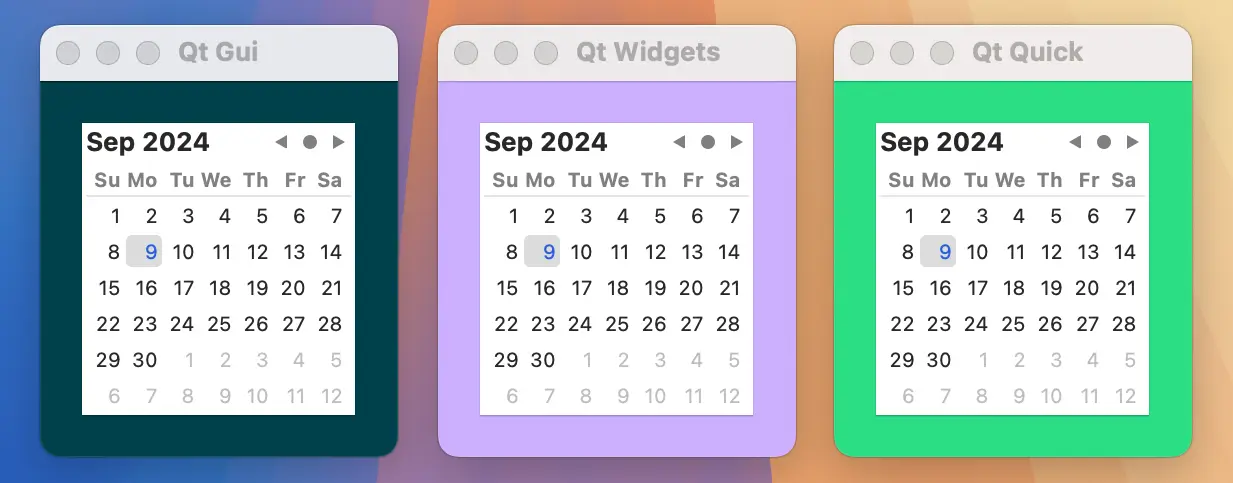
#include <AppKit/NSDatePicker.h>
#include <AppKit/NSLayoutConstraint.h>

QWindow *createCalendarWindow()
{
    auto *datePicker = [NSDatePicker new];
    cleanupFunctions.push_back([=]{ [datePicker release]; });

    datePicker.datePickerStyle = NSDatePickerStyleClockAndCalendar;
    datePicker.datePickerElements = NSDatePickerElementFlagYearMonthDay;
    datePicker.drawsBackground = YES;
    datePicker.dateValue = [NSDate now];

    auto *calendarWindow = QWindow::fromWinId(WId(datePicker));
    calendarWindow->setMinimumSize(QSizeF::fromCGSize(datePicker.fittingSize).toSize());

    return calendarWindow;
}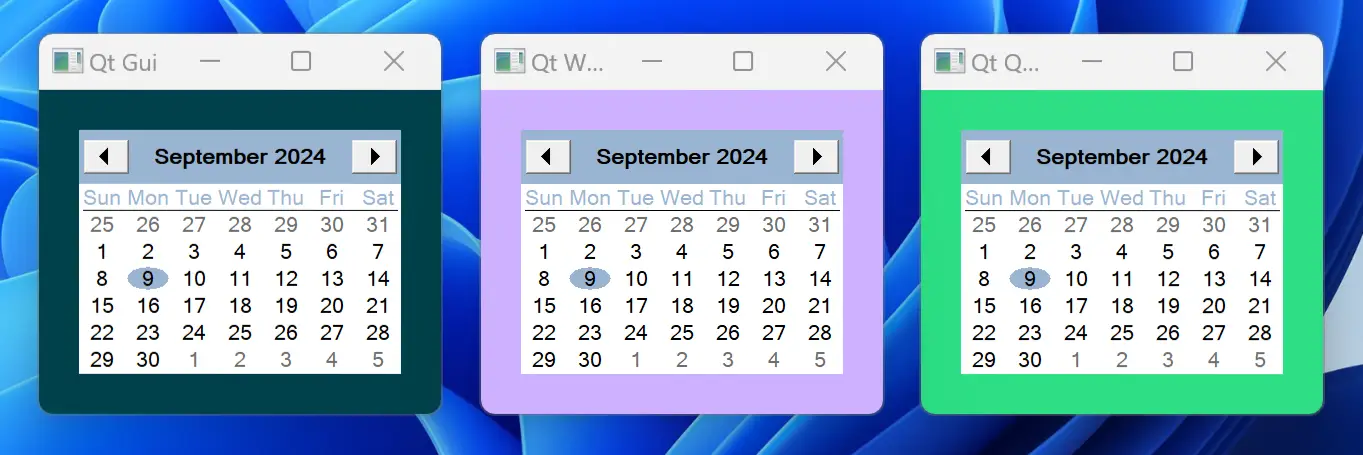
#include <windows.h>
#include <commctrl.h>

QWindow *createCalendarWindow()
{
    static bool initializedDateControl = []{
        INITCOMMONCONTROLSEX icex;
        icex.dwSize = sizeof(icex);
        icex.dwICC = ICC_DATE_CLASSES;
        return InitCommonControlsEx(&icex);
    }();
    Q_ASSERT(initializedDateControl);

    HWND monthCalendar = CreateWindow(MONTHCAL_CLASSW,
        nullptr, MCS_NOTODAYCIRCLE | MCS_NOTODAY, 0, 0, 0, 0,
        nullptr, nullptr, GetModuleHandle(nullptr), nullptr);
    cleanupFunctions.push_back([=]{ DestroyWindow(monthCalendar); });

    auto *calendarWindow = QWindow::fromWinId(WId(monthCalendar));

    RECT minimumSize;
    MonthCal_GetMinReqRect(monthCalendar, &minimumSize);
    const auto dpr = calendarWindow->devicePixelRatio();
    calendarWindow->setMinimumSize(QSize(
        minimumSize.right / dpr,minimumSize.bottom / dpr));

    return calendarWindow;
}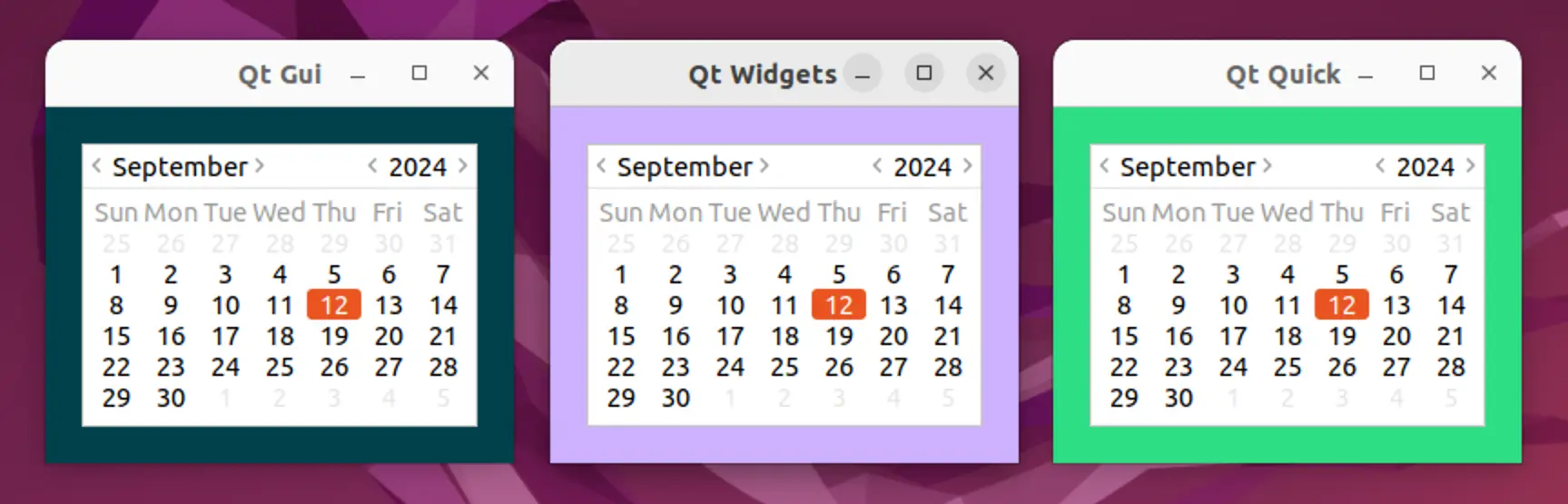
#include <gtk/gtk.h>
#include <gtk/gtkx.h>

QWindow *createCalendarWindow()
{
    static bool initializedGTK = []{
        qputenv("GDK_BACKEND", "x11");
        return gtk_init_check(nullptr, nullptr);
    }();
    Q_ASSERT(initializedGTK);

    auto *plug = gtk_plug_new(0);
    g_signal_connect(GTK_WIDGET(plug), "delete-event", G_CALLBACK(+[]{
        return true; // Don't destroy on close
    }), nullptr);
    cleanupFunctions.push_back([=]{ gtk_widget_destroy(GTK_WIDGET(plug)); });

    auto *calendar = gtk_calendar_new();
    gtk_container_add(GTK_CONTAINER(plug), GTK_WIDGET(calendar));
    gtk_widget_show_all(plug);

    auto *calendarWindow = QWindow::fromWinId(gtk_plug_get_id(GTK_PLUG(plug)));

    GtkRequisition minimumSize;
    gtk_widget_get_preferred_size(calendar, &minimumSize, NULL);
    calendarWindow->setMinimumSize(QSize(minimumSize.width, minimumSize.height));

    return calendarWindow;
}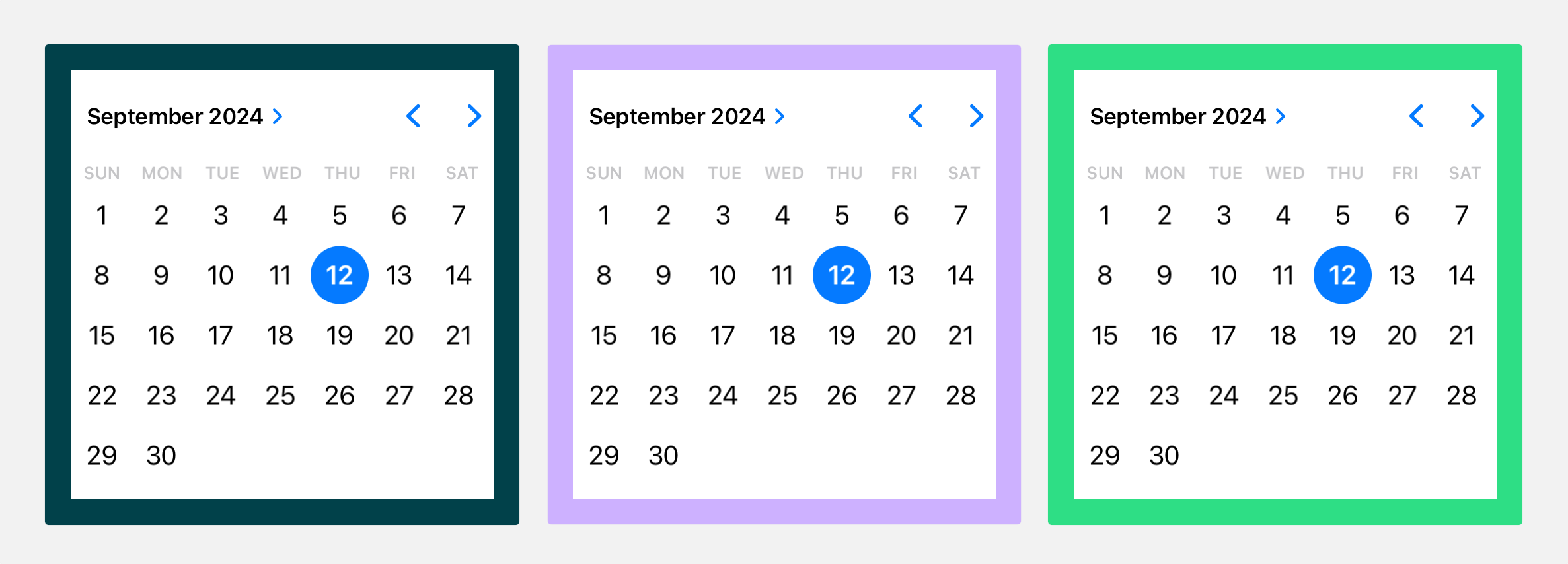
#include <UIKit/UIDatePicker.h>

QWindow *createCalendarWindow()
{
    auto *datePicker = [UIDatePicker new];
    cleanupFunctions.push_back([=]{ [datePicker release]; });

    datePicker.datePickerMode = UIDatePickerModeDate;
    datePicker.preferredDatePickerStyle = UIDatePickerStyleInline;
    datePicker.backgroundColor = UIColor.systemBackgroundColor;

    auto *calendarWindow = QWindow::fromWinId(WId(datePicker));
    calendarWindow->setMinimumSize(QSizeF::fromCGSize(datePicker.frame.size).toSize());

    return calendarWindow;
}
Q_DECLARE_JNI_CLASS(CalendarView, "android/widget/CalendarView")
Q_DECLARE_JNI_CLASS(Color, "android/graphics/Color")

QWindow *createCalendarWindow()
{
    using namespace QtJniTypes;
    using namespace QNativeInterface;

    auto *androidApp = qGuiApp->nativeInterface<QAndroidApplication>();
    Q_ASSERT(androidApp);

    auto *calendarView = new CalendarView(androidApp->context());
    cleanupFunctions.push_back([=]{ delete calendarView; });

    // Resolving Android default colors is not trivial, so let's ask Qt
    QColor paletteColor = qGuiApp->palette().color(QPalette::Window);
    int backgroundColor = Color::callStaticMethod<int>("rgb",
        paletteColor.red(), paletteColor.green(), paletteColor.blue());
    calendarView->callMethod<void>("setBackgroundColor", backgroundColor);

    auto *calendarWindow = QWindow::fromWinId(WId(calendarView->object()));
    calendarWindow->setMinimumSize(QSize(200, 220));

    return calendarWindow;
}
#include <emscripten.h>
#include <emscripten/val.h>
using emscripten::val;
using emscripten::EM_VAL;

EM_JS(EM_VAL, createCalendarElement, (), {
    var calendar = document.createElement("calendar-date");
    calendar.innerHTML = "<calendar-month></calendar-month>";
    return Emval.toHandle(calendar);
});

QWindow *createCalendarWindow()
{
    static bool initializedCalendarComponent = []{
        return EM_ASM_INT(
            var script = document.createElement('script');
            script.src = "https://unpkg.com/cally";
            script.type = "module";
            document.head.appendChild(script);
            return true;
        );
    }();
    Q_ASSERT(initializedCalendarComponent);

    val *calendarElement = new val(val::take_ownership(createCalendarElement()));
    cleanupFunctions.push_back([calendarElement]{ delete calendarElement; });

    QWindow *window = QWindow::fromWinId(WId(calendarElement));
    window->setMinimumSize(QSize(250, 300));
    return window;
}
Hosting a foreign window
Now that we have a foreign QWindow, we can host it in a Qt UI. We have several options here, as described below.
Hosting in Qt GUI
At the lowest level, we can host the foreign window by reparenting it into another QWindow, via QWindow::setParent(). This approach leaves it up to the application developer to handle positioning, resizing, and other aspects of managing the hosted child window, so we generally advise against
integrating on this level, if at all possible.
In this example we first create a minimal container window implementation.
class ContainerWindow : public QRasterWindow
{
protected:
    bool event(QEvent *event) override
    {
        if (event->type() == QEvent::ChildWindowAdded) {
            auto *childWindow = static_cast<QChildWindowEvent*>(event)->child();
            childWindow->resize(childWindow->minimumSize());
            setMinimumSize(childWindow->size().grownBy(contentsMargins));
            resize(minimumSize());
        }

        return QRasterWindow::event(event);
    }

    void showEvent(QShowEvent *) override
    {
        findChild<QWindow*>()->setVisible(true);
    }

    void resizeEvent(QResizeEvent *) override
    {
        auto *containedWindow = findChild<QWindow*>();
        containedWindow->setPosition(
            (width() / 2)  - containedWindow->width() / 2,
            (height() / 2) - containedWindow->height() / 2
        );
    }

    void paintEvent(QPaintEvent *) override
    {
        QPainter painter(this);
        painter.fillRect(0, 0, width(), height(), "#00414A");
    }
};
Which we can then reparent our foreign window into.
ContainerWindow window;
window.setTitle("Qt Gui");

auto *calendarWindow = createCalendarWindow();
calendarWindow->setParent(&window);
Hosting in Qt Widgets
For applications built on the Qt Widgets UI stack we follow the same approach as for QWindow::fromWinId(), by creating a QWidget representation of the QWindow, via QWidget::createWindowContainer().
We could then reparent the widget into another widget, via QWidget::setParent(), with the same caveats as the Qt GUI example above of having to manage positioning, resizing, etc. manually. In this example we prefer to add the window container widget to a QVBoxLayout, which allows us to automatically center the foreign window inside the top level widget.
QWidget widget;
widget.setPalette(QColor("#CDB0FF"));
widget.setWindowTitle("Qt Widgets");
widget.setLayout(new QVBoxLayout);
widget.layout()->setContentsMargins(contentsMargins);
widget.layout()->setAlignment(Qt::AlignCenter);

auto *calendarWidget = QWidget::createWindowContainer(createCalendarWindow());
widget.layout()->addWidget(calendarWidget);
Hosting in Qt Quick
Finally, for applications built on the Qt Quick UI stack, we use the WindowContainer item to manage the foreign window.
Window {
    id: root
    title: "Qt Quick"
    color: "#2CDE85"

    property alias calendarWindow: calendar.window

    property int contentsMargins: 20

    minimumWidth: calendarWindow.minimumWidth + contentsMargins * 2
    minimumHeight: calendarWindow.minimumHeight + contentsMargins * 2

    WindowContainer {
        id: calendar
        width: window.minimumWidth
        height: window.minimumHeight
        anchors.centerIn: parent
    }
}
In this example the foreign window is exposed to the QML engine as an initial property, but this could be solved in different ways depending on the needs of the application.
QQmlApplicationEngine engine;
engine.setInitialProperties({{ "calendarWindow", QVariant::fromValue(createCalendarWindow()) }});
engine.loadFromModule("windowhosting", "Main");© 2026 The Qt Company Ltd. Documentation contributions included herein are the copyrights of their respective owners. The documentation provided herein is licensed under the terms of the GNU Free Documentation License version 1.3 as published by the Free Software Foundation. Qt and respective logos are trademarks of The Qt Company Ltd. in Finland and/or other countries worldwide. All other trademarks are property of their respective owners.
