
ColorPalette RESTful API client
Example of how to generate the OpenAPI client code and integrate it into an application.
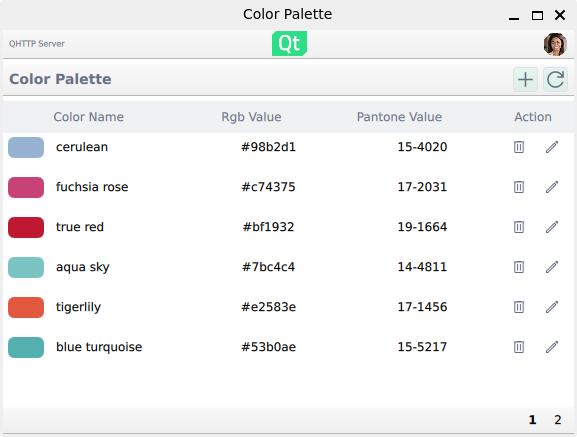
This example demonstrates how to use the Qt OpenAPI generator to create RESTful API client code from the colorpalette.yaml specification and integrate it into a QML application. Its structure and UI closely match the Qt Quick Demo - RESTful API client example so that the differences in the networking and integration approach are easy to identify.
Running the Example
You can run the example from:
- Qt Creator
Open the Welcome mode and select the example from Examples. For more information, see Qt Creator: Tutorial: Build and run.
- Qt Extension for Visual Studio Code
Run the Qt: Open Qt examples command from the Command Palette, and select the example from the list. For more information, see Qt Extension for Visual Studio Code: Tutorial: Build and run.
Note: Before building the example, make sure that the OpenAPI Generator is available in your PATH. See Using the module for information about installing the required tools.
Application functionality
The example provides the same basic functionalities as Qt Quick Demo - RESTful API client.
Server selection
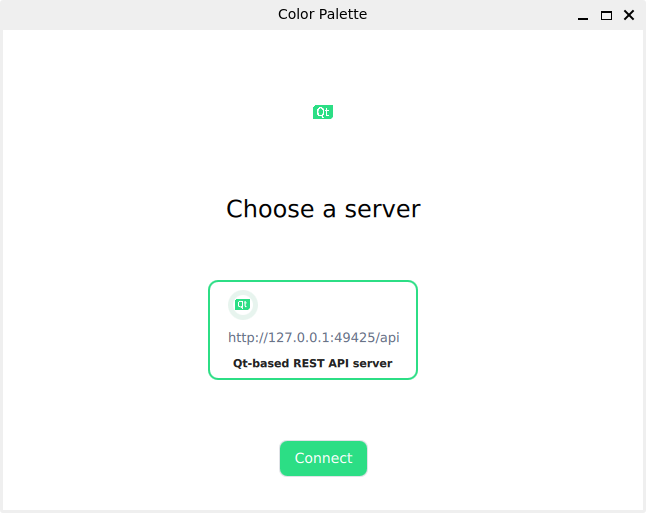
At startup, the application presents a predefined server option that the Color Palette client can communicate with:
Once the server is selected and the Connect button is pressed, the RESTful API client issues a test HTTP GET request to verify that the server is available. If the server is not running, the application remains on the server selection view.
Generating client code from an OpenAPI specification
The CMakeLists.txt file invokes the Qt OpenAPI generator to generate client code from the colorpalette.yaml specification by calling the qt_add_openapi_client() function.
qt_add_openapi_client(ColorpaletteClientExample
    SPEC_FILE
        ${CMAKE_CURRENT_SOURCE_DIR}/colorpalette.yaml
)
The generated API classes ColorsApi and UsersApi handle all the low-level HTTP details:
- Server configuration
- HTTP request construction for all standard HTTP methods
- Serialization of input parameters according to the specification
- Deserialization of server responses into typed objects
- Success and errors are reported through Qt signals
Compared to the other version of the example that uses the QtNetworkAuth APIs directly, this approach eliminates manual network request construction.
Exposing generated APIs to QML
The generated API classes ColorsApi and UsersApi are exposed to QML via helper classes defined in ApiBridges.h. Each helper uses the QML_FOREIGN macro and registers the underlying C++ instance as a singleton, allowing QML to access the same object while ownership remains in C++. For more details on this topic, check the Qt QML documentation on exposing an existing object as a singleton.
struct ForeignColorsAPI
{
    Q_GADGET
    QML_FOREIGN(QtOpenAPI::ColorsApi)
    QML_SINGLETON
    QML_NAMED_ELEMENT(ColorsApi)

};
Using the APIs from QML
Once registered, the APIs are available globally in QML. This allows QML components to directly access ColorsApi and UsersApi and call their methods, as shown below:
ColorsApi.getColors(page)Each API method emits signals when the operation succeeds or fails, allowing QML components to handle the server responses:
function onAddColorFinished() {
    root.fetchColors(root.currentColorPage)
}

function onAddColorErrorOccurred(errorType, errorStr) {
    root.handleError(errorStr)
}
Helper singleton types
Some API methods take non-trivial types as parameters, such as Credentials and Color. The example provides QML singletons to construct instances of such types in ApiBridges.h:
class Credentials: public QObject
{
    Q_OBJECT
    QML_ELEMENT
    QML_SINGLETON
public:
    Q_INVOKABLE QtOpenAPI::Credentials create(const QString &email, const QString &password)
    {
        QtOpenAPI::Credentials credentials;
        credentials.setEmail(email);
        credentials.setPassword(password);
        return credentials;
    }
};
These singletons can then be used in QML when calling API methods. For example, Credentials is used to create a credentials object before logging in:
let credentials = Credentials.create(userInfo.model.email, "apassword");
UsersApi.loginUser(credentials);
Source files
See also All Qt Examples, Qt Quick Demo - RESTful API client, and RESTful API Server.
© 2026 The Qt Company Ltd. Documentation contributions included herein are the copyrights of their respective owners. The documentation provided herein is licensed under the terms of the GNU Free Documentation License version 1.3 as published by the Free Software Foundation. Qt and respective logos are trademarks of The Qt Company Ltd. in Finland and/or other countries worldwide. All other trademarks are property of their respective owners.
