
QML Previewer Example
Demonstrates how to mix Qt Quick with a Qt Widgets application using QWidget::createWindowContainer().
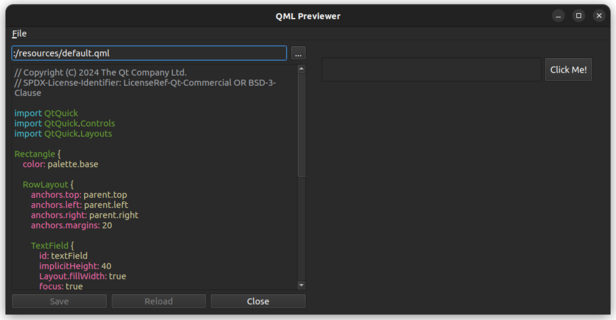
The example demonstrates how you can embed Qt Quick scenes inside a Qt Widgets application, and how different UI aspects integrate between Qt Widgets and Qt Quick. This includes:
- Tab focusing between Qt Widgets and Qt Quick
- Drag and drop between Qt Widgets and Qt Quick
- Shortcuts defined in the embedded QML file
- Embedding a QQuickView inside a QLayout
Running the Example
You can run the example from:
- Qt Creator
Open the Welcome mode and select the example from Examples. For more information, see Qt Creator: Tutorial: Build and run.
- Qt Extension for Visual Studio Code
Run the Qt: Open Qt examples command from the Command Palette, and select the example from the list. For more information, see Qt Extension for Visual Studio Code: Tutorial: Build and run.
UI walkthrough
The main window of the example contains a file browser on the left side, which allows you to select QML files to preview. The right side displays the QML content in a QQuickWidget. You can interact with the QML content, including clicking buttons, entering text, and using shortcuts defined in the QML files.
The example also demonstrates how to handle focus and input events between the Qt Widgets and Qt Quick components, ensuring a smooth user experience.
See also QWidget::createWindowContainer().
© 2026 The Qt Company Ltd. Documentation contributions included herein are the copyrights of their respective owners. The documentation provided herein is licensed under the terms of the GNU Free Documentation License version 1.3 as published by the Free Software Foundation. Qt and respective logos are trademarks of The Qt Company Ltd. in Finland and/or other countries worldwide. All other trademarks are property of their respective owners.
