
Qt Quick 3D - Antialiasing Example
Demonstrates the antialiasing modes in Qt Quick 3D.
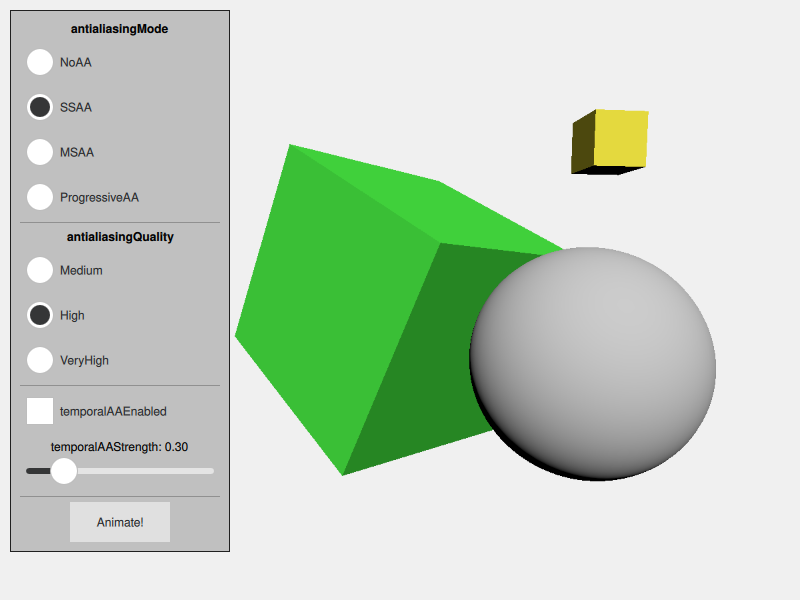
The Antialiasing example demonstrates how to control antialiasing in Qt Quick 3D. It shows a simple scene that exhibits antialiasing artifacts. There is a simple Qt Quick user interface that allows choosing between the antialiasing types, and setting the options that control them.
The test scene
This example shows a simple scene that contains a sphere and two rotated cubes. The scene is set up so that it clearly shows jagged edges when antialiasing is not enabled.
Controlling antialiasing
Antialiasing is controlled by the SceneEnvironment object. The values are set based on the selection made in the user interface.
The antialiasing mode can be set to NoAA to disable antialiasing, or to one of the following:
SSAAfor supersample antialiasingMSAAfor multisample antialiasingProgressiveAAfor progressive antialiasing
The antialiasing quality can be set to Medium, High, or VeryHigh.
In addition, temporal antialiasing can be enabled independently. The temporal antialiasing mode can be set to one of the following:
TAADefaultfor basic temporal antialiasingTAAMotionVectorfor higher-quality temporal antialiasing which uses motion vectors
     environment: SceneEnvironment {
         id: sceneEnvironment
         clearColor: "#002b36"
         backgroundMode: SceneEnvironment.Color

         antialiasingMode: modeButton1.checked ? SceneEnvironment.NoAA : modeButton2.checked
                                                 ? SceneEnvironment.SSAA : modeButton3.checked
                                                   ? SceneEnvironment.MSAA : SceneEnvironment.ProgressiveAA

         antialiasingQuality: qualityButton1.checked ? SceneEnvironment.Medium : qualityButton2.checked
                                                       ? SceneEnvironment.High : SceneEnvironment.VeryHigh
         temporalAAEnabled: temporalModeButton.checked
         temporalAAStrength: temporalStrengthSlider.value
         temporalAAMode: temporalModeDefault.checked ? SceneEnvironment.TAADefault : SceneEnvironment.TAAMotionVector
     }
See the Anti-Aliasing page in the asset conditioning section for further discussion on antialiasing.
© 2026 The Qt Company Ltd. Documentation contributions included herein are the copyrights of their respective owners. The documentation provided herein is licensed under the terms of the GNU Free Documentation License version 1.3 as published by the Free Software Foundation. Qt and respective logos are trademarks of The Qt Company Ltd. in Finland and/or other countries worldwide. All other trademarks are property of their respective owners.
