
Qt Quick 3D - Cascaded Shadow Maps Example
Demonstrates cascaded shadow maps.
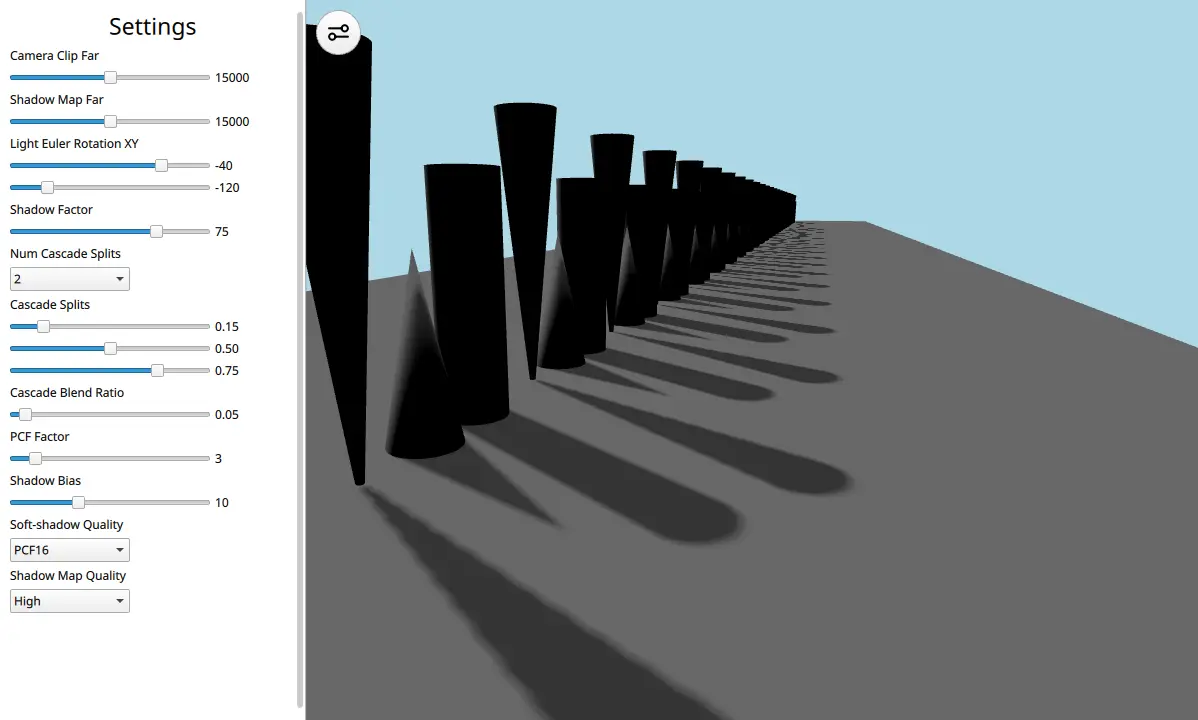
This example demonstrates how to use a DirectionalLight with cascaded shadow maps.
Let's have a look at the scene's QML code:
View3D {
    id: view
    x: settings.viewX
    y: 0
    width: parent.width - settings.viewX
    height: parent.height
    camera: camera
    environment: SceneEnvironment {
        clearColor: "lightblue"
        backgroundMode: SceneEnvironment.Color
        antialiasingMode: SceneEnvironment.MSAA
        antialiasingQuality: SceneEnvironment.High
    }

    PerspectiveCamera {
        id: camera
        position: Qt.vector3d(458, 300, 515)
        eulerRotation: Qt.vector3d(-14, 19, 0)
        clipFar: settings.clipFar
    }

    DirectionalLight {
        visible: true
        castsShadow: true
        shadowFactor: settings.shadowFactor
        eulerRotation: settings.eulerRotation
        csmSplit1: settings.csmSplit1
        csmSplit2: settings.csmSplit2
        csmSplit3: settings.csmSplit3
        csmNumSplits: settings.csmNumSplits
        shadowMapQuality: settings.shadowMapQuality
        csmBlendRatio: settings.csmBlendRatio
        shadowBias: settings.shadowBias
        pcfFactor: settings.pcfFactor
        softShadowQuality: settings.softShadowQuality
        shadowMapFar: settings.shadowMapFar
        lockShadowmapTexels: settings.lockShadowmapTexels
    }

    Model {
        id: ground
        source: "#Cube"
        scale: Qt.vector3d(25, 0.01, 135)
        z: -5500
        materials: PrincipledMaterial {
            baseColor: "gray"
        }
        castsShadows: false
    }

    Node {
        id: shapeSpawner
        Component.onCompleted: {
            var conesAndCylinderTrio = Qt.createComponent("ConesAndCylinderTrio.qml")
            var z_pos = 0
            for (var i = 0; i < 25; i++) {
                conesAndCylinderTrio.incubateObject(shapeSpawner, {
                                                    "z_positions": [
                                                            z_pos,
                                                            z_pos - 125,
                                                            z_pos - 250
                                                        ]})
                z_pos -= 450
            }
        }
    }

    MouseArea {
        anchors.fill: parent
        acceptedButtons: Qt.LeftButton
        propagateComposedEvents: true
        onClicked: {
            settings.drawerVisible = false
            wasd.forceActiveFocus() // focus WASD controller for keyboard input
        }
    }
}
The scene consists of a DirectionalLight, a PerspectiveCamera, a floor Model, and a long array of cones and cylinder Models. This long array is laid out like this to show how cascades can help increase the graphical fidelity of the scene. With just one shadow map it will cause artifacts but with cascades these can be remedied. The DirectionalLight contains a lot of properties that are tweakable through a settings pane in the UI.
The reader is encouraged to see the Shadow Mapping article for more information on the different properties and to try out the example to see how they interact.
© 2026 The Qt Company Ltd. Documentation contributions included herein are the copyrights of their respective owners. The documentation provided herein is licensed under the terms of the GNU Free Documentation License version 1.3 as published by the Free Software Foundation. Qt and respective logos are trademarks of The Qt Company Ltd. in Finland and/or other countries worldwide. All other trademarks are property of their respective owners.
