
Qt WebChannel Standalone Example
A simple chat between a server and a remote client running in a browser.
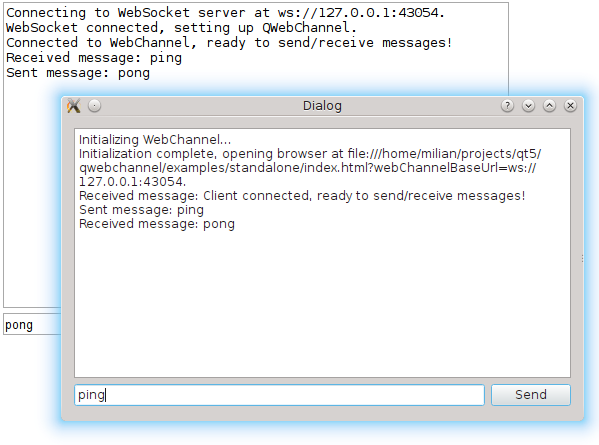
Standalone demonstrates how to use the QWebChannel C++ API to communicate with an external client. It is a simple chat between a C++ application and a remote HTML client running in your default browser.
Running the Example
You can run the example from:
- Qt Creator
Open the Welcome mode and select the example from Examples. For more information, see Qt Creator: Tutorial: Build and run.
- Qt Extension for Visual Studio Code
Run the Qt: Open Qt examples command from the Command Palette, and select the example from the list. For more information, see Qt Extension for Visual Studio Code: Tutorial: Build and run.
Communicating with a Remote Client
The C++ application sets up a QWebChannel instance and publishes a Core object over it. On the remote client side, index.html runs in your default browser. Both show a dialog with the list of received messages and an input box to send messages to the other end.
The Core emits the Core::sendText() signal when the user sends a message. The signal automatically gets propagated to the HTML client. When the user enters a message on the HTML side, Core::receiveText() is called.
All communication between the HTML client and the C++ server is done over a WebSocket. The C++ side instantiates a QWebSocketServer and wraps incoming QWebSocket connections in QWebChannelAbstractTransport objects. These objects are then connected to the QWebChannel instance.
Serving the Client Page
The index.html page and the qwebchannel.js script it loads are compiled into the application as Qt resources. The application serves them over a minimal loopback HTTP server and opens the default browser at the resulting http:// URL. A loopback URL works even when the browser and the application do not share a filesystem, as on a sandboxed or cross-compiled platform.
The example implements its own minimal HTTP server so that building it does not require the Qt HTTP Server module. In a real application, you would use QHttpServer instead.
See also Qt WebChannel JavaScript API.
© 2026 The Qt Company Ltd. Documentation contributions included herein are the copyrights of their respective owners. The documentation provided herein is licensed under the terms of the GNU Free Documentation License version 1.3 as published by the Free Software Foundation. Qt and respective logos are trademarks of The Qt Company Ltd. in Finland and/or other countries worldwide. All other trademarks are property of their respective owners.
