
C
Embedded Clock and Contacts Apps
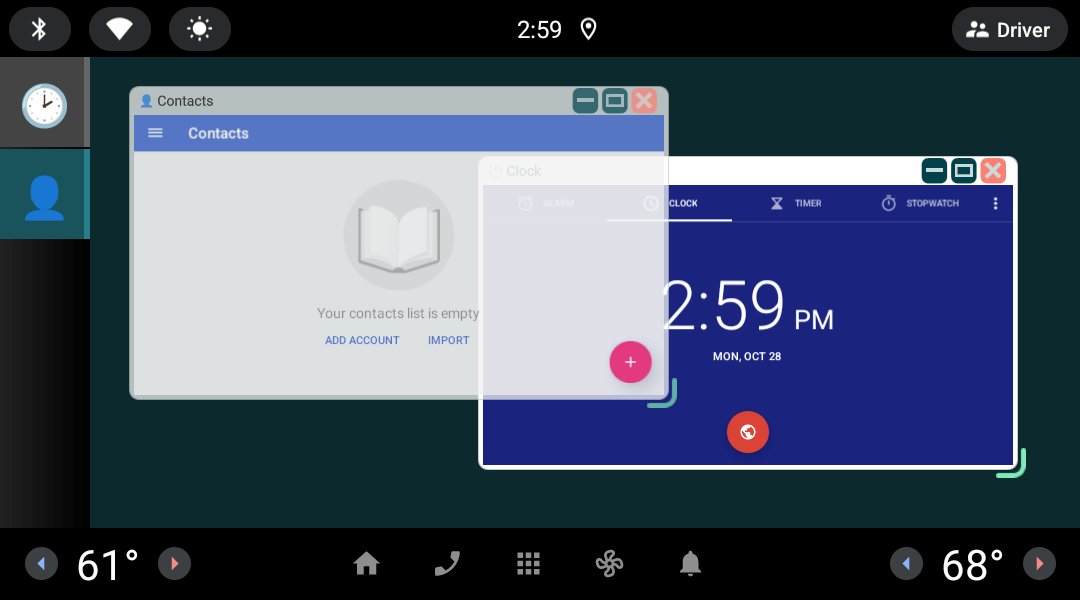
An app that embeds the Clock and Contacts apps in floating window using the Qt for Android Automotive ActivityView type.
Building and deploying the example
See specific steps relating to building and deploying Qt for Android Automotive examples.
Including the API
To use the ActivityView plugin in Qt Quick application, first, we have to import the Qt for Android Automotive ActivityView module in QML:
import QtAndroidAutomotive.ActivityViewWrapping an application inside the floating window
In the example, we implement a floating window QML type. This type is defined in DialogWindow.qml and it encapsulates the visual appearance and behavior.
Next, in ContainerWindow.qml, we will declare a ListModel as activitiesModel, with two elements of ListElement type, which holds properties required to create DialogWindow instance.
ListModel {
    id: activitiesModel

    ListElement {
        maximized: false
        minimized: false
        packageName: "com.android.deskclock"
        running: false
        symbol: "🕑"
        title: "Clock"
    }

    ListElement {
        maximized: false
        minimized: false
        packageName: "com.android.contacts"
        running: false
        symbol: "👤"
        title: "Contacts"
    }
}
Using ActivityView
The ActivityView QML API related functionality is covered by the ActivityView item placed inside DialogWindow, and by setting parameters of each embedded Activity.
ActivityView {
    id: activityView

    packageName: root.running ? root.packageName : ""
    usePlaceholder: edgeBottomRight.active

    placeholder: Text {
        id: activitySymbol

        font.pixelSize: 64
        horizontalAlignment: Text.AlignHCenter
        text: root.symbol
        verticalAlignment: Text.AlignVCenter
    }

    anchors {
        bottom: parent.bottom
        bottomMargin: root.radius / 2
        left: parent.left
        leftMargin: root.radius / 2
        right: parent.right
        rightMargin: root.radius / 2
        top: titleBar.bottom
    }
}
By using the DialogWindow component as a Repeater delegate, we can now instantiate floating windows, which will wrap the Activities of Android Applications. In this example we are embedding the Clock and Contacts applications inside these two windows.
Repeater {
    id: dialogRepeater
    model: activitiesModel

    DialogWindow {
        id: dialogWindow

        required property int index
        property rect lastSize: Qt.rect(x, y, width, height)

        titleBar.dragArea.target: dialogWindow
        height: (Window.height * 2) / 3
        width: Window.width / 2
        x: (index + 1) * 32
        y: (index + 1) * 32

    }
}
Available under certain Qt licenses.
Find out more.
