
Sign Android packages
To publish your application, you must sign it by using a public-private key pair that consists of a certificate and a corresponding private key and is identified by an alias. The key pair is used to verify that the future versions of your application are actually created by you.
Warning: Keep the key pair in a safe place and take backup copies because you cannot update the application if you lose the key pair.
You can use Qt Creator to generate a keystore and a self-signed certificate. The generated certificate has the structure of an X.509 v3 digital certificate. It has information about the version, serial number, and validity period of the certificate, the ID of the algorithm that is used to encrypt the data, the organization that issued the certificate, and the subject (owner) of the certificate. In case of a self-signed certificate, the issuer and owner of the certificate are the same. In addition, the certificate has information about the algorithm that is used to sign the certificate, as well as the signature of the certificate.
A password protects the keystore. In addition, you can protect each alias with its individual password.
When you sign an Android application, you must select a keystore that has certificates and a certificate alias from the keystore. The signing process embeds the public key (certificate) for the alias into the APK.
Create a keystore and certificate
To create a keystore and a self-signed certificate:
- Go to Projects > Build Settings > Build Android APK and select Details.
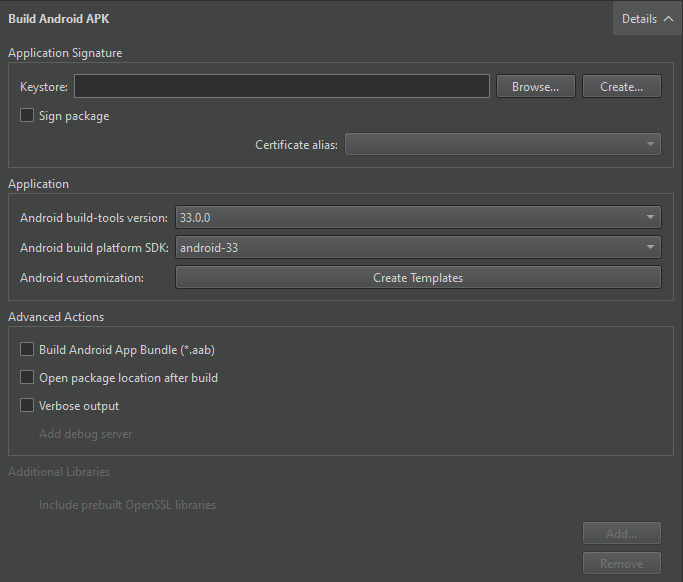
- In the Keystore field, select Create to create a new keystore that has one key pair in the Create a Keystore and a Certificate dialog:
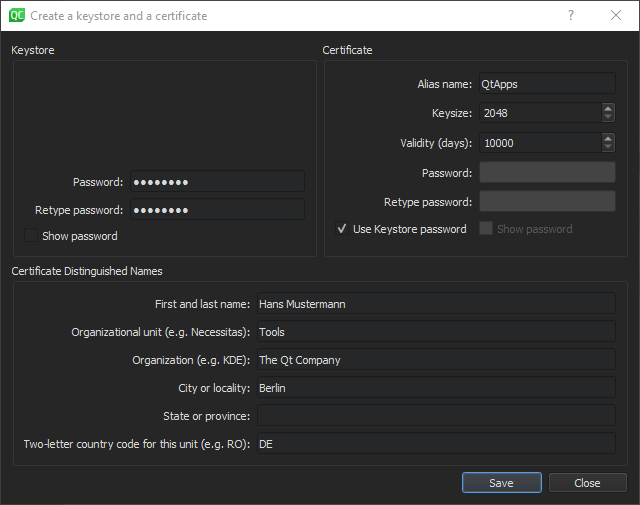
- In the Keystore group, enter a password to protect the keystore.
- In the Certificate group, specify the key size and validity period of the certificate. You can specify a separate password to protect the key pair or use the keystore password.
- In the Certificate Distinguished Names group, enter information about yourself and your company or organization that identifies the issuer and the owner of the key pair.
- Select Save.
- In the Keystore File Name dialog, enter a name for the keystore and select a location for it.
- In the Keystore dialog, enter the keystore password to create the key pair in the keystore.
Sign a package
To sign an Android package by using a key pair:
- Go to Projects > Build Settings > Build Android APK and select Details.
- In the Keystore field, select Choose to select an existing keystore.
- In the Certificate alias field, select an alias from the list of key pairs that the keystore has.
- Select Sign package to use the alias to sign the Android package.
See also How to: Develop for Android and Developing for Android.
Copyright © The Qt Company Ltd. and other contributors. Documentation contributions included herein are the copyrights of their respective owners. The documentation provided herein is licensed under the terms of the GNU Free Documentation License version 1.3 as published by the Free Software Foundation. Qt and respective logos are trademarks of The Qt Company Ltd in Finland and/or other countries worldwide. All other trademarks are property of their respective owners.
