
Clangd
The Clang project has libraries for parsing C language family source files and providing you with detailed diagnostics. The clangd index provides exact and complete results for services such as code completion.
To set preferences for clangd, go to Preferences > C++ > Clangd and select Use clangd.
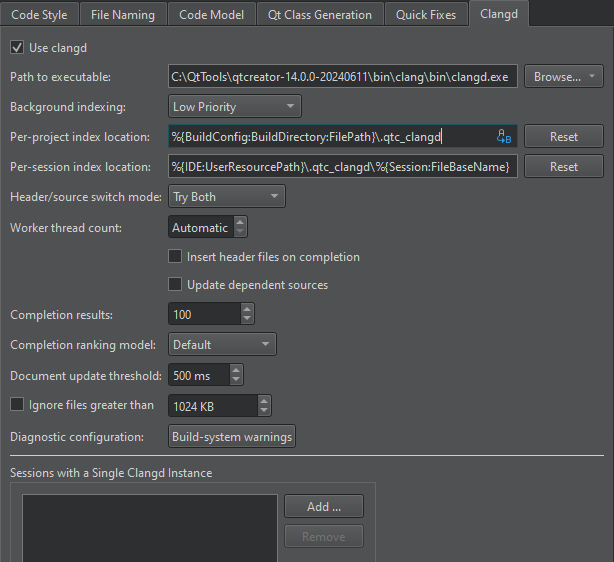
The following table describes the available preferences.
| Preference | Description |
|---|---|
| Path to executable | Specify the path to clangd version 14, or later. |
| Background indexing | Select Off to use a faster, but less accurate built-in indexer. Set the indexing priority based on whether accuracy or speed is more important to you during global symbol searches. |
| Per-project index location | Specify the folder to store the index files for each project. The compile-commands.json file is also stored here. |
| Per-session index location | Specify the folder to store the index files for each session. |
| Header/source switch mode | Select the C/C++ backend for switching between header and source files. Try Both uses clangd if the built-in code model does not find anything. |
| Worker thread count | Set a fixed number of cores to use. By default, clangd uses all unused cores. |
| Insert header files on completion | Insert header files when completing symbols. |
| Update dependent sources | Re-parse all source files that include a header file when editing it. Clear this option to only re-parse when saving the header file. |
| Completion results | Maximum number of completion results. Set to 0 to remove the limit. |
| Completion ranking model | Select the clangd model for ranking completion suggestions. Decision Forest (default) uses machine learning. Heuristic is hand-crafted. |
| Document update threshold | Time Qt Creator waits before sending document changes to the server. |
| Ignore files greater than | Maximum size of files to parse. Enable to make parsing faster. |
| Diagnostic configuration | Clang checks to perform. Select to edit the checks. |
| Sessions with a Single Clangd Instance | Add sessions that should use a single clangd process for indexing. |
Clang checks
Select the value of the Diagnostic configuration field to open the Diagnostic Configurations dialog, where you can select and edit the checks to perform.
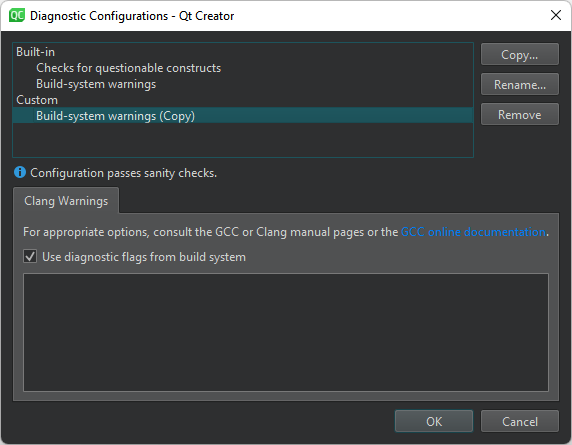
In addition to using the built-in checks, you can select Copy to create copies of them and edit the copies to fit your needs.
- Build-system warnings shows warnings as specified by the build system.
- Checks for questionable constructs combines the
-Walland-Wextrachecks for easily avoidable questionable constructions and some additional issues.
Clang checks begin with -W. Each check also has a negative version that begins with -Wno.
Keep in mind that some options turn on other options. For more information, see Options to Request or Suppress Warnings or the GCC or Clang manual pages.
See also Specify clangd settings, Clang code model, and Code Model.
Copyright © The Qt Company Ltd. and other contributors. Documentation contributions included herein are the copyrights of their respective owners. The documentation provided herein is licensed under the terms of the GNU Free Documentation License version 1.3 as published by the Free Software Foundation. Qt and respective logos are trademarks of The Qt Company Ltd in Finland and/or other countries worldwide. All other trademarks are property of their respective owners.
