
View type hierarchy
Use the Type Hierarchy view to see the type hierarchy of a class.
To view the type hierarchy of a class:
- Right-click a class in the code editor.
- Select Open Type Hierarchy or select Ctrl+Shift+T.
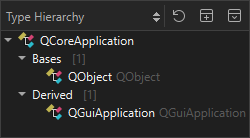
To navigate in the type hierarchy, double-click a class or select it. The definition of the selected class opens in the code editor.
The view highlights instances of the selected class.
Copyright © The Qt Company Ltd. and other contributors. Documentation contributions included herein are the copyrights of their respective owners. The documentation provided herein is licensed under the terms of the GNU Free Documentation License version 1.3 as published by the Free Software Foundation. Qt and respective logos are trademarks of The Qt Company Ltd in Finland and/or other countries worldwide. All other trademarks are property of their respective owners.
