
Bazaar and Breezy
Bazaar is a free version control system sponsored by Canonical. Breezy is a fork of Bazaar that is backwards compatible with Bazaar's disk format and protocols. However, Breezy runs on Python 3, rather than on Python 2.
Note: Enable the Bazaar plugin to use Bazaar or Breezy.
Additional Bazaar and Breezy functions
In addition to the standard version control system functions described in Use common VCS functions, you can select the following functions in the Tools > Bazaar submenu.
| Menu Item | Description |
|---|---|
| Pull | Turn a branch into a mirror of another branch. |
| Push | Update the mirror of a branch. |
| Uncommit | Remove the last committed revision. |
Uncommitting revisions
In Bazaar and Breezy, committing changes to a branch creates a new revision that holds a snapshot of the state of the working tree. To remove the last committed revision, select Tools > Bazaar > Uncommit and select the options you want in the Uncommit dialog.
| Option | Description |
|---|---|
| Keep tags that point to removed revisions | Keeps the tags that point to the removed revisions. |
| Only remove the commits from the local branch when in a checkout | Removes the commits only from the local branch. |
| Revision | Removes all commits up to the specified entry in the revision log. |
To test the outcome of the Uncommit command without actually removing anything, select Dry Run.
Uncommit leaves the working tree ready for a new commit. The only change it might make is restoring pending merges that were present before the commit.
Bazaar and Breezy preferences
To set Bazaar or Breezy preferences, select Preferences > Version Control > Bazaar.
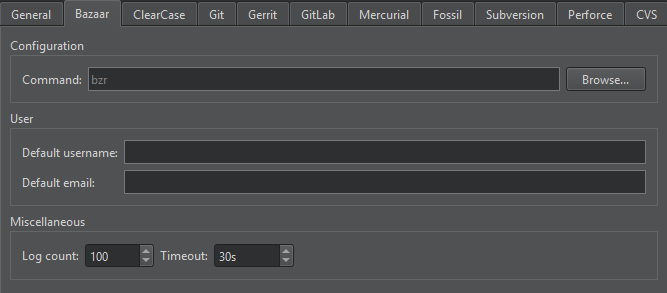
| Preference | Description |
|---|---|
| Command | The path to the command-line client executable. |
| Default username | The username to use by default when committing changes. |
| Default email | The email address to use by default when committing changes. |
| Log count | The maximum number of lines the log can have. |
| Timeout | A timeout for version control operations. |
See also Enable and disable plugins, Set up version control systems, Use common VCS functions, and Version control systems.
Copyright © The Qt Company Ltd. and other contributors. Documentation contributions included herein are the copyrights of their respective owners. The documentation provided herein is licensed under the terms of the GNU Free Documentation License version 1.3 as published by the Free Software Foundation. Qt and respective logos are trademarks of The Qt Company Ltd in Finland and/or other countries worldwide. All other trademarks are property of their respective owners.
