
Annotate designs
You can submit your designs to review or further development as QML files. You can annotate your designs to provide reviewers or developers with additional information about them. You can add global annotations that apply to the whole file or annotate individual components.
An annotation consist of an annotation name and one or several comments. The comments have a title, author, and comment text.
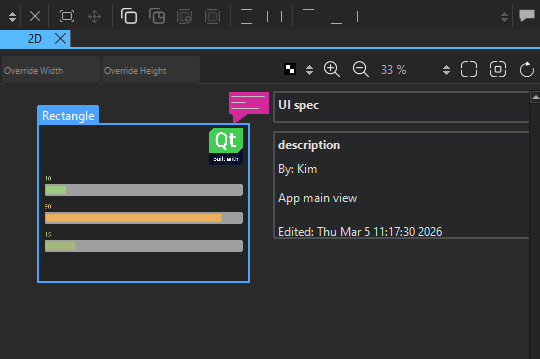
Annotations are saved in the end of QML files when you save the file. They do not affect the QML performance in any way.
Annotate components
To add annotations to components:
- Select the component to annotate in the Navigator or 2D view.
- In Properties, select Add Annotation to open Annotation Editor.
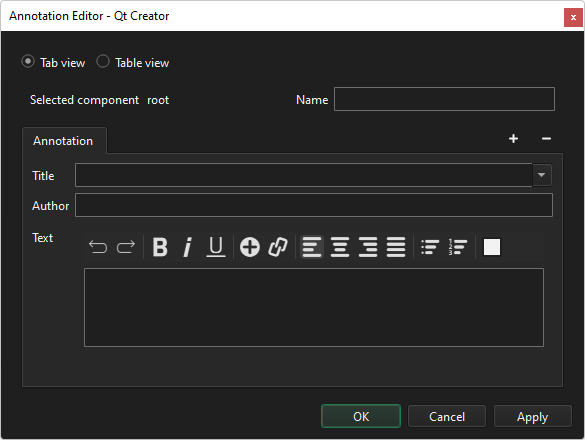
Selected component shows the ID of the component.
- In Name, enter a free-form text that describes the component.
- In Title, enter the text to display in the tab for this comment.
- In Author, enter the author's name.
- In Text, enter the comment text.
- Select OK.
To add more comments about the component, select  (Add Comment).
To remove the active comment, select  (Remove Comment). To remove the annotation, right-click the annotation icon, and then select Remove Annotation.
To view the annotations in table format, select Table view.
To edit annotations, select Edit Annotation in the context menu of the component.
Add global annotations
To add or edit global annotations:
- Select
 on the top toolbar.
 - Go to Edit and select Edit Global Annotations.
Global annotations have an additional status property for indicating whether you are still working on the design, you have submitted it to review, or it can be considered done.
To set the status, select Add Status.
See also How to: Design Qt Quick UIs, Qt Quick UI design, and Designing Qt Quick UIs.
Copyright © The Qt Company Ltd. and other contributors. Documentation contributions included herein are the copyrights of their respective owners. The documentation provided herein is licensed under the terms of the GNU Free Documentation License version 1.3 as published by the Free Software Foundation. Qt and respective logos are trademarks of The Qt Company Ltd in Finland and/or other countries worldwide. All other trademarks are property of their respective owners.
