
Build with GN
GN (Generate Ninja) is a meta-build system that generates build files for Ninja.
Note: Activate the GN extension to use it.
Open GN projects
To open GN projects, go to File > Open Project, and then select the BUILD.gn file from your project.
Add GN tools
To specify paths to GN executables:
- Select Preferences > GN > Tools > Add.
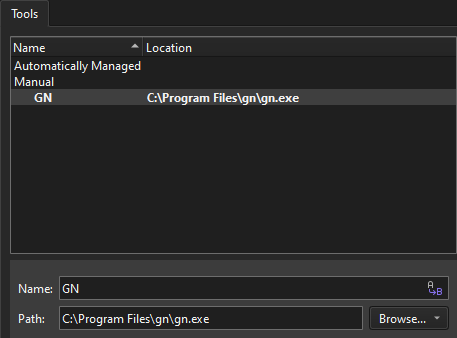
- In Name, specify a name for the tool.
- In Path, specify the path to the GN executable.
- Select Apply to save your changes.
Add GN tools to kits
To use GN to build projects:
- Go to Preferences > Kits > Kits.
- Select a kit to edit.
- In GN Tool, select a GN tool.
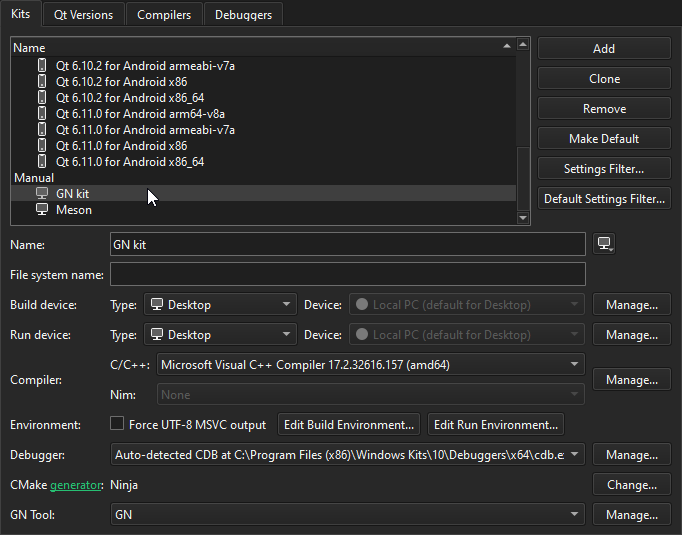
- Activate the kit for the project.
For more information, see Managing kits.
See also Activate extensions and Activate kits for a project.
Copyright © The Qt Company Ltd. and other contributors. Documentation contributions included herein are the copyrights of their respective owners. The documentation provided herein is licensed under the terms of the GNU Free Documentation License version 1.3 as published by the Free Software Foundation. Qt and respective logos are trademarks of The Qt Company Ltd in Finland and/or other countries worldwide. All other trademarks are property of their respective owners.
