
Set up vcpkg package manager
The experimental vcpkg plugin integrates the vcpkg C/C++ package manager. It is available on all the supported development platforms.
Create and edit vcpkg.json files to specify packages to build as part of your project when using CMake as the build system.
Note: Enable the Vcpkg plugin to use it.
Set up vcpkg
To set up vcpkg from the command line, enter:
$ git clone https://github.com/microsoft/vcpkg
$ cd vcpkg

$ ./bootstrap-vcpkg.sh
Set the path to vcpkg
To set the Path to the directory where you installed vcpkg, select Preferences > CMake > Vcpkg.
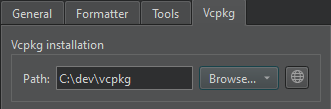
Select  to download vcpkg if you have not installed it yet.
Turn off automatic setup
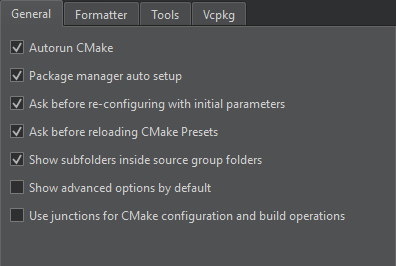
By default, vcpkg is automatically set up for use with CMake. To turn off automatic setup, select Preferences > CMake > General > Package manager auto setup.
See also Create vcpkg manifest files, Edit vcpkg manifest files, Enable and disable plugins, Supported platforms, and vcpkg.
Copyright © The Qt Company Ltd. and other contributors. Documentation contributions included herein are the copyrights of their respective owners. The documentation provided herein is licensed under the terms of the GNU Free Documentation License version 1.3 as published by the Free Software Foundation. Qt and respective logos are trademarks of The Qt Company Ltd in Finland and/or other countries worldwide. All other trademarks are property of their respective owners.
