
Generating a UI from a URDF file with urdfviewer
URDF is an XML schema: Unified Robot Description Format. It's the industry-standard interchange format for vendors to describe everything that is needed to model robots: the list of links and joints, range of motion of each joint, meshes to render links realistically, visual properties of the materials, mass and inertial properties, collision volumes.
If you purchase a robot for use with ROS, hopefully it comes with a URDF file. If you design your own, plugins are available for most CAD systems to export a URDF file.
You can use the QtROS urdfviewer tool to generate a Qt Quick 3D scene containing a model of your robot, with bindings to subscribers for the most common telemetry topics. This is a good starting point for a digital twin, teach pendant or some other kind of UI that needs to show a live rendering of the robot's pose; you can then modify the generated code to add the rest of your desired UI.
urdfviewer --help tells what arguments it accepts:
$ urdfviewer --help
Usage: urdfviewer [options] urdf or xacro destination
Import a URDF file, preview and export a Qt Quick 3D scene

Options:
  -h, --help                   Displays help on commandline options.
  --help-all                   Displays help, including generic Qt options.
  -v, --version                Displays version information.
  -b, --bridge                 Preview with live ROS bridge.
  -u, --upm <units>            Scene <units> per meter.
  -p, --topic-prefix <prefix>  DDS topic <prefix> for robot.

Arguments:
  urdf or xacro                File to open
  destination                  Output directory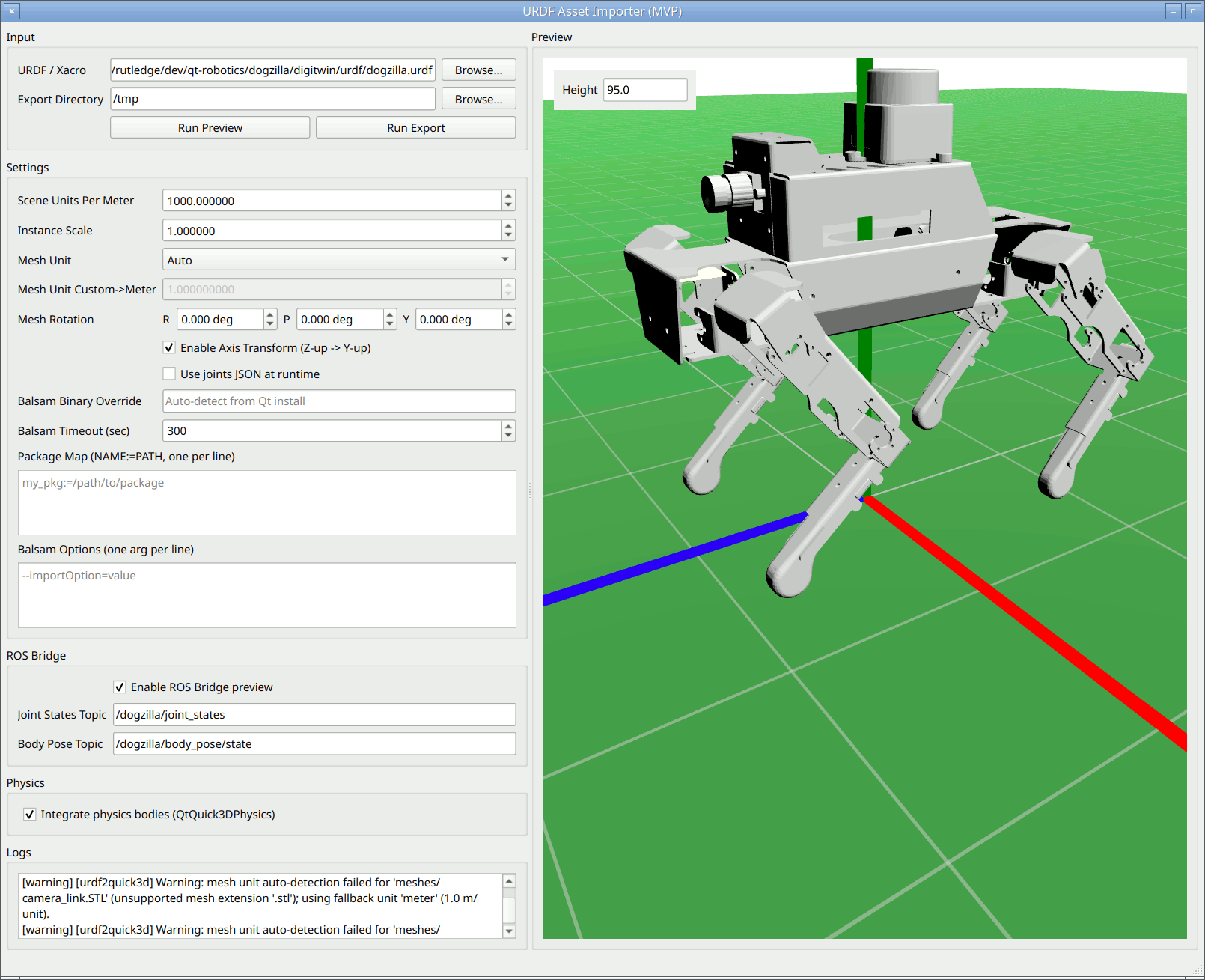
After starting it and adjusting the settings as necessary, press the Run Preview button to generate the "live" 3D scene: if you are using standard topics like /myrobot/body_pose/state and /myrobot/jointstates, you should see the model staying in sync with the robot's movements.
Press the Run Export button to save the generated code to the directory shown in the Export Directory field.
© 2026 The Qt Company Ltd. Documentation contributions included herein are the copyrights of their respective owners. The documentation provided herein is licensed under the terms of the GNU Free Documentation License version 1.3 as published by the Free Software Foundation. Qt and respective logos are trademarks of The Qt Company Ltd. in Finland and/or other countries worldwide. All other trademarks are property of their respective owners.
