
Mark strings for translation
 Development
 With Qt tools, such as lupdate and Qt Linguist, you can translate Qt Quick applications into local languages. Most of the text to translate in an application consists of either single words or short phrases. These typically appear as window titles, menu items, tooltips, and labels.
How does Qt handle translations?
Qt minimizes the performance cost of using translations by translating the phrases for each window as they are created. In most applications, the main window is created just once. Dialogs are often created once and then shown and hidden as required. Once the initial translation has taken place, there is no further runtime overhead for the translated windows. Only those windows that are created, destroyed and subsequently created will have a translation performance cost.
Use translation functions to mark user-visible UI text for translation in QML code. Qt supports two approaches to identifying translatable text: text-based and ID-based.
Text-based translation
In the text-based translation approach, Qt indexes each translatable string by the translation context and optionally a disambiguating comment developers add to it. The same phrase may occur in more than one context without conflict. If a phrase occurs more than once in a particular context, Qt translates it only once and applies the translation to every occurrence within the context.
ID-based translation
In the ID-based translation approach, an explicit ID uniquely identifies each translation. The IDs are unique project-wide. If an ID occurs more than once in a project, Qt translates it only once and applies the translation to every occurrence within the project.
In QML, you can use the following functions to mark user-visible strings for translation in .qml files.
| Name | Use for | Example |
|---|---|---|
qsTr() | Text-based translation | text: "Hello" becomes text: qsTr("Hello") |
qsTranslate() | Text-based translation | text: "Hello" becomes text: qsTranslate("<context>", "Hello") |
qsTrId() | ID-based translation | text: "Hello" becomes text: qsTrId("Hello") |
To mark strings as translatable:
- In the plugin, go to
 (Settings) > Code.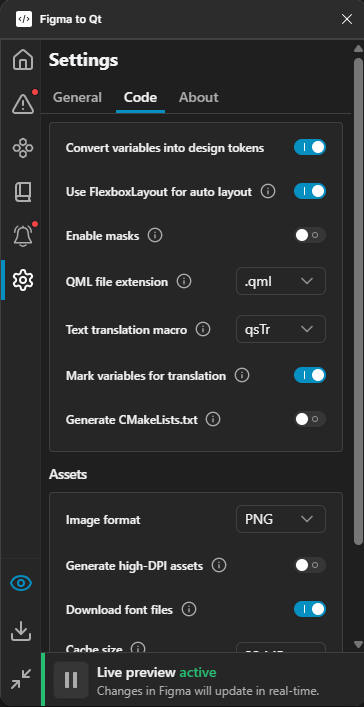
Code settings on the Settings page in the plugin.
- In Text translation macro, select the function to wrap all user-visible strings in.
Mark string variables for translation
By default, the plugin marks only Figma Text layers translatable, and design token string values remain literal. To include string variables in translation, turn on Mark variables for translation.
The plugin marks the string variables as translatable. For example, logo_desc: qsTr("Towards future").
The following types of design tokens are not translatable because they either don't contain text or the text is set somewhere else:
- String tokens that alias another token. The plugin converts them to a binding expression, such as
strings.fontFamily, not a string literal. - Component property bindings, such as
text: root.label, that are not enclosed in quotation marks. - Color, number, and boolean tokens.
Translating for Qt for MCUs
Qt for MCUs does not support the qsTranslate function. If you switch to Qt for MCUs after using it, the plugin replaces all its occurrences with qsTr.
If you select qsTrId, the plugin adds instructions to the QML project file for the QML compiler to look up ID-based translations.
See also Qt Linguist Manual and Using lupdate.
© 2026 The Qt Company Ltd. Documentation contributions included herein are the copyrights of their respective owners. The documentation provided herein is licensed under the terms of the GNU Free Documentation License version 1.3 as published by the Free Software Foundation. Qt and respective logos are trademarks of The Qt Company Ltd in Finland and/or other countries worldwide. All other trademarks are property of their respective owners.
