
Generate CMake configuration files
 Development
 QML projects (.qmlproject) are useful for creating user interfaces. To use the projects for application development with Qt Creator or some other development tool, you have to add:
- A
CMakeLists.txtproject configuration file - C++ code (
.cpp) - Resource files
- Code needed for deploying applications to devices
For more information about integrating QML and C++, see Qt: Overview - QML and C++ Integration.
Building Qt Quick applications with CMake
Qt Creator project wizard templates create projects that you can build with CMake. It is a tool to simplify the build process for development projects across different platforms. CMake automatically generates build systems, such as Makefiles and Ninja files.
For more information about using CMake to build Qt applications, see:
Create CMakeList.txt files for QML modules
Figma to Qt generates a CMakeLists.txt file that contains a qt_add_qml_module() call for each downloaded QML module. You can include these files from the main CMakeLists.txt file of your project.
To create CMake configuration files for QML modules:
- In the plugin, go to
 (Settings) > Code.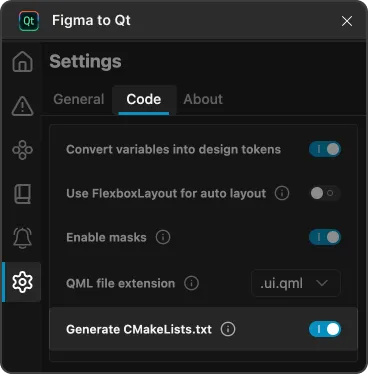
Generate CMakeLists.txt in Code settings on the Settings page in the plugin.
- Select Generate CMakeLists.txt.
- Select
 (Download) to include
 CMakeLists.txtfiles in the downloaded package.
An example of a CMakeList.txt file
For example, Figma to Qt generates the following CMakeLists.txt file for a design that uses design tokens:
qt_add_qml_module(DesignTokens
    URI DesignTokens
    QML_FILES
        MainScreen.qml
        Button.qml

    RESOURCES
        assets/icon.png
        assets/icon@2x.png
)
An example of using the file
In your project's main CMakeLists.txt file, include the generated module using the add_subdirectory() call and link to your application using the target_link_libraries() call:
make_minimum_required(VERSION 3.16)

project(MyApp LANGUAGES CXX)

find_package(Qt6 REQUIRED COMPONENTS Quick)

# Include the generated module
add_subdirectory(DesignTokens)

# Link to your application
qt_add_executable(MyApp main.cpp)
target_link_libraries(MyApp PRIVATE DesignTokens)
See also Convert variables into design tokens and Download converted designs.
© 2026 The Qt Company Ltd. Documentation contributions included herein are the copyrights of their respective owners. The documentation provided herein is licensed under the terms of the GNU Free Documentation License version 1.3 as published by the Free Software Foundation. Qt and respective logos are trademarks of The Qt Company Ltd in Finland and/or other countries worldwide. All other trademarks are property of their respective owners.
