
Select Qt version
 Development
 The Qt version you select controls how much of the design Figma to Qt can convert into code rather than rendering it as images. Later Qt versions add QML types and properties, so the plugin can convert more layers into code. For example, with Qt 6.12 or later the plugin converts ellipse layers into instances of QML EllipseShape instead of rendering them as images.
By default, the plugin uses the latest released Qt version, which gives the highest conversion fidelity.
Select a Qt version to match how the code will be used:
- Pick the latest version for the best conversion fidelity: more QML code and less assets.
- Pick an earlier version if the developers or the target platform require a particular Qt version.
If you use a later Qt version than the developers, they might need to switch QML types and remove properties that their Qt version does not support.
To select a Qt version:
- In the plugin, go to
 (Settings) > Code.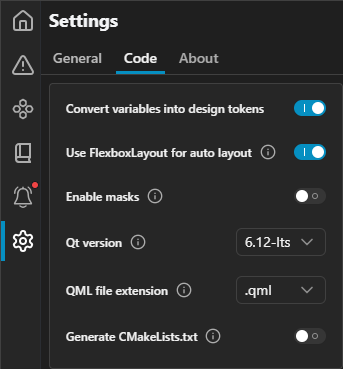
Code settings on the Settings page in the plugin.
- In Qt version, select the Qt version to use.
The plugin remembers the selected Qt version and uses it until you change it.
You can view the Qt version of the code in the live preview:
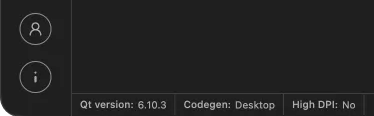
Qt version of the code in the live preview.
See also Convert designs.
© 2026 The Qt Company Ltd. Documentation contributions included herein are the copyrights of their respective owners. The documentation provided herein is licensed under the terms of the GNU Free Documentation License version 1.3 as published by the Free Software Foundation. Qt and respective logos are trademarks of The Qt Company Ltd in Finland and/or other countries worldwide. All other trademarks are property of their respective owners.
