
Variant layer moved
A layer that the default variant has moved to another position among its sibling layers, or under a different parent layer, in one of the variants. QML states cannot move a layer, so the plugin keeps the layer where the default variant puts it and drops the changes that the other variant makes to it. The layer is still rendered in every state.
To keep the changes from the variant, give the layer the same parent layer and the same position in every variant.
How to avoid this error in Figma
Design a set of variants so that each layer is the same layer in every variant. The plugin identifies a layer by its name and by its place in the Figma Layers panel. For more information, see Designing component variants.
The following examples ignore this guideline, so the plugin shows issues for them.
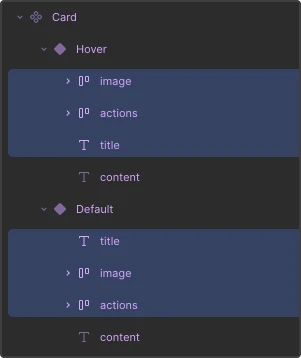
In the Hover variant of the Card component, three layers are in a different order compared with the default variant.
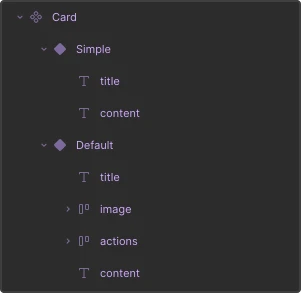
In the Card component, the Simple variant contains layers that are also in the Default variant, but these layers are in a different position because the Simple variant has fewer layers than the Default variant.
See also Fix conversion issues and Variants.
© 2026 The Qt Company Ltd. Documentation contributions included herein are the copyrights of their respective owners. The documentation provided herein is licensed under the terms of the GNU Free Documentation License version 1.3 as published by the Free Software Foundation. Qt and respective logos are trademarks of The Qt Company Ltd in Finland and/or other countries worldwide. All other trademarks are property of their respective owners.
