
Variant layer parent conflict
A layer that the default variant does not have is added by two or more of the other variants, which place it under different parent layers. The plugin cannot decide where the layer belongs, so it drops the layer, and everything nested inside it, from every variant.
In the following example, Variant A and Variant B both contain a layer called button. However, it has a different parent in each variant, and it does not exist in the Default variant. Therefore, the plugin drops the layer.
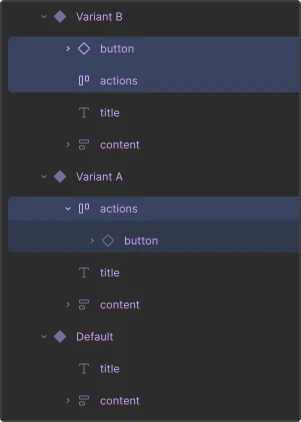
To keep the layer, place it under the same layer in every variant that has it, or add it to the default variant as well.
See also Fix conversion issues and Variants.
© 2026 The Qt Company Ltd. Documentation contributions included herein are the copyrights of their respective owners. The documentation provided herein is licensed under the terms of the GNU Free Documentation License version 1.3 as published by the Free Software Foundation. Qt and respective logos are trademarks of The Qt Company Ltd in Finland and/or other countries worldwide. All other trademarks are property of their respective owners.
