
Qt Canvas Painter - Compact Health Example
Demonstrates the use of QCanvasPainter in a QWindow.
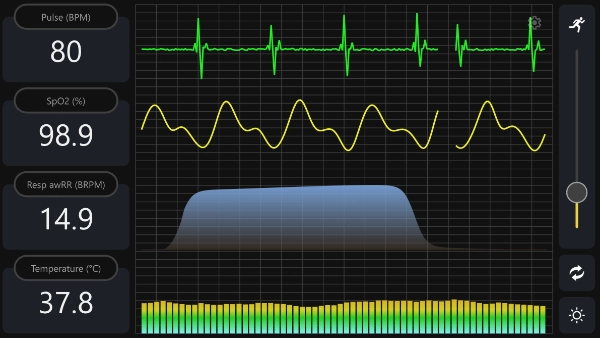
This example demonstrates using Qt Canvas Painter in a pure QWindow application. The Qt Quick and Qt Widgets stacks are not used.
The application renders all content through QRhi backends with QCanvasPainter. Rendering and QCanvasPainter's integration with QRhi are managed via QCanvasRhiPaintDriver. This means hardware acceleration is used where available for the selected backend.
Note: QRhi is part of Qt Gui Private. As such, it offers limited compatibility guarantees. There are no source or binary compatibility guarantees for these classes, meaning the API is only guaranteed to work with the Qt version the application was developed against.
What This Example Demonstrates
- Rendering a full custom UI in a QWindow.
- Creating and managing QRhi, a swapchain, and depth-stencil resources.
- Recording draw commands through QCanvasPainter and QCanvasRhiPaintDriver.
- Driving continuous animation with QWindow::requestUpdate().
Walkthrough
The application chooses a rendering API based on the platform by default. You can also request a specific backend with command-line arguments:
--null--opengl--vulkan--d3d11--d3d12--metal
If backend creation fails, the example attempts to fall back to OpenGL ES 2 when available.
int main(int argc, char *argv[])
{
    QGuiApplication app(argc, argv);
    app.setAttribute(Qt::AA_SynthesizeTouchForUnhandledMouseEvents);

    QRhi::Implementation graphicsApi;
#if defined(Q_OS_WIN)
    graphicsApi = QRhi::D3D11;
#elif QT_CONFIG(metal)
    graphicsApi = QRhi::Metal;
#elif QT_CONFIG(vulkan)
    graphicsApi = QRhi::Vulkan;
#else
    graphicsApi = QRhi::OpenGLES2;
#endif

    QCommandLineParser cmdLineParser;
    cmdLineParser.addHelpOption();
    QCommandLineOption nullOption({ "n", "null" }, QLatin1String("Null"));
    cmdLineParser.addOption(nullOption);
    QCommandLineOption glOption({ "g", "opengl" }, QLatin1String("OpenGL"));
    cmdLineParser.addOption(glOption);
    QCommandLineOption vkOption({ "v", "vulkan" }, QLatin1String("Vulkan"));
    cmdLineParser.addOption(vkOption);
    QCommandLineOption d3d11Option({ "d", "d3d11" }, QLatin1String("Direct3D 11"));
    cmdLineParser.addOption(d3d11Option);
    QCommandLineOption d3d12Option({ "D", "d3d12" }, QLatin1String("Direct3D 12"));
    cmdLineParser.addOption(d3d12Option);
    QCommandLineOption mtlOption({ "m", "metal" }, QLatin1String("Metal"));
    cmdLineParser.addOption(mtlOption);

    cmdLineParser.process(app);

    if (cmdLineParser.isSet(nullOption))
        graphicsApi = QRhi::Null;
    if (cmdLineParser.isSet(glOption))
        graphicsApi = QRhi::OpenGLES2;
    if (cmdLineParser.isSet(vkOption))
        graphicsApi = QRhi::Vulkan;
    if (cmdLineParser.isSet(d3d11Option))
        graphicsApi = QRhi::D3D11;
    if (cmdLineParser.isSet(d3d12Option))
        graphicsApi = QRhi::D3D12;
    if (cmdLineParser.isSet(mtlOption))
        graphicsApi = QRhi::Metal;

#if QT_CONFIG(opengl)
    QSurfaceFormat fmt;
    fmt.setDepthBufferSize(24);
    fmt.setStencilBufferSize(8);
#  ifdef Q_OS_MACOS
    fmt.setVersion(4, 1);
    fmt.setProfile(QSurfaceFormat::CoreProfile);
#  endif
    QSurfaceFormat::setDefaultFormat(fmt);
#endif

    MainWindow window(graphicsApi);
    window.resize(1920 / 2, 1080 / 2);
    window.show();

    return app.exec();
}
MainWindow is a subclass of PainterWindow, which is a QWindow. PainterWindow implements a window that shows content rendered via QRhi, Qt's graphics abstraction. It initializes a QRhi instance when the window is exposed, manages a swapchain and depth-stencil buffer, handles resize events, and invokes a virtual paint() function implemented by MainWindow.
For a better understanding of the PainterWindow implementation, it is recommended to check out the RHI Window Example, since in essence it is very similar to the RhiWindow class in that example.
One QCanvasPainter-specific step is to retrieve a QCanvasPainterFactory instance after QRhi has been initialized:
if (!m_factory) {
    m_factory = new QCanvasPainterFactory;
    m_factory->create(m_rhi.get());
}
Rendering a new frame happens in the render() function, which is invoked when the window is shown, resized, and in response to update requests scheduled via requestUpdate().
Unlike in the RHI Window Example, we will not create vertex and uniform buffers or graphics pipelines via the QRhi API, and issue draw calls directly. Instead, QCanvasRhiPaintDriver is used to record a render pass with the QCanvasPainter-generated rendering.
void PainterWindow::render()
{
    if (!m_factory || !m_factory->isValid() || !m_rhi || !m_sc)
        return;

    if (!m_hasSwapChain || m_notExposed)
        return;

    if (m_sc->currentPixelSize() != m_sc->surfacePixelSize() || m_newlyExposed) {
        resizeSwapChain();
        if (!m_hasSwapChain)
            return;
        m_newlyExposed = false;
    }

    QRhi::FrameOpResult r = m_rhi->beginFrame(m_sc.get());
    if (r == QRhi::FrameOpSwapChainOutOfDate) {
        resizeSwapChain();
        if (!m_hasSwapChain)
            return;
        r = m_rhi->beginFrame(m_sc.get());
    }
    if (r != QRhi::FrameOpSuccess) {
        qDebug("beginFrame failed with %d, retry", r);
        requestUpdate();
        return;
    }

    QRhiCommandBuffer *cb = m_sc->currentFrameCommandBuffer();
    QRhiRenderTarget *rt = m_sc->currentFrameRenderTarget();

    QCanvasRhiPaintDriver *pd = m_factory->paintDriver();
    QCanvasPainter *painter = m_factory->painter();

    pd->resetForNewFrame();
    pd->beginPaint(cb, rt, m_fillColor, size(), float(devicePixelRatio()));
    paint(painter);
    pd->endPaint();

    m_rhi->endFrame(m_sc.get());
}
MainWindow's paint() implementation uses the QCanvasPainter API and does not need to handle low-level QRhi details directly.
First, it loads and registers images if not yet done:
void MainWindow::paint(QCanvasPainter *p)
{
    if (!m_initialized) {
        auto flags = QCanvasPainter::ImageFlag::GenerateMipmaps;
        m_b1ImageLight = p->addImage(QImage(":/images/icon_random_light.png"), flags);
        m_b1ImageDark = p->addImage(QImage(":/images/icon_random_dark.png"), flags);
        m_b2ImageLight = p->addImage(QImage(":/images/icon_theme_light.png"), flags);
        m_b2ImageDark = p->addImage(QImage(":/images/icon_theme_dark.png"), flags);
        m_b3ImageLight = p->addImage(QImage(":/images/icon_settings_light.png"), flags);
        m_b3ImageDark = p->addImage(QImage(":/images/icon_settings_dark.png"), flags);
        m_sImageLight = p->addImage(QImage(":/images/icon_run_light.png"), flags);
        m_sImageDark = p->addImage(QImage(":/images/icon_run_dark.png"), flags);
        m_initialized = true;
    }
This is followed by the actual drawing, involving the filling and stroking of paths, rendering text, and drawing images. For example:
// Highlight pressed button
if (m_selectedButton) {
    p->beginPath();
    p->roundRect(m_views[m_selectedButton].rect, viewRadius);
    p->setLineWidth(2.0f * m_px);
    p->setStrokeStyle(m_theme.highlight());
    p->stroke();
}
QCanvasPainter drawing commands prepare geometry, state, and QRhi draw work internally. The command stream is flushed when endPaint() is called in PainterWindow::render(). That is where a render pass is recorded on the associated QRhiCommandBuffer.
Before returning, MainWindow::paint() calls requestUpdate(), a QWindow function that requests a new frame synchronized with the display's presentation rate. This keeps the content continuously updating for animation.
See the full example source code for implementation details.
© 2026 The Qt Company Ltd. Documentation contributions included herein are the copyrights of their respective owners. The documentation provided herein is licensed under the terms of the GNU Free Documentation License version 1.3 as published by the Free Software Foundation. Qt and respective logos are trademarks of The Qt Company Ltd. in Finland and/or other countries worldwide. All other trademarks are property of their respective owners.
