
Qt for Android
Qt has two ways for you to develop applications for Android:
- Qt for Android for developing full Qt applications.
- Qt Quick for Android for integrating Qt Quick content into native Android applications.
Qt for Android
Qt for Android™ enables you to develop Qt applications for Android devices, and supports a wide range of features and use-cases.
Qt for Android provides the platform integration, runtime bridges, build and packaging support, and platform plugins that connect the cross-platform Qt libraries (such as Qt Core, Qt GUI, Qt Quick, and Qt Widgets) to Android-specific services and the Android SDK.
Qt applications run on Android devices by handling the interaction between the native Android (Java/Kotlin) side and the Qt (C++) side, including event propagation, lifecycle management, and rendering.
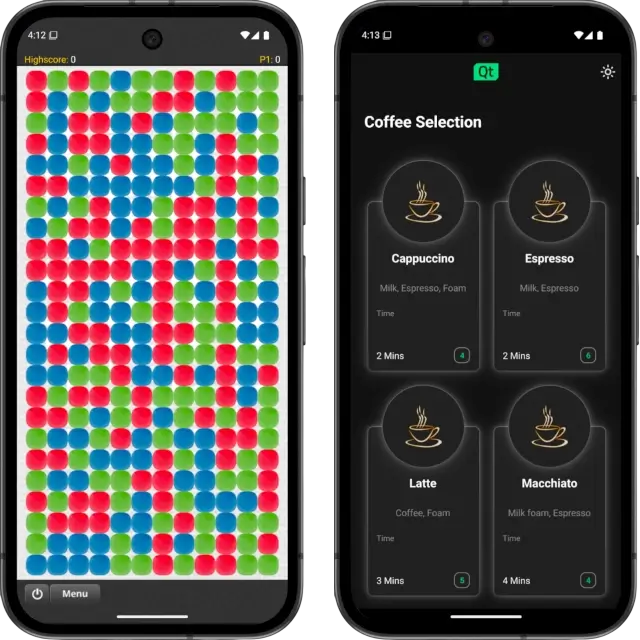
Key Features and Capabilities
The main features of Qt for Android:
- Cross-platform development. A Qt application for Android is typically a QML application with the code behind it written in C++. With minimal or no adjustments, you can write your application code once and deploy it on multiple platforms.
- Native performance. Since the Qt runtime is compiled for Android, it provides native performance and access to native capabilities of Android devices.
- Rich UI components. Use Qt's extensive set of Qt Quick components for responsive interfaces.
You can also use the extensive module ecosystem of Qt to add features to your application:
- Qt Quick Controls for ready-made UI controls that feature a customizable Material Style that adapts to Android's look and feel.
- Qt Widgets for traditional desktop-style widgets, if needed.
- Qt Quick 3D for displaying 3D graphics in your applications.
- Qt Quick Shapes for vector graphics and custom shapes.
- Particles and graphical effects for advanced visual effects.
- Qt Multimedia for audio and video playback and recording.
- Qt Graphs for 2D and 3D data visualization.
- Qt Virtual Keyboard for on-screen keyboard support.
- Qt Sensors for accessing device sensors.
- Qt Location for mapping and location-based services.
- Qt Bluetooth for Bluetooth connectivity.
- Qt Network for secure network communication and cryptography.
- C++ integration. Ideal for applications that rely on existing C++ libraries or require high-performance native code.
- Mature and consistent APIs. Qt's stable modules reduce platform fragmentation and make it easier to maintain feature parity between platforms.
Explore Qt for Android
To learn about developing with Qt for Android, here are the main topics to check:
- Getting Started with Qt for Android
- Qt for Android Prerequisites
- How Qt for Android Works
- Qt for Android Manifest File Configuration
- Building Qt for Android Projects from Command Line
- Deploying an Application on Android
- The androiddeployqt Tool
- Android Security Considerations
- Building Qt for Android from Source
- Qt Jenny: Java Code Generator
Android Fragments
You cannot use Android Fragments in a Qt for Android application. However, Qt does offer its own modular components and views with QML. You can combine multiple components in one QML view. For more information, see QML Documents.
If you are integrating Qt Quick for Android into an Android application, you can use the QtQuickView API inside Android Fragments.
Qt Quick for Android
The Qt Quick for Android lets you add Qt Quick components to your native Android application UI as a View. This is particularly useful for integrating complex UI elements, animations, or 3D graphics into specific parts of your app without rewriting the entire application in Qt. Unlike Qt for Android, which replaces the entire UI with Qt, Qt Quick for Android complements your existing native Android UI.
With Qt Quick for Android, you can extend your native application's UI with these components:
- Qt Quick and Qt Quick Controls for ready-made UI controls that feature a customizable Material Style that adapts to Android's look and feel.
- Qt Quick 3D for displaying 3D graphics in your applications.
- Qt Quick Shapes for vector graphics and custom shapes.
- Particles and graphical effects for advanced visual effects.
- Qt Graphs for 2D and 3D data visualization.
Qt Quick for Android includes a plugin for Google's Android Studio. You can find it on the IntelliJ marketplace.
Supported Configurations
The following configurations are supported in this Qt release:
| Section | Description |
|---|---|
| Distribution | Android 9 (API 28) to 16 (API 36) |
| Architecture | arm64-v8a, x86_64, x86, and armeabi-v7a |
| Compiler | Clang 17.0.2 (NDK r27c or 27.2.12479018) Note: It's recommended that Qt apps use the same NDK version used for building the official Qt for Android libraries to avoid missing symbol errors. In releases supporting multiple NDKs, the newest supported NDK is used for building Qt. |
| JDK | JDK 21 |
| Gradle | Gradle 9.5.1 and AGP 9.2.1 |
| Package | Multi-ABI APKs, AABs and AARsNote: Multi-ABI builds are available only when using CMake. For more information, see CMake Android Multi-ABIs. |
For more information on the supported Android versions, see Qt for Android Supported Versions Selection Guidelines.
Overview of Qt Jenny |
© 2026 The Qt Company Ltd. Documentation contributions included herein are the copyrights of their respective owners. The documentation provided herein is licensed under the terms of the GNU Free Documentation License version 1.3 as published by the Free Software Foundation. Qt and respective logos are trademarks of The Qt Company Ltd. in Finland and/or other countries worldwide. All other trademarks are property of their respective owners.
