
Qt for Android Language Exchange
Demonstrates calling Java and Kotlin code from Qt, and Qt code from Java and Kotlin, in an Android application.
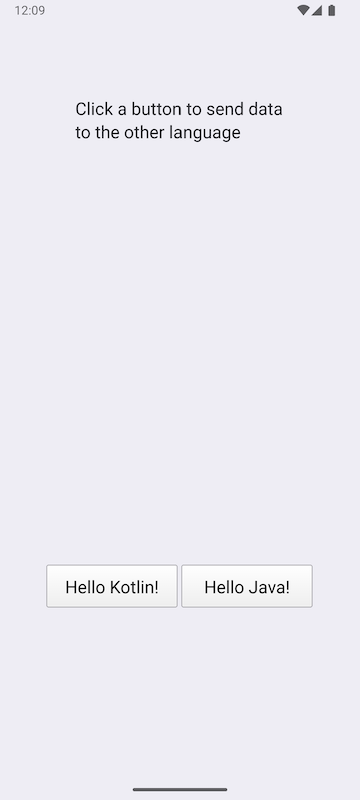
Click on one of the buttons to send a string to the Java and Kotlin classes and get a modified string back.
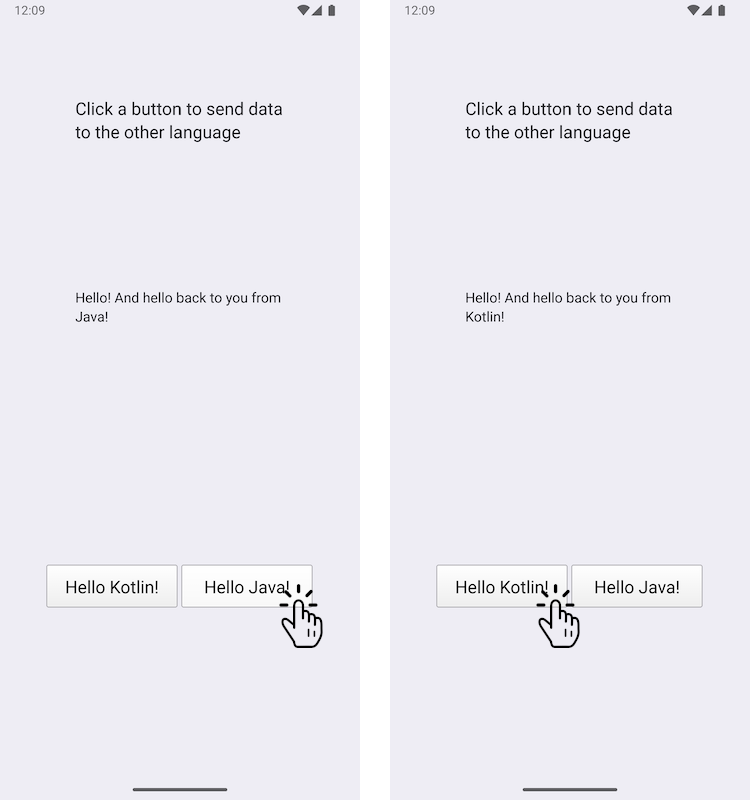
This example demonstrates how to add a custom Java class and a custom Kotlin class to an Android application, and how to call them using the JNI convenience APIs in Qt. In the other direction, the Java class and Kotlin class call Qt functions.
Running the Example
You can run the example from:
- Qt Creator
Open the Welcome mode and select the example from Examples. For more information, see Qt Creator: Tutorial: Build and run.
- Qt Extension for Visual Studio Code
Run the Qt: Open Qt examples command from the Command Palette, and select the example from the list. For more information, see Qt Extension for Visual Studio Code: Tutorial: Build and run.
Note: This example can only be run on Android devices.
Exchanging data between C++ and Java/Kotlin using Qt signals
We define a custom Java class called JavaExchanger in the JavaExchanger.java file:
package org.qtproject.example.androidlanguageexchange;

public class JavaExchanger
{
    private long mCppExchanger;

    private native void connectToCppExchanger(long cppExchanger);
    private native void fromOther(long cppExchanger, String str);

    public JavaExchanger(long cppExchanger) {
        mCppExchanger = cppExchanger;
        connectToCppExchanger(cppExchanger);
    }
    public void fromCpp(int type, String str) {
        if (type == OtherLanguageType.Java.getCode()) {
            String msg = str + " And hello back to you from\nJava!";
            fromOther(mCppExchanger, msg);
        }
    }
}
We define a custom Kotlin class called KotlinExchanger in the KotlinExchanger.kt file:
package org.qtproject.example.androidlanguageexchange;

class KotlinExchanger(private val cppExchanger: Long) {

    private external fun connectToCppExchanger(cppExchanger: Long)
    private external fun fromOther(cppExchanger: Long, str: String)

    init {
        connectToCppExchanger(cppExchanger)
    }

    fun fromCpp(type: Int, str: String) {
        if (type == OtherLanguageType.Kotlin.code) {
            val msg = "$str And hello back to you from\nKotlin!"
            fromOther(cppExchanger, msg)
        }
    }
}
Both of these classes take a long integer that is just a QObject* cast to long, and when the fromCpp functions are called as a result of calling the connectToCppExchanger function, they modify the incoming string and send it back to the fromOther with the long int.
In the DataExchanger C++ class header file, dataexchanger.h, we declare a simple C++ API to exchange data between C++ and Kotlin/Java. It consists of QObject with a fromCpp signal that is sent from the C++ code as a response to the buttons, and a fromOther signal that the Java/Kotlin code uses to send a string to the C++ code, as described before.
// A simple data exchanger. All this class does is convey semi-abstract data
// back and forth. For the purposes of this example, treat it as an opaque
// and not necessarily modifiable engine object that just happens to have
// a signal that's directly consumable by the code in other languages. The
// rest of the glue is done in OtherLanguageHandler.
class DataExchanger : public QObject
{
    Q_OBJECT
public:
    explicit DataExchanger(QObject *parent = nullptr);

    enum OtherLanguageType {Java, Kotlin};
signals:
    void fromCpp(OtherLanguageType type, const QString& str);
    void fromOther(const QString& str);
};
The call to the Java method uses QJniObject which relies on the Java Native Interface (JNI) APIs to communicate with Java/Kotlin. The long integer argument is cast back to the DataExchanger type, and the fromCpp signal is then connected to a lambda that calls the Java/Kotlin fromCpp function.
// We provide this function so that the Java/Kotlin objects can register themselves
// as signal observers. The C++ code doesn't decide where and when that happens.
void connectToCppExchanger(JNIEnv* /*env*/, jobject thiz, jlong cppExchanger)
{
    DataExchanger* exchanger = reinterpret_cast<DataExchanger*>(cppExchanger);
    QJniObject androidExchanger(thiz);
    QObject::connect(exchanger, &DataExchanger::fromCpp, exchanger,
                     // Intentional, and important capture by value of the QJniObject.
                     // This keeps the underlying Java/Kotlin object alive until the call
                     // to it is performed.
                     [androidExchanger](DataExchanger::OtherLanguageType type, const QString& str) {
                         androidExchanger.callMethod("fromCpp",
                                                     static_cast<int>(type), str);
                     });
}
The call of a native method of the Java/Kotlin class is forwarded to the DataExchanger class, by again converting the long integer to DataExchanger and then calling the fromOther signal of that type.
// The Java/Kotlin code calls this. The C++ code doesn't decide where and when
// it is called.
// Note that the function must be registered with the Qt native method
// registration facilities because it relies on the Qt wrapping that knows how to
// convert a jstring to a QString.
void fromOther(JNIEnv* /*env*/, jobject /*thiz*/,
                       jlong cppExchanger, const QString &str)
{
    DataExchanger* exchanger = reinterpret_cast<DataExchanger*>(cppExchanger);
    exchanger->fromOther(str);
}
To make sure our buttons do what they are supposed to, we add the following code to trigger sending a string to Java/Kotlin and to get back the modified string:
    QObject::connect(&javaButton, &QPushButton::clicked, &javaButton, [&]() {
        dataExchanger.fromCpp(DataExchanger::Java, "Hello!");
    });

    QObject::connect(&kotlinButton, &QPushButton::clicked, &kotlinButton, [&]() {
        dataExchanger.fromCpp(DataExchanger::Kotlin, "Hello!");
    });
    QObject::connect(&dataExchanger, &DataExchanger::fromOther,
                     &dataExchanger, [&](const QString& str) {
        fromOtherLabel.setText(str);
});See also Qt for Android.
© 2026 The Qt Company Ltd. Documentation contributions included herein are the copyrights of their respective owners. The documentation provided herein is licensed under the terms of the GNU Free Documentation License version 1.3 as published by the Free Software Foundation. Qt and respective logos are trademarks of The Qt Company Ltd. in Finland and/or other countries worldwide. All other trademarks are property of their respective owners.
