
Qt Quick 3D - Volumetric Fog Extension Example
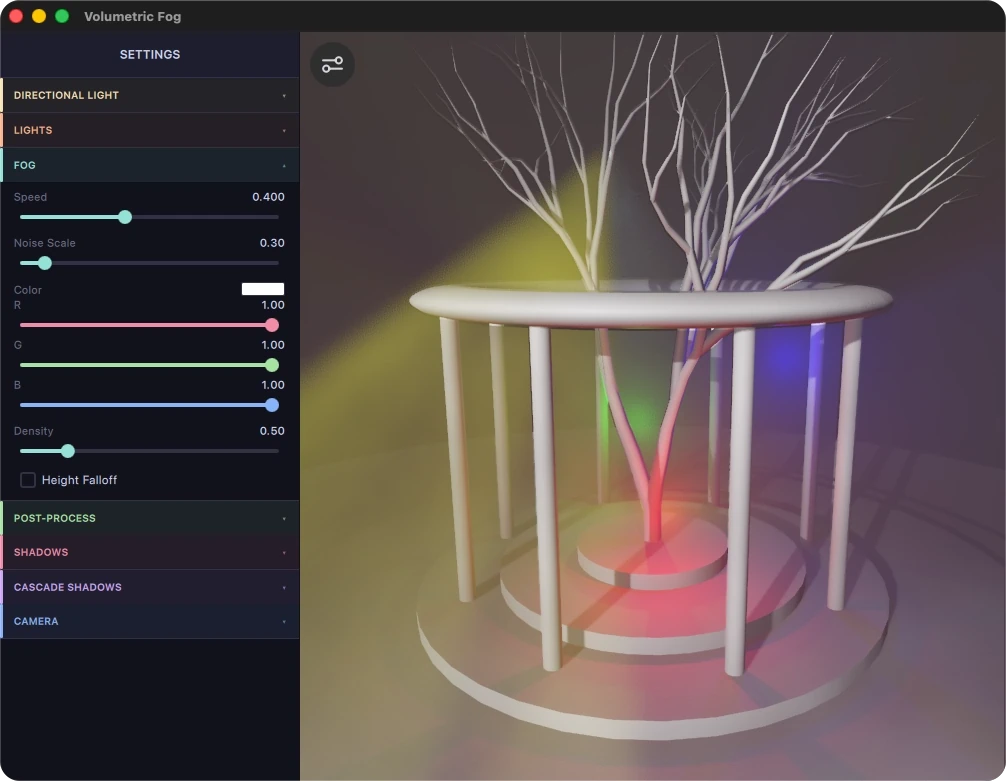
Demonstrates how to implement volumetric fog in a render extension.
Overview
This example implements volumetric fog as a Qt Quick 3D render extension, and shows how to reuse the extension in your own project.
The extension divides the camera frustum into a 3D grid of froxels, frustum-aligned voxels, and uses a compute shader to accumulate the light that scatters toward the camera in each cell. A post-processing effect then composites the result onto the rendered frame.
Controls
Drag with the mouse to orbit the camera around the scene. Use the settings panel to change the lighting, the fog, the post-processing, and the shadow settings.
Implementation
Note: The extension injects light into the froxel grid with a compute shader, so it requires a graphics API and hardware with compute shader support. OpenGL versions older than 4.3 and OpenGL ES versions older than 3.1 have no compute support. See QRhi::Compute for details.
The VolumetricFogExtension type implements the volumetric fog extension. It lives in the separate VFExtension subproject, so you can add it to your own project unchanged.
Set the following properties on VolumetricFogExtension:
VolumetricFogExtension {
    id: froxelExtension
    froxelWidth: 160
    froxelHeight: 96
    froxelDepth: 96
    nearPlane: 1.0
    farPlane: 4000.0
    fogVolumes: [ fogSphere ]

    iesTexture: settings.iesLights ? iesAtlasTexture : null
    iesCount: iesTextureData.sources.length
    iesLightProfiles: [
        IESLightProfileIndex { light: pinkSpot; index: settings.iesLightIndex; intensity: 0.5}
    ]
}
The froxelWidth, froxelHeight, and froxelDepth properties define the resolution of the froxel grid that the compute shader fills. A higher resolution produces more detailed light scattering, but uses more GPU memory and compute time.
The nearPlane and farPlane properties define the depth range that the volumetric effect covers. Match them to the clip distances of the PerspectiveCamera.
The fogVolumes property holds the list of Fog3DVolume nodes that define where fog is present in the scene.
IES Light Profiles
A photometric profile from the Illuminating Engineering Society (IES) shapes the angular light distribution of a spot light. The iesTexture property takes a Texture whose data comes from an IESTextureData object. That object parses .ies files and packs them into a 2D atlas texture. The iesCount property specifies how many profiles the atlas holds, and iesLightProfiles maps individual lights to profile indices through IESLightProfileIndex objects.
Texture {
    id: iesAtlasTexture
    textureData: IESTextureData {
        id: iesTextureData
        sources: [
            "qrc:/assets/l0.ies",
            "qrc:/assets/l1.ies",
            "qrc:/assets/l2.ies",
            "qrc:/assets/l3.ies",
            "qrc:/assets/l4.ies",
            "qrc:/assets/l5.ies",
        ]
    }

    tilingModeHorizontal: Texture.ClampToEdge
    tilingModeVertical: Texture.ClampToEdge
    minFilter: Texture.Linear
    magFilter: Texture.Linear
    generateMipmaps: false
}
Attaching the Extension to a View3D
Add the extension to the extensions list of the View3D. The render pipeline then invokes the extension's compute shader once per frame:
View3D {
    extensions: [ froxelExtension ]
}
Fog Volumes
A Fog3DVolume node defines a fog region in the scene. The type property selects one of two shapes, Fog3DVolume.Sphere or Fog3DVolume.Box, and the extents property sets the bounding dimensions. The color and density properties control the appearance.
Advancing noiseOffset each frame animates the noise. To make the density fall off with height, set heightEnabled to true and adjust leastIntenseY, mostIntenseY, and heightCurve:
Fog3DVolume {
    id: fogSphere
    type: Fog3DVolume.Sphere
    extents: Qt.vector3d(5000, 5000, 5000)
    color: settings.fogVolumeColor
    density: settings.fogVolumeDensity
    noiseOffset: Qt.vector3d(baseNode.time * 0.1 * settings.fogSpeed,
                             baseNode.time * 0.02 * settings.fogSpeed,
                             baseNode.time * 0.01 * settings.fogSpeed)
    noiseScale: settings.fogVolumeNoiseScale
    heightEnabled: settings.fogVolumeHeightEnabled
    leastIntenseY: settings.fogVolumeHeightLeastY
    mostIntenseY: settings.fogVolumeHeightMostY
    heightCurve: settings.fogVolumeHeightCurve
}
VolumetricFogEffect
The extension exposes its result through the read-only froxelTexture property, a 3D RGBA texture that holds the accumulated light scattering data for each froxel. Add the VolumetricFogEffect post-processing effect to the ExtendedSceneEnvironment to consume that texture. The effect ray-marches through the froxel texture and composites the volumetric light onto the rendered frame:
effects: [
    VolumetricFogEffect {
        froxelTexture: froxelExtension.froxelTexture
        cameraPosition: camera.scenePosition
        cameraForward: camera.forward
        invViewMatrix: camera.sceneTransform
        marchSteps: froxelExtension.froxelDepth
        nearPlane: froxelExtension.nearPlane
        farPlane: froxelExtension.farPlane
        frameBaseJitter: se.temporalAAEnabled &&
                         se.temporalAAMode === SceneEnvironment.TAAMotionVector &&
                         se.antialiasingMode !== SceneEnvironment.MSAA ? 1.0 : 0.0
        jitterIntensity: settings.jitterIntensity
    }
]
The marchSteps property controls the number of ray marching steps. Match it to froxelDepth. The frameBaseJitter and jitterIntensity properties enable temporal dithering, which reduces banding artifacts when the scene also uses temporal antialiasing.
Reusing the Extension in Your Own Project
The VFExtension subproject builds as a QML module of its own. To use it in another project, copy the directory, add it with add_subdirectory(), and link the library into your target:
add_subdirectory(VFExtension)

target_link_libraries(myapp PRIVATE VFExtension)
Then import the module in QML:
import VFExtensionNote: The extension includes private Qt Quick 3D headers and links against Qt6::Quick3DPrivate. Private API carries no source or binary compatibility guarantee, so the extension may need changes when you move to a newer Qt version.
See also Qt Quick 3D - Stencil Outline Extension Example, Qt Quick 3D - Simple Fog Example, and User-Defined Render Passes in Qt Quick 3D.
© 2026 The Qt Company Ltd. Documentation contributions included herein are the copyrights of their respective owners. The documentation provided herein is licensed under the terms of the GNU Free Documentation License version 1.3 as published by the Free Software Foundation. Qt and respective logos are trademarks of The Qt Company Ltd. in Finland and/or other countries worldwide. All other trademarks are property of their respective owners.
