
Qt Quick 3D - XR Spatial Anchors Example
Demonstrates how to use spatial anchors in Qt Quick 3D XR.
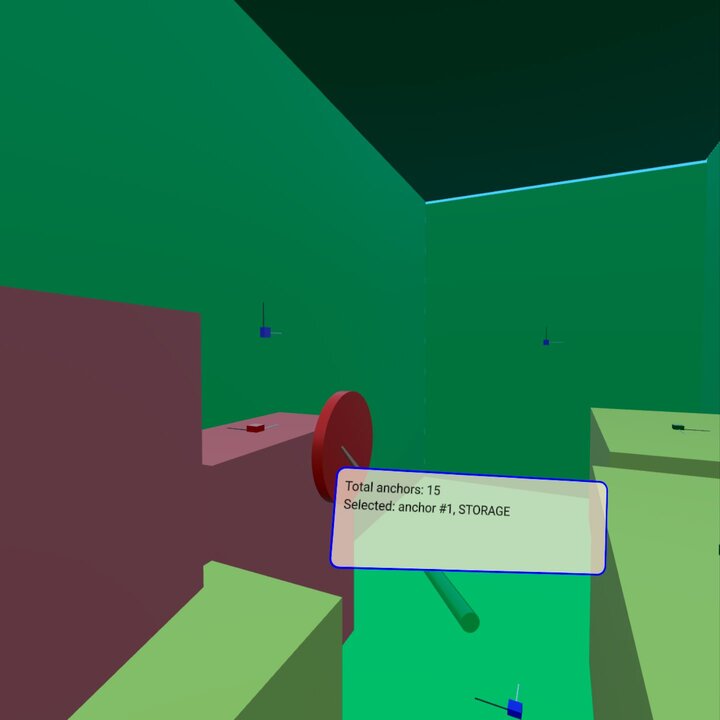
This example shows how to use XrSpatialAnchorListModel to display and interact with real physical objects in the environment. It supports both passthrough mode and fully immersive mode. The basic structure follows the xr_simple example.
The most relevant part of the example is a Repeater3D on an XrSpatialAnchorListModel. For each anchor, we create a box that fills the volume of the anchor with a color. The choice of color depends on the classification of the anchor. This box is invisible in passthrough mode. In addition, we visualize the position and orientation of the anchor with small boxes:
Repeater3D {
    id: spatialAnchors
    model: XrSpatialAnchorListModel {

    }
    delegate: Node {
        id: anchorNode
        required property XrSpatialAnchor anchor
        required property int index
        position: anchor.position
        rotation: anchor.rotation

        Model {
            pickable: true
            z: anchorNode.anchor.has3DBounds ? anchorNode.anchor.offset3D.z / 2 * 100 : 0 // Position is center of 2D surface also for 3D anchors
            scale: anchorNode.anchor.has3DBounds ? anchorNode.anchor.extent3D : Qt.vector3d(anchorNode.anchor.extent2D.x, anchorNode.anchor.extent2D.y, 0.01)
            materials: PrincipledMaterial {
                // Make anchor objects invisible in passthrough mode
                baseColor: xrView.passthroughEnabled ? Qt.rgba(0, 0, 0, 0) : anchorColor(anchor)
                alphaMode: xrView.passthroughEnabled ? PrincipledMaterial.Blend : PrincipledMaterial.Opaque
                roughness: 0.7
            }
            source: anchorNode.anchor.has3DBounds ? "#Cube" : "#Rectangle"
            property string anchorInfo: "anchor #" + anchorNode.index + ", " + anchorNode.anchor.classificationString
        }

        Model {
            // Visualize anchor orientation
            materials: PrincipledMaterial {
                baseColor: anchorNode.anchor.has3DBounds ? anchorNode.anchor.has2DBounds ? "green" : "red" : "blue"
            }
            scale: Qt.vector3d(0.05, 0.05, 0.05)
            source: "#Cube"

            Model {
                materials: PrincipledMaterial {
                    baseColor: "black"
                }
                scale: Qt.vector3d(0.1, 3, 0.1)
                source: "#Cube"
                y: 150
            }
            Model {
                materials: PrincipledMaterial {
                    baseColor: "white"
                }
                scale: Qt.vector3d(3, 0.1, 0.1)
                source: "#Cube"
                x: 150
            }
        }
        visible: anchor.has2DBounds || anchor.has3DBounds
    }
}
The box for the anchor is pickable and has a string property anchorInfo that contains the classificationString of the anchor. We then perform picking based on the controller's position. (See the xr_input example for details.) If we hit one of the anchor boxes, we show a label with the anchor information:
Node {
    id: labelNode
    position: rightController.position
    rotation: rightController.rotation

    property int numAnchors: spatialAnchors.count
    property string anchorInfo: "(no anchor)"

    Node {
        y: 15
        x: -15
        scale: Qt.vector3d(0.1, 0.1, 0.1)
        Rectangle {
            width: 300
            height: 100
            color: Qt.rgba(1,0.9,0.8,0.7)
            radius: 10
            border.width: 2
            border.color: "blue"
            Text {
                anchors.fill: parent
                anchors.margins: 10
                textFormat: Text.StyledText
                text: "Total anchors: " + labelNode.numAnchors + "<br>" + "Selected: " + labelNode.anchorInfo + "<br>" + "Press A to Capture/Update anchors"
            }
        }
    }
}© 2026 The Qt Company Ltd. Documentation contributions included herein are the copyrights of their respective owners. The documentation provided herein is licensed under the terms of the GNU Free Documentation License version 1.3 as published by the Free Software Foundation. Qt and respective logos are trademarks of The Qt Company Ltd. in Finland and/or other countries worldwide. All other trademarks are property of their respective owners.
