
Add external libraries to Android packages
Qt Creator automatically detects which Qt libraries an application uses and adds them as dependencies.
To copy external libraries into the application's library folder and load them on startup:
- Go to Projects > Build Settings > Build Android APK, and select Details.
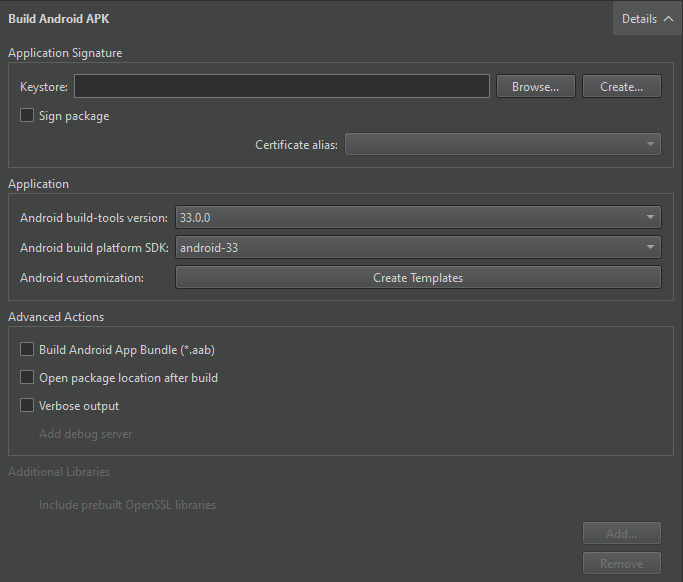
- In Additional Libraries, select the libraries to add.
Add OpenSSL libraries
To add OpenSSL libraries, select Include prebuilt OpenSSL libraries in the Additional Libraries group.
This adds the OpenSSL include project that you specify in Preferences > SDKs > Android OpenSSL Settings. This works for both qmake and CMake projects.
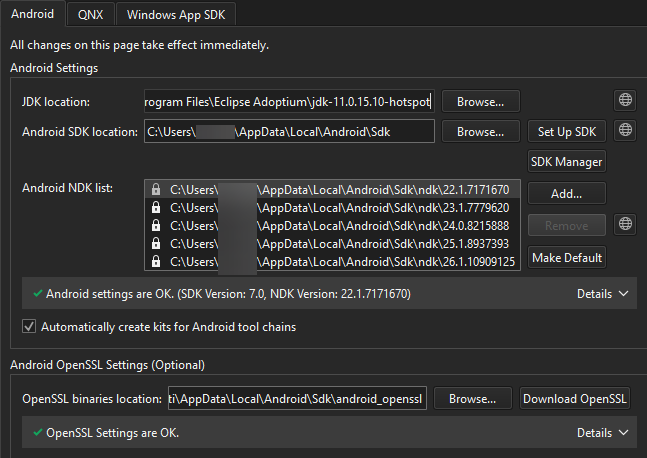
You can also manually add the paths to the required libssl.so and libcrypto.so libraries to the Additional Libraries field.
See also How to: Develop for Android and Developing for Android.
Copyright © The Qt Company Ltd. and other contributors. Documentation contributions included herein are the copyrights of their respective owners. The documentation provided herein is licensed under the terms of the GNU Free Documentation License version 1.3 as published by the Free Software Foundation. Qt and respective logos are trademarks of The Qt Company Ltd in Finland and/or other countries worldwide. All other trademarks are property of their respective owners.
