
Create Android packages
To specify settings for the androiddeployqt tool, go to Projects > Build Settings > Build Android APK and select Details.
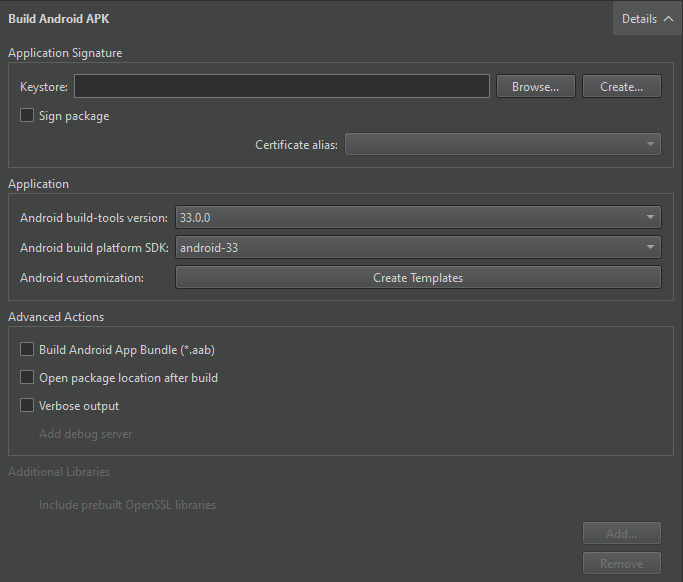
The androiddeployqt tool creates APKs based on the settings. For more information about the available options, see androiddeployqt.
You can view information about what the androiddeployqt tool is doing in Compile Output. To view more information, select Verbose output.
Select Add debug server to include the debug server binary into a package.
Select API Level
In the Android build platform SDK field, select the API level to use for building the application. Usually, you should select the highest API level available.
Usually, you should use the highest version of the Android SDK build tools for building. If necessary, select another version in the Android build-tools version field.
Build AABs
For testing the application locally, use the APK format because Qt Creator can install and run the package on the device. For distribution to the Google Play store, create an AAB by selecting Build Android App Bundle (*.aab).
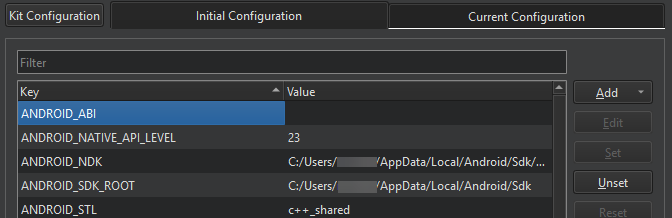
When building with CMake, you can view the selected ABIs in Initial Configuration in the CMake section. You can set additional ABIs as values of the ANDROID_ABI key:
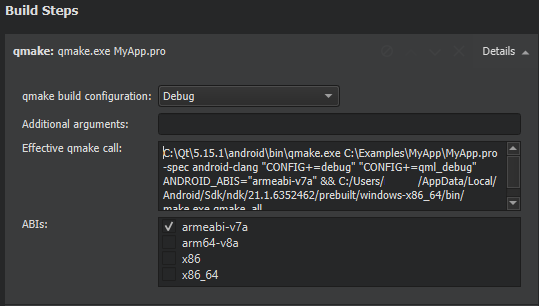
When building with Qbs or qmake, you can select the ABIs in the ABIs field in the Build Steps:
Build AARs
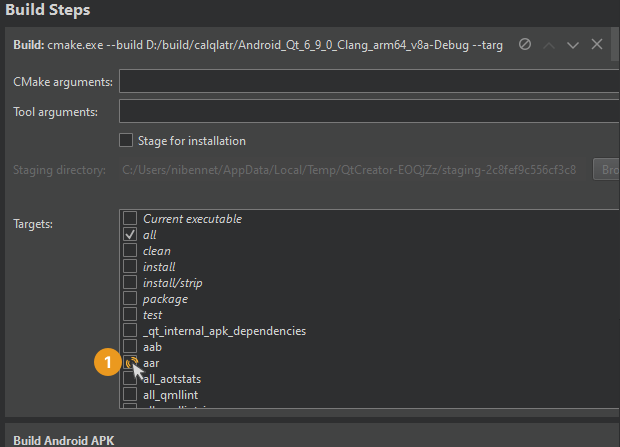
Select the AAR target in the Build Steps section.
See also How to: Develop for Android and Developing for Android.
Copyright © The Qt Company Ltd. and other contributors. Documentation contributions included herein are the copyrights of their respective owners. The documentation provided herein is licensed under the terms of the GNU Free Documentation License version 1.3 as published by the Free Software Foundation. Qt and respective logos are trademarks of The Qt Company Ltd in Finland and/or other countries worldwide. All other trademarks are property of their respective owners.
