
Deploy applications to Android
Because bundling applications as APK packages is not simple, Qt has the androiddeployqt tool. When you deploy an application using a Qt for Android kit, Qt Creator runs the tool to create the necessary files and to bundle them into an APK. For more information, see Android Package Templates.
To view the packages that the androiddeployqt tool created, select Open package location after build.
Specify deployment settings
To specify settings for deploying applications, go to Projects > Deploy Settings and select a deploy configuration in Active deployment configuration.
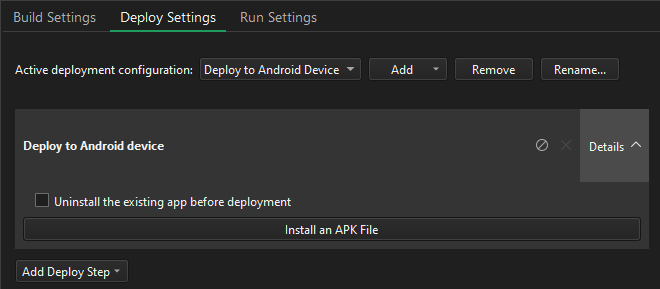
To add deploy configurations for a project, select Add.
To rename the current deployment method, select Rename.
To remove the current deployment method, select Remove.
About Android deploy settings
Android applications are packaged as ZIP files called Application Packages (APK), Android App Bundles (AAB), or Android Archives (AAR). You can install and run APK files on a device. You can upload AAB files to the Google Play Store.
Qt for Android has binaries for armv7a, arm64-v8a, x86, and x86-64. To support several different ABIs in your application, build an AAB that has binaries for each of the ABIs. The Google Play Store uses the AAB to generate optimized APK packages for the devices that request downloads and automatically signs them with your publisher key.
Qt Creator supports the following methods of deployment for Android applications:
- As a stand-alone, distributable application package (APK).
- As an app bundle (AAB) for distribution in the Google Play store.
- As an AAR, which fundamentally differs from the APK and AAB formats in that it is an Android library. You can use it as a dependency for an Android app module, but you cannot run it alone.
All Qt versions do not support AABs. Qt 6.3.0 and later support multi-abi builds for applications when you build with CMake. AARs are supported from Qt 6.8.0 onwards. For more information, see Deploying an Application on Android.
To specify settings for application packages, go to Projects > Build Settings > Build Android APK and select Details.
For more information about specifying additional start options for applications, see Specify Android run settings.
Select a device for deployment
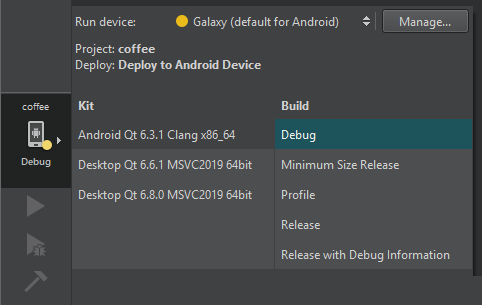
Qt Creator deploys the packages on the Android device that you select in the kit selector. To add devices, select Manage.
Remove previous installations
To remove previously installed files from the device, go to Projects > Deploy Settings and select Uninstall the existing app before deployment.
Install pre-built APKs
To install a pre-built APK, such as a 3rd-party application, on a device, go to Projects > Deploy Settings and select Install an APK File.
See also How to: Develop for Android and Developing for Android.
Copyright © The Qt Company Ltd. and other contributors. Documentation contributions included herein are the copyrights of their respective owners. The documentation provided herein is licensed under the terms of the GNU Free Documentation License version 1.3 as published by the Free Software Foundation. Qt and respective logos are trademarks of The Qt Company Ltd in Finland and/or other countries worldwide. All other trademarks are property of their respective owners.
