
Behavior
To specify indentation preferences for text files that do not have C++ or QML code (such as Python code files), select Preferences > Text Editor > Behavior.
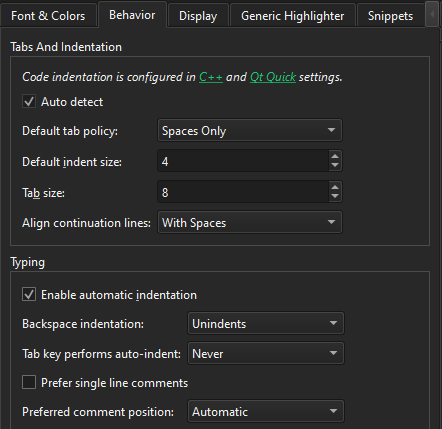
You can specify how to interpret the Tab and Backspace key presses and how to align continuation lines.
Specifying tab preferences
You can specify tab preferences at the following levels:
- For all C++ files
- For all QML files
- For all other text files
- For C++ files in a project
- For QML files in a project
- For other text files in a project
Specifying tabs and indentation
You can specify tab policy and tab size in the Tabs and Indentation group. In the Default Tab policy field, select whether to use only spaces or only tabs for indentation, or to use a mixture of them.
By default, the tab length in code editor is 8 spaces and the indent size is 4 spaces. You can specify the tab length and indent size separately for each project and for different types of files.
You can have continuation lines aligned with the previous line. In the Align continuation lines field, select Not at all to disable automatic alignment and indent continuation lines to the logical depth. To always use spaces for alignment, select With Spaces. To follow the Tab policy, select With Regular Indent.
Setting typing preferences
When you type text or code, it is indented automatically according to the selected text editor or code style preferences. To set typing preferences, select Preferences > Text Editor > Behavior > Typing.
The following table describes the typing preferences you can set.
| Preference | Description |
|---|---|
| Enable automatic indentation | Automatically indent new lines according to the text editor or code style preferences. |
| Backspace indentation | Specify how the indentation is decreased when you select Backspace:
|
| Tab key performs auto-indent | Specify when the Tab key automatically indents text:
|
| Prefer single line comments | When your highlight definition file has definitions for both multi and single line comments, select this option to apply the single line comment definition when commenting out a selection. |
| Preferred comment position | Specify the position of single line comments when you comment out a selection:
|
See also How to: Configure editors, Find preferences, Indent text or code, Specify Qt Quick code style, Configuring editors, C++ code style, and Nim.
Copyright © The Qt Company Ltd. and other contributors. Documentation contributions included herein are the copyrights of their respective owners. The documentation provided herein is licensed under the terms of the GNU Free Documentation License version 1.3 as published by the Free Software Foundation. Qt and respective logos are trademarks of The Qt Company Ltd in Finland and/or other countries worldwide. All other trademarks are property of their respective owners.
