
ClearCase
IBM Rational ClearCase is a version control, workspace management, parallel development support, and build automation solution developed by IBM. Use the ClearCase client plugin on Linux and Windows to access a ClearCase server.
Note: Enable the ClearCase plugin to use it.
Using GNU Diffutils with ClearCase
You can use the GNU Diffutils tool With ClearCase to compare files and activities:
- Download Diffutils and extract it to a directory in your PATH.
- Select Preferences > Version Control > ClearCase.
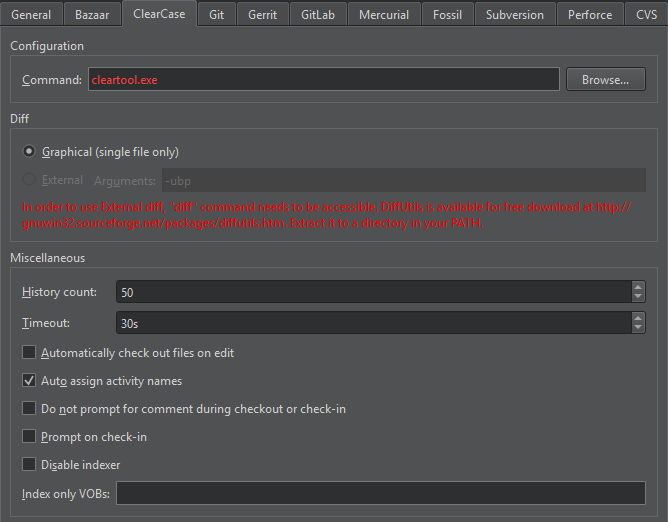
- Select the External radio button. The radio button is disabled if
diffis not in the PATH. - In the Arguments field, specify arguments for running
diff.
Checking out and checking in
In addition to the standard version control system functions described in Use common VCS functions, you can access additional functions in Tools > ClearCase.
| Menu Item | Description |
|---|---|
| Check Out | Create a writable copy of a file. If you check out files in a Unified Change Management (UCM) view, they are added to the change set of a UCM activity. |
| Undo Check Out | Cancel the checkout for a file and delete the checked-out version. |
| Check In Activity | Check in all checked-out versions of files in the change set of the current UCM activity. |
| Check In | Create a permanent new version of the current file or all files in the versioned object base (VOB). |
| Undo Hijack | Revert a hijacked file to its checked in version. A file is hijacked if you change the read-only attribute of a file that is loaded into a snapshot view and modify the file without checking it out. |
ClearCase preferences
To set ClearCase preferences, select Preferences > Version Control > ClearCase.
| Preference | Description |
|---|---|
| History count | The number of event records to show in the history view. |
| Timeout | The timeout in seconds for version control operations. |
| Automatically check out files on edit | Automatically check out files when you edit them. |
| Auto assign activity names | Automatically assign names to UCM activities. |
| Do not prompt for comment during checkout or check-in | By default, you have to enter a comment when checking files out or in. This option suppresses the prompt for comments. |
| Prompt on check-in | Confirm that you want to check in files by showing a prompt when you select Check In. |
| Disable indexer | Disable indexing of files in VOBs. To only have some VOBs indexed, specify them in the Index only VOBs field. |
See also Enable and disable plugins, Set up version control systems, Use common VCS functions, and Version control systems.
Copyright © The Qt Company Ltd. and other contributors. Documentation contributions included herein are the copyrights of their respective owners. The documentation provided herein is licensed under the terms of the GNU Free Documentation License version 1.3 as published by the Free Software Foundation. Qt and respective logos are trademarks of The Qt Company Ltd in Finland and/or other countries worldwide. All other trademarks are property of their respective owners.
