
Fossil
Fossil is an open source distributed version control system, designed and developed by the creator of SQLite. A stand-alone Fossil executable has a source control management engine, web interface, issue tracker, wiki, and built-in web server. Fossil is available for Linux, Windows, and macOS.
Note: Enable the Fossil plugin to use it.
To use Fossil from Qt Creator, you must install and configure it, as described in the following sections.
Configuring Fossil
- Download the Fossil SCM client and install the
fossilexecutable file in yourPATH. - Create or designate a directory to store local Fossil repositories and remote clones. For example:
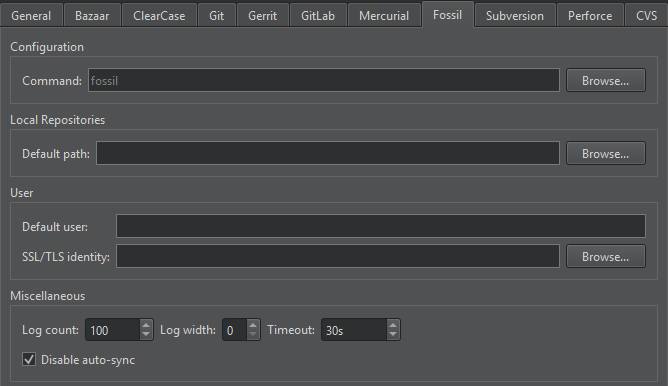
~/fossils/qt. - Select Preferences > Version Control > Fossil, and set the designated directory in the Default path field.
To create a local Fossil repository, select Tools > Fossil > Create Repository.
To clone a remote Fossil repository, select File > New Project > Import Project > Fossil Clone.
Additional Fossil functions
In addition to the standard version control system functions described in Use common VCS functions, the Fossil submenu has the following items.
| Menu Item | Description |
|---|---|
| Pull | Pull changes from the remote repository. |
| Push | Push committed changes to the remote repository. |
| Update | Change the version of the current checkout. Any uncommitted changes are retained and applied to the new checkout. |
| Settings | Configure the settings of the local repository. |
Fossil preferences
To set Fossil preferences, select Preferences > Version Control > Fossil.
| Preference | Description |
|---|---|
| Command | Specifies the path to the command-line client executable. |
| Default path | Sets the path to the directory to store local repositories by default. |
| Default user | Specifies an existing user who becomes the author of changes made to the repository. |
| SSL/TLS identity | Sets the SSL/TLS client identity key to use for authentication if the server requests it. |
| Log count | Sets the maximum number of lines the log can have. |
| Log width | Sets the width of log entry lines to 20 or above. The value 0 shows a single line per entry. |
| Timeout | Sets a timeout for version control operations. |
| Disable auto sync | Disables automatic pull before a commit or update and automatic push after a commit or tag or branch creation. |
See also Enable and disable plugins, Set up version control systems, Use common VCS functions, and Version control systems.
Copyright © The Qt Company Ltd. and other contributors. Documentation contributions included herein are the copyrights of their respective owners. The documentation provided herein is licensed under the terms of the GNU Free Documentation License version 1.3 as published by the Free Software Foundation. Qt and respective logos are trademarks of The Qt Company Ltd in Finland and/or other countries worldwide. All other trademarks are property of their respective owners.
