
Perforce
Perforce is a fast software configuration management system developed by Perforce Software.
Note: Enable the Perforce plugin to use it.
Configuring Perforce
To set Perforce preferences, select Preferences > Version Control > Perforce:
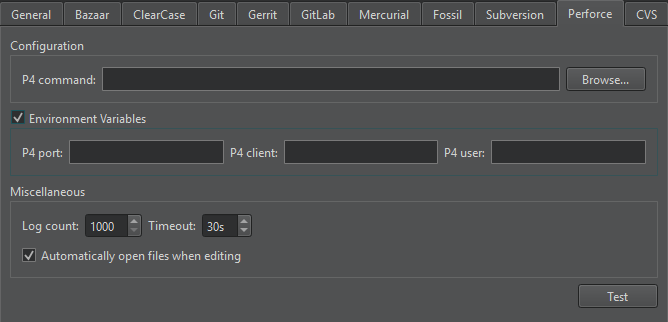
In P4 command, set the path to the command-line client executable.
Set workspace details in P4 user, P4 client, and P4 port.
Using configuration files
To specify workspace details individually for several projects, use configuration files:
- Create a
p4config.txtconfiguration file for each project in the top level project directory. - Go to Preferences > Version Control > Perforce.
- Clear Environment Variables.
- To set
P4CONFIGto use the file that you created, run the following command from the command line once:p4 set P4CONFIG=p4config.txt
For more information about using the P4CONFIG variable, see Perforce: P4CONFIG.
Additional Perforce functions
In addition to the standard version control system functions described in Use common VCS functions, you can access additional functions in Tools > Perforce.
| Menu Item | Description |
|---|---|
| Edit File | Open a file for editing within the client workspace. |
| Opened | List files that are open for editing. |
| Pending Changes | Group files for commit. |
| Describe | View information about change lists and the files in them. |
See also Enable and disable plugins, Set up version control systems, Use common VCS functions, and Version control systems.
Copyright © The Qt Company Ltd. and other contributors. Documentation contributions included herein are the copyrights of their respective owners. The documentation provided herein is licensed under the terms of the GNU Free Documentation License version 1.3 as published by the Free Software Foundation. Qt and respective logos are trademarks of The Qt Company Ltd in Finland and/or other countries worldwide. All other trademarks are property of their respective owners.
