
Set up Git
To set up Git, go to Preferences > Version Control > General.
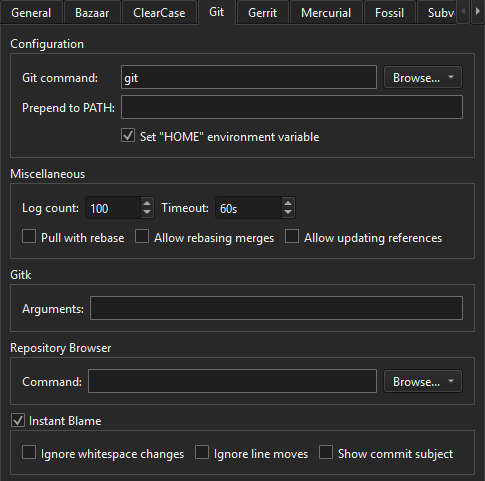
Git tab in Version Control preferences
You can set the following preferences:
- When the Git executable is not in the
PATHvariable, specify the full path to the executable in Git command. - Alternatively, add the folder containing the Git executable to Prepend to PATH.
- In Windows, Git needs to know the
HOMEdirectory for its own settings and forSSHto find the keys. If theHOMEdirectory is not correctly set, select Set HOME environment variable to set it. For more information, see Use Git for Windows. - To limit the entries in the git log, change Log count.
- To avoid that Git commands run forever (for example on network problems), set Timeout.
- To rebase local commits instead of merging them during git pull, select Pull with rebase.
- To allow rebasing merges during Interactive rebase, select Allow rebasing merges. This is an advanced option and requires Git version 2.18 or later.
- To allow updating references during Interactive rebase, select Allow updating references. This is an advanced option and requires Git version 2.38 or later.
- To specify additional arguments when running Gitk, add them to Gitk > Arguments.
- To use another application for viewing Git history, such as GitX or QGit, specify the path to the executable in Repository Browser > Command. See Other repository browsers for more information.
- For the Instant Blame settings, see Show instant blame.
See also How to: Use Git and Using Git.
Copyright © The Qt Company Ltd. and other contributors. Documentation contributions included herein are the copyrights of their respective owners. The documentation provided herein is licensed under the terms of the GNU Free Documentation License version 1.3 as published by the Free Software Foundation. Qt and respective logos are trademarks of The Qt Company Ltd in Finland and/or other countries worldwide. All other trademarks are property of their respective owners.
