
Edit CMake configuration files
To open a CMakeLists.txt file for editing, right-click it in the Projects view and select Open With > CMake Editor.
You can also use the cmo filter in the locator to open the CMakeLists.txt file for the current run configuration in the editor. This is the same build target as when you go to Build and select Build for Run Configuration.
The following features are supported:
- Selecting F2 when the cursor is on a:
- Filename - to open the file
- CMake function, macro, option, target, CMake's Find or Include module, local variable created by
setorlist, or package - to go to that item
- Keyword completion
- Code completion for local functions and variables, cache variables,
ENV, targets, packages, and variables thatfind_packageadds - Pre-defined code snippets for setting CMake print properties and variables, as well as creating Qt console and GUI applications and sample Find modules
- Path completion
- Auto-indentation
- Matching parentheses and quotes
- A quick fix for creating files that a command names but which do not exist yet, and for installing the Qt components that
find_packageasks for but which you did not install, with on the lines that name one
Warnings and errors are displayed in Issues.
Create missing files
When you add a source file that does not exist to a command such as add_executable or target_sources, CMake stops the configure run with a Cannot find source file error.
Qt Creator marks the lines that name such a file with . Select it to create the file.
Or, place the cursor on the file name, or anywhere in the command that lists it, select Alt+Enter, and then select Create File.
Either way, Qt Creator creates the file and the directories that lead to it, opens it in the editor, and runs CMake again.
add_subdirectory works the same way: when the directory it names does not exist, or has no CMakeLists.txt, the quick fix creates an empty CMakeLists.txt there. The binary directory, which is the optional second argument, is left to CMake.
Install missing Qt packages
If you add a Qt module in find_package that you did not install, Qt Creator creates an entry in the Issues view with the option to install the missing component with Qt Online Installer.
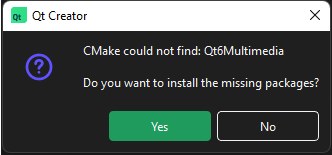
Click the link to install the package with Qt Online Installer.
You do not have to run CMake to get there. Qt Creator marks the components that the Qt of the kit does not have with . Select it, or place the cursor on the name of the component, or anywhere in the find_package call, select Alt+Enter, and then select Install Qt Component. Qt Online Installer opens with the package that ships the component.
Components that find_package lists as OPTIONAL_COMPONENTS are left alone: a project that asks for those builds without them.
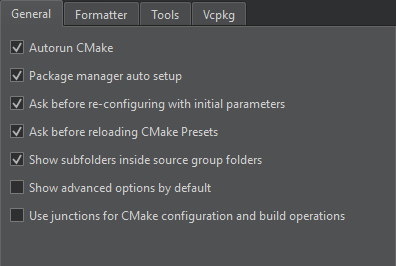
To turn off the messages and the light bulbs, go to Preferences > CMake > General and clear Maintenance Tool dependency provider.
See also How To: Build with CMake, Apply quick fixes, CMake, Completion, and Snippets.
Copyright © The Qt Company Ltd. and other contributors. Documentation contributions included herein are the copyrights of their respective owners. The documentation provided herein is licensed under the terms of the GNU Free Documentation License version 1.3 as published by the Free Software Foundation. Qt and respective logos are trademarks of The Qt Company Ltd in Finland and/or other countries worldwide. All other trademarks are property of their respective owners.
