
Use junction points on Windows
Long project paths on Windows might lead to builds failing.
To overcome these issues:
- Use source directory names with short absolute paths. For example, use
C:\devinstead ofC:\Users\My Name\Projects. - Use short build directory paths.
- Use the Ninja generator for CMake.
- Use junction points on Windows for the source and build directories.
Junction points
At a junction point, a directory serves as an alias to another directory on the computer.
To use the junction points for CMake configure, build, and install operations, go to Preferences > CMake > General and select Use junctions for CMake configuration and build operations.
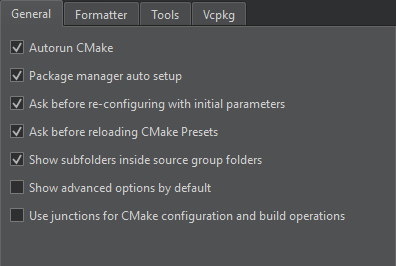
The build system configures, compiles, and installs the project through the junction points making command line commands shorter.
Set environment variables
Qt Creator stores junction points in C:\ProgramData\QtCreator\Links. To use another path, set it as the value of the QTC_CMAKE_JUNCTIONS_DIR environment variable.
Set the QTC_CMAKE_JUNCTIONS_HASH_LENGTH environment variable to shorten the MD5 hash key length from its default length value of 32.
See also How to: Build with CMake.
Copyright © The Qt Company Ltd. and other contributors. Documentation contributions included herein are the copyrights of their respective owners. The documentation provided herein is licensed under the terms of the GNU Free Documentation License version 1.3 as published by the Free Software Foundation. Qt and respective logos are trademarks of The Qt Company Ltd in Finland and/or other countries worldwide. All other trademarks are property of their respective owners.
