
Add custom properties
Each preset component has a set of preset properties that you can specify values for. You can add custom properties that would not otherwise exist for a particular component type. You bind the properties to dynamic expressions to define global properties for a component that can be read by other components. For example, you can specify global properties for the root component that you can use in the child components.
For example, to specify spacing between UI elements, you could define a margin for a component that does not have a margin property, and then use bindings to refer to the value of the margin property from other components.
Similarly, you can add custom properties for your own components that are based on preset components.
Any content that is data-driven should be exported as a public property (alias property) of the relevant component. For example, a speedometer should have an int or real property for speed to which the UI is bound.
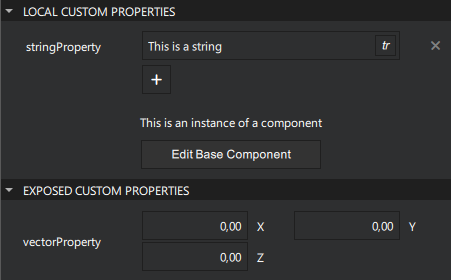
Add properties for a component
To add a custom property for a component:
- Go to Properties > Local Custom Properties.
- Select
 (Add).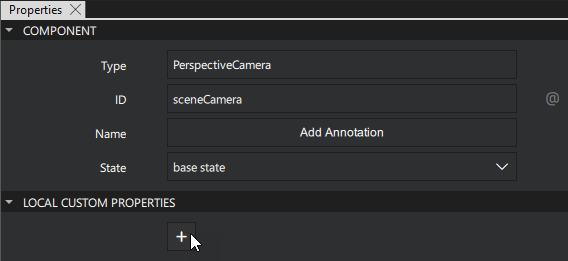
- Set the Name and Type for the property.
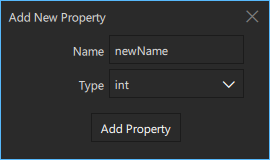
The Add New Property dialog.
- Select Add Property to add the property.
Bind a property value
To bind the value of the property to that of another one or to data accessible in the application:
- In the Properties view, select
 next to the property.
 - Select Set Binding.
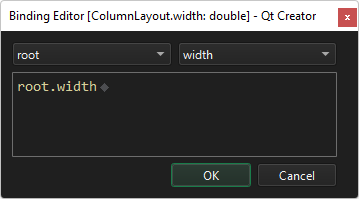
The Binding Editor dialog.
For more information, see Set bindings.
Add custom properties in the Connections view
To add a custom property for a component in the Connections view:
- Select a component in the 2D or Navigator view.
- Go to Connections > Properties.
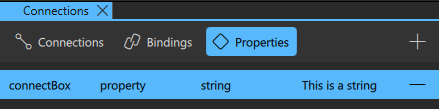
- Select (Add) to add a custom property.
- In the custom property editor, select the Type of the property to include.
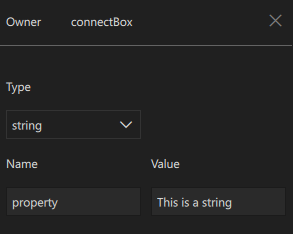
The custom property editor.
- Set the Name and Value for the property.
Remove custom properties
Go to Connections > Properties, and select  (Remove) to delete the selected custom property.
Supported property types
The following table describes the supported property types:
| Type | Description |
|---|---|
| alias | Property alias that holds a reference to another property |
| bool | Binary true or false value |
| color | Color value that can be specified by using an SVG color name, such as "red", "green", or "lightsteelblue", or a hexadecimal triplet or quad in the form "#RRGGBB" and "#AARRGGBB", respectively. For example, the color red corresponds to a triplet of "#FF0000" and a slightly transparent blue to a quad of "#800000FF". In addition, you can use the following Qt functions: Qt.rgba(), Qt.hsva(), Qt.hsla(), Qt.darker(), Qt.lighter(), and Qt.tint(). |
| int | Whole integer number, such as 0, 10, or -20 |
| real | Number with a decimal point |
| string | Free form text string |
| TextureInput | Specifies a texture exposed to the shaders of a CustomMaterial or Effect. |
| url | Resource locator, such as a file name. It can be either absolute, (https://qt-project.org), or relative (pics/logo.png). A relative URL is resolved relative to the URL of the parent component. |
| variant | Generic property type. For example, variant properties can store numbers, strings, objects, arrays, and functions. |
| vector2d | Refers to a value with x and y attributes. |
| vector3d | Refers to a value with x, y, and z attributes. |
| vector4d | Refers to a value with x, y, z, and w attributes. |
See also How to: Use UI components, Qt Quick UI design, and Designing Qt Quick UIs.
Copyright © The Qt Company Ltd. and other contributors. Documentation contributions included herein are the copyrights of their respective owners. The documentation provided herein is licensed under the terms of the GNU Free Documentation License version 1.3 as published by the Free Software Foundation. Qt and respective logos are trademarks of The Qt Company Ltd in Finland and/or other countries worldwide. All other trademarks are property of their respective owners.
