PySide6.QtPdf.QPdfSearchModel
- class QPdfSearchModel
The
QPdfSearchModelclass searches for a string in a PDF document and holds the results.Details
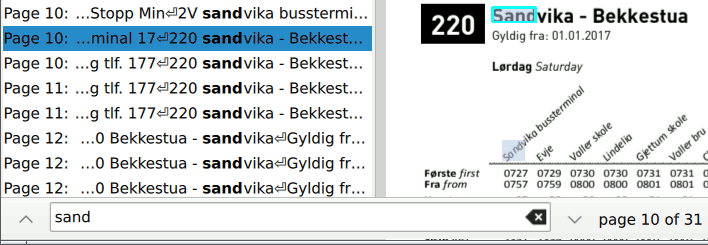
This is used in the Model/View Programming paradigm to display a list of search results, to highlight them on the rendered PDF pages, and to iterate through them using the “search forward” / “search backward” buttons and shortcuts that would be found in a typical document-viewing UI:
Synopsis
Properties
countᅟ- The number of search results founddocumentᅟ- The document to searchsearchStringᅟ- The string to search forstatusᅟ- The search status
Methods
def
__init__()def
count()def
document()def
resultAtIndex()def
resultsOnPage()def
searchString()def
status()def
updatePage()
Slots
def
setDocument()
Signals
def
countChanged()def
statusChanged()
Note
This documentation may contain snippets that were automatically translated from C++ to Python. We always welcome contributions to the snippet translation. If you see an issue with the translation, you can also let us know by creating a ticket on https:/bugreports.qt.io/projects/PYSIDE
- class Role
Constant
Description
QPdfSearchModel.Role.Role.Page
The page number where the search result is found (int).
QPdfSearchModel.Role.Role.IndexOnPage
The index of the search result on the page (int).
QPdfSearchModel.Role.Role.Location
The position of the search result on the page (QPointF).
QPdfSearchModel.Role.Role.ContextBefore
The adjacent text on the page, before the search string (QString).
QPdfSearchModel.Role.Role.ContextAfter
The adjacent text on the page, after the search string (QString).
See also
- class Status
This enum describes the current status of the search model.
Constant
Description
QPdfSearchModel.Status.Status.Null
The initial status before the first search has begun.
QPdfSearchModel.Status.Status.Searching
The status while the search is being conducted.
QPdfSearchModel.Status.Status.Finished
The status when all possible search results have been found on all pages.
See also
Added in version 6.12.
Note
Properties can be used directly when
from __feature__ import true_propertyis used or via accessor functions otherwise.- property countᅟ: int
This property holds the number of search results found.
- Access functions:
Signal
countChanged()
- property documentᅟ: QPdfDocument
This property holds the document to search.
- Access functions:
- property searchStringᅟ: str
This property holds the string to search for.
- Access functions:
- property statusᅟ: QPdfSearchModel.Status
This property holds the search status.
This property tells whether a search is in progress.
See also
- Access functions:
Signal
statusChanged()
- __init__()
- __init__(parent)
- Parameters:
parent –
QObject
Constructs a new search model with parent object
parent.- count()
- Return type:
int
Getter of property
countᅟ.- countChanged()
Notification signal of property
countᅟ.- document()
- Return type:
See also
Getter of property
documentᅟ.- documentChanged()
Notification signal of property
documentᅟ.Returns a result found by
indexin thedocument(), regardless of the page on which it was found.indexmust be less thanrowCount().Returns the list of all results found on the given
page.- searchString()
- Return type:
str
See also
Getter of property
searchStringᅟ.- searchStringChanged()
Notification signal of property
searchStringᅟ.- setDocument(document)
- Parameters:
document –
QPdfDocument
See also
Setter of property
documentᅟ.- setSearchString(searchString)
- Parameters:
searchString – str
See also
Setter of property
searchStringᅟ.Getter of property
statusᅟ.Notification signal of property
statusᅟ.- updatePage(page)
- Parameters:
page – int