Robot Arm Collision
Importing a URDF robot as a Qt Quick 3D module with physics collision shapes, driven either by an animation or by live ROS 2 joint states.
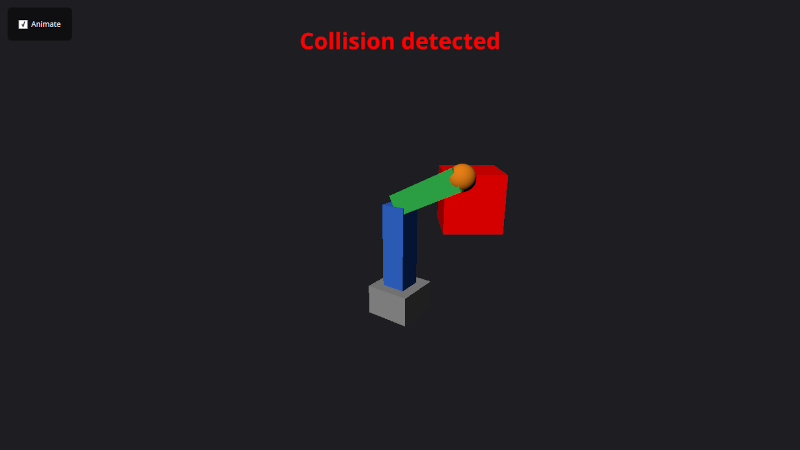
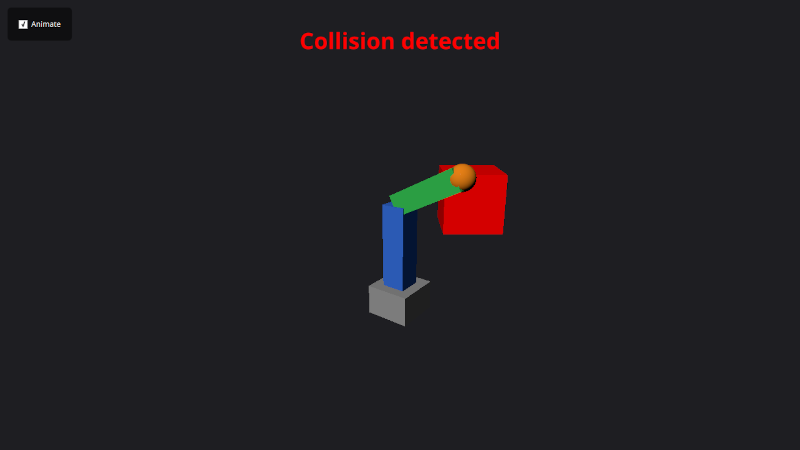
Robot Arm Collision turns a URDF robot description into a Qt Quick 3D scene at build time and adds Qt Quick 3D Physics collision detection. The arm sweeps through a static box obstacle; while any link overlaps the box it tints red and an on-screen "Collision detected" banner flashes. The arm can be driven two ways: by a built-in animation, or live from sensor_msgs/JointState messages arriving over ROS 2.
Running the example
- Source your ROS 2 environment and launch Qt Creator from that shell.
- Open
examples/robotarmcollision/CMakeLists.txtin Qt Creator, then build and run. - With Animate checked, the arm runs the demo animation and periodically collides with the obstacle.
- With Animate unchecked, the arm follows incoming
sensor_msgs/JointStatemessages on/joint_states. Publish joint states to move it — for example with a joint-state publisher loadingsimple_arm.urdf, in a separate ROS-sourced terminal:ros2 launch examples/robotarmcollision/simple_arm.launch.py
Importing a URDF at build time
Unlike the other examples, this one does not import a ROS message package — it imports a robot. qt_ros2_import_urdf() converts simple_arm.urdf into a Qt Quick 3D QML module named SimpleArm and links it into the target. The PHYSICS option generates Qt Quick 3D Physics rigid bodies and collision shapes from the URDF collision meshes, and ROS_BRIDGE generates a companion type that feeds live joint states into the model:
qt_ros2_import_urdf(robotarmcollisionapp
    simple_arm.urdf
    PHYSICS
    ROS_BRIDGE
)
The qt_ros2_import_urdf() function also accepts options for the QML module URI, scene scale, and output directory, and it re-runs the importer automatically whenever the URDF file changes — so a plain cmake --build picks up edits to the robot description.
Assembling the scene
The generated module provides three cooperating types:
SimpleArmControl— the control object. It holds the joint angles (for exampleshoulderLiftAngle) and joint metadata (jointInfos[n].upper/lowerlimits), and — becausePHYSICSwas used — can emit collision overlap reports whensendTriggerReportsis enabled.SimpleArm— the 3D model. It renders the links and is bound to a control object via itscontrolproperty.RosBridge— the generated ROS bridge. Bound to the same control object, it applies incoming/joint_statesto the arm.
import QtQuick3D
import QtQuick3D.Physics
import SimpleArm

SimpleArmControl {
    id: armControl
    sendTriggerReports: true   // let links report overlaps to the obstacle
}

RosBridge {
    control: armControl
    // Drop joint messages while animating; otherwise drive from /joint_states.
    processMessages: !window.animate
}

View3D {
    SimpleArm { control: armControl }   // the 3D model, sharing the control
}
Toggling the Animate check box flips RosBridge.processMessages: when the built-in animation is running the bridge ignores ROS messages so the two drive sources never fight, and when it is off the arm follows /joint_states.
Detecting collisions
The obstacle is a TriggerBody, which does not physically block the kinematic arm — it only reports overlaps. An overlaps counter is incremented and decremented as links enter and leave, which both tints the box red and flashes the banner:
TriggerBody {
    id: obstacle
    property int overlaps: 0
    collisionShapes: BoxShape { extents: Qt.vector3d(18, 18, 18) }

    onBodyEntered: { obstacle.overlaps++; banner.flash() }
    onBodyExited:  obstacle.overlaps = Math.max(0, obstacle.overlaps - 1)

    Model {
        source: "#Cube"
        materials: PrincipledMaterial {
            baseColor: obstacle.overlaps > 0 ? "red" : "#cccccc"
        }
    }
}
Files:
Images:
See also R6 Robot Teach Pendant.
© 2026 The Qt Company Ltd. Documentation contributions included herein are the copyrights of their respective owners. The documentation provided herein is licensed under the terms of the GNU Free Documentation License version 1.3 as published by the Free Software Foundation. Qt and respective logos are trademarks of The Qt Company Ltd. in Finland and/or other countries worldwide. All other trademarks are property of their respective owners.