R6 Robot Teach Pendant
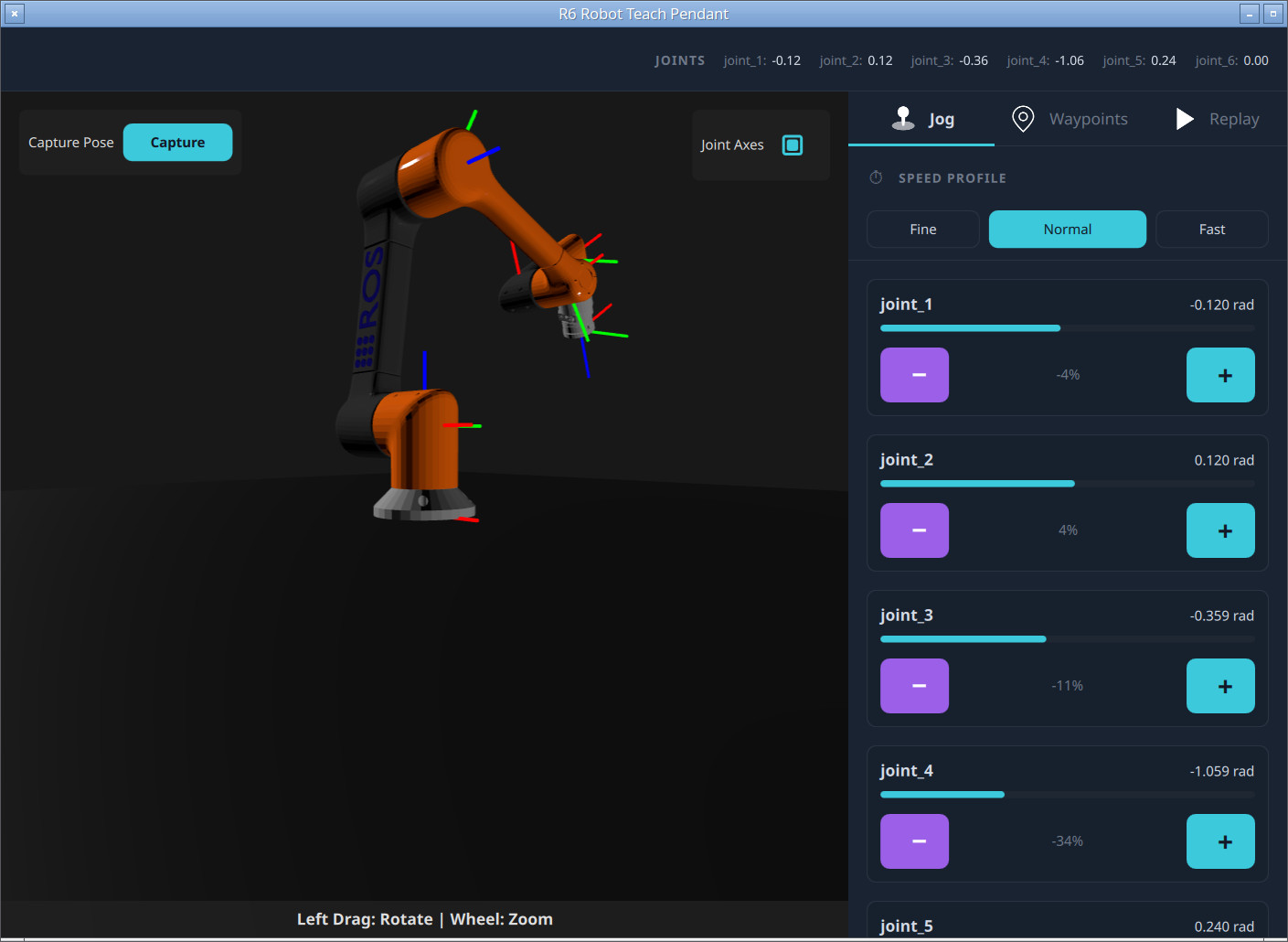
A teach pendant for a 6-DOF arm: a live 3D model driven by TF, joint jogging and waypoint programming driven by joint trajectories.
R6 Robot Teach Pendant is a teach pendant for the 6-DOF r6bot arm from ros2_control example 7. It shows the arm as a live Qt Quick 3D model driven by TF, and lets the operator jog individual joints, capture named waypoints, and replay them as a looping sequence — commanding the arm through trajectory_msgs/JointTrajectory messages. It is the most involved example of driving a robot (as opposed to monitoring one), and a thorough demonstration of consuming TF with FrameTransformer.
Running the example
- Build the
ros2_controldemos in a workspace, in a ROS-sourced terminal:mkdir -p ~/ros2_ws/src && cd ~/ros2_ws/src git clone https://github.com/ros-controls/ros2_control_demos -b ${ROS_DISTRO} cd ~/ros2_ws/ rosdep install --from-paths ./ -i -y --rosdistro ${ROS_DISTRO} colcon build --merge-install - Source your ROS 2 environment and launch Qt Creator from that shell.
- Open
examples/r6botteachpendant/CMakeLists.txtin Qt Creator, then build and run. - Launch the r6bot simulation in a separate terminal:
source ~/ros2_ws/install/setup.bash
ros2 launch ros2_control_demo_example_7 r6bot_controller.launch.py
Forwarding command-line arguments to ROS
Because a teach pendant may be launched with ROS arguments (for remapping or parameters), main.cpp initializes the ROS 2 context explicitly, forwarding argc/\c argv, before constructing the Qt application:
#include <QtRos2Core/qros2context.h>

int main(int argc, char *argv[])
{
    QRos2Context::init(argc, argv);      // hand ROS args to rclcpp
    QGuiApplication app(argc, argv);
    QQmlApplicationEngine engine;
    engine.loadFromModule("R6BotTeachPendant", "Main");
    return app.exec();
}
The view model
All ROS logic is centralized in R6BotViewModel.qml — no other QML file imports the bridge — which keeps the UI files purely presentational. It declares one Node hosting three entities:
import QtRos2.Core
import QtRos2.SensorMsgs as SensorMsgs
import QtRos2.Transforms
import QtRos2.TrajectoryMsgs as TrajectoryMsgs

Node {
    id: ros2Node
    nodeName: "qt_r6bot_teach_pendant"

    SensorMsgs.JointStateSubscriber { id: jointStateSubscriber; topic: "/joint_states" }
    FrameTransformer { id: tfXform }
    TrajectoryMsgs.JointTrajectoryPublisher {
        id: trajectoryPublisher
        topic: "/r6bot_controller/joint_trajectory"
    }
}
The CMake side enables the publisher/subscriber capabilities and links the trajectory message module. TF is consumed through QtRos2.Transforms (FrameTransformer), which wraps tf2_ros in C++, so no tf2_msgs QML module import is required:
qt_ros2_configure_target(r6botteachpendant
    CAPABILITIES PUBLISHER SUBSCRIBER
    MODULES QtRos2TrajectoryMessages
)
Reading joint state
The JointStateSubscriber's message drives the numeric panels. The view model derives a few convenient properties from it, including a moving flag used to sequence replay:
readonly property list<real> currentPositions: jointStateSubscriber.message.position
readonly property bool moving:
    jointStateSubscriber.message.velocity.some(vel => vel !== 0.0)
Commanding the arm
Motion commands are trajectory_msgs/JointTrajectory messages. The view model echoes the joint names from /joint_states, then builds a list of interpolated points ending in a zero-velocity settling point, and publishes:
trajectoryPublisher.publish({
    header: { stamp: { sec: 0, nanosec: 0 }, frameId: "" },
    jointNames: jointStateSubscriber.message.name,   // echo names from /joint_states
    points: points                                   // {positions, velocities, timeFromStart}
})
Jogging a single joint applies a delta to one position and sends a short single-point trajectory; the jog step sizes (Fine/Normal/Fast) are 0.02, 0.1, and 0.2 radians.
Driving the 3D model from TF
The 3D robot is driven entirely by TF, not by joint angles directly — the robot_state_publisher in the r6bot stack turns /joint_states into /tf, and the pendant consumes that. A single FrameTransformer maintains the TF buffer from its own /tf and /tf_static subscriptions; TFBufferManager.qml re-reads every edge of the kinematic chain whenever the transformer signals a change:
Connections {
    target: root.frameTransformer
    function onTransformsChanged() { root._refresh() }
}

function _refresh() {
    for (const e of root._edges) {                 // world→base_link→link_1→…→tool0
        if (root.frameTransformer.canTransform(e[0], e[1])) {
            const tr = root.frameTransformer.lookupTransform(e[0], e[1]).transform
            root[e[2] + "_p"] = Qt.vector3d(tr.translation.x, tr.translation.y, tr.translation.z)
            root[e[2] + "_q"] = Qt.quaternion(tr.rotation.w, tr.rotation.x,
                                              tr.rotation.y, tr.rotation.z)
        }
    }
}
Two details are worth copying into your own code:
lookupTransform(parent, child)returns the child frame in its parent's coordinates — the local transform a nested scene-graph node needs.R6BotModel.qmlis a nestedNodechain mirroring the URDF, and each link binds its localposition/\crotation to one edge.- A ROS quaternion is
(x, y, z, w)butQt.quaternion()takes(w, x, y, z)— note the reordering above. The model is also scaled from meters to millimeters and rotated to map ROS Z-up into Qt Quick 3D's Y-up convention.
A transformsReady flag (set once every edge resolves) gates the model's visibility, so nothing renders until the whole chain is available.
Waypoints and replay
Waypoints capture the joint positions (from /joint_states), not TF, and are held in memory for the session. Replay is velocity-driven rather than timed: after sending a waypoint, the view model waits for the arm to come to rest (all joint velocities return to zero) before sending the next one, using the moving transition:
onMovingChanged: {
    if (wasMoving && !moving) {           // the arm just stopped
        if (nextWaypointToSend >= waypoints.length) {
            if (loopEnabled) { restartFromFirstWaypoint() }
            else            { executing = false }
        } else {
            sendNextWaypoint()
        }
    }
    wasMoving = moving
}
Per-waypoint duration is derived from the largest joint delta, and stopping publishes the current position with zeroed velocities to halt smoothly.
The UI at a glance
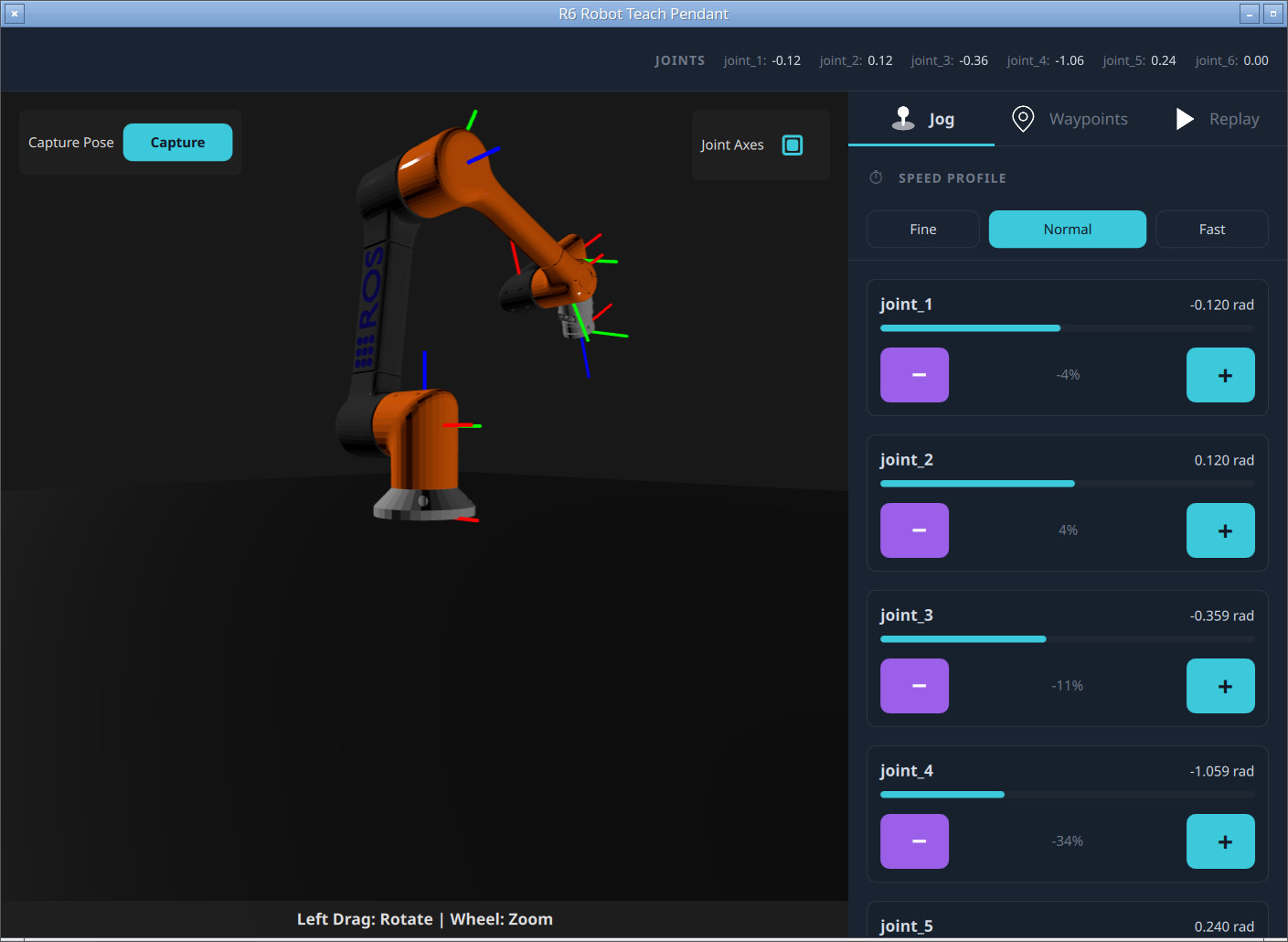
- A status bar shows the live joint readout from
/joint_states. - The large 3D view shows the arm (with an optional per-joint axis triad) driven by TF.
- A tabbed side panel offers Jog (per-joint +/- with step size), Waypoints (capture, list, jump-to), and Replay (play sequence, progress, loop).
Files:
- r6botteachpendant/CMakeLists.txt
- r6botteachpendant/JogPanel.qml
- r6botteachpendant/JointAxes.qml
- r6botteachpendant/Link_0.qml
- r6botteachpendant/Link_1.qml
- r6botteachpendant/Link_2.qml
- r6botteachpendant/Link_3.qml
- r6botteachpendant/Link_4.qml
- r6botteachpendant/Link_5.qml
- r6botteachpendant/Link_6.qml
- r6botteachpendant/Main.qml
- r6botteachpendant/R6BotModel.qml
- r6botteachpendant/R6BotView3D.qml
- r6botteachpendant/R6BotViewModel.qml
- r6botteachpendant/ReplayPanel.qml
- r6botteachpendant/StatusBar.qml
- r6botteachpendant/TFBufferManager.qml
- r6botteachpendant/Theme.qml
- r6botteachpendant/WaypointPanel.qml
- r6botteachpendant/jog.svg
- r6botteachpendant/main.cpp
- r6botteachpendant/play.svg
- r6botteachpendant/waypoint.svg
Images:
See also Robot Monitor, Robot Arm Collision, and Qt ROS2 Transforms QML Types.
© 2026 The Qt Company Ltd. Documentation contributions included herein are the copyrights of their respective owners. The documentation provided herein is licensed under the terms of the GNU Free Documentation License version 1.3 as published by the Free Software Foundation. Qt and respective logos are trademarks of The Qt Company Ltd. in Finland and/or other countries worldwide. All other trademarks are property of their respective owners.