TurtleSim Controller
Driving the classic ROS 2 turtlesim with all four communication patterns — publisher, subscriber, service, and action — from one QML app.
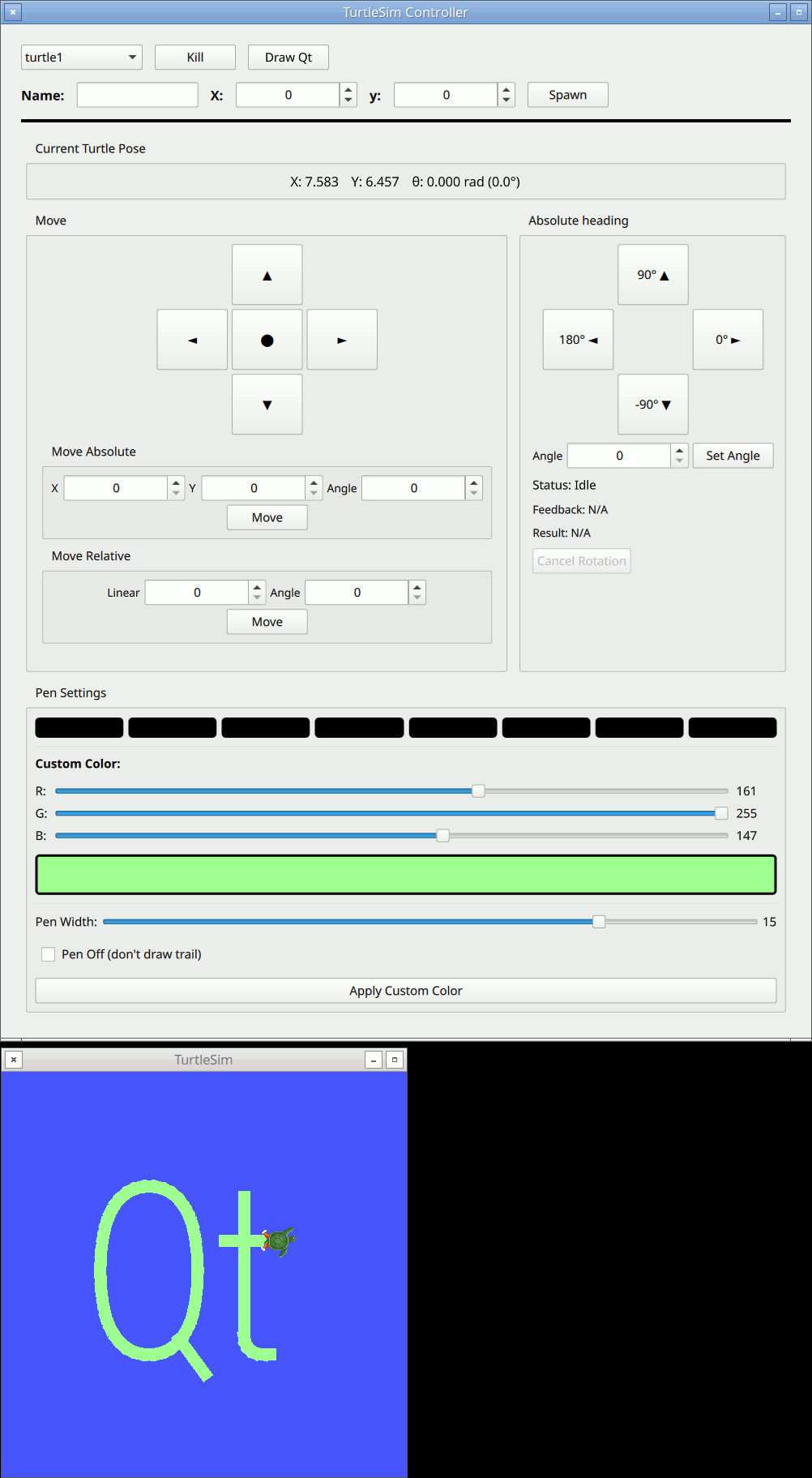
TurtleSim Controller controls one or more turtles in the classic ROS 2 turtlesim simulator. In a single application it exercises every communication pattern the bridge supports: a publisher for velocity commands, a subscriber for pose updates, several service clients for spawning turtles and setting the pen, and an action client for rotating to an absolute heading. It is the best example to read once you have seen the Simple Publisher and Simple Subscriber basics.
Running the example
- Source your ROS 2 environment and launch Qt Creator from that shell.
- Open
examples/turtlesim_controller/CMakeLists.txtin Qt Creator, then build and run. - Start the TurtleSim backend in a separate, ROS-sourced terminal:
ros2 run turtlesim turtlesim_node
Wrapping a third-party package
turtlesim is not one of the built-in message modules, so the example wraps it on demand. In CMakeLists.txt, qt_ros2_configure_target enables the four capabilities the app needs and asks the bridge to generate a QML module for the turtlesim package:
qt_ros2_configure_target(appturtlesim_controller
    CAPABILITIES PUBLISHER SUBSCRIBER SERVICE ACTION
    MODULES QtRos2GeometryMessages
    IMPORT_PACKAGES turtlesim
)
The generated types become available in QML under QtRos2.Imported.Turtlesim — imported packages are surfaced beneath the QtRos2.Imported namespace:
import QtRos2.Core
import QtRos2.Imported.Turtlesim
import QtRos2.GeometryMsgs as Geom
One node per turtle
All of a turtle's ROS entities are collected in TurtleControllerNode.qml, a reusable component parameterized by a baseName. Because turtlesim namespaces every topic and service under the turtle's name, the component builds its topic strings from baseName and shares a single Node:
// Velocity command publisher
Geom.TwistPublisher {
    node: root.rosNode
    topic: `/${root.baseName}/cmd_vel`
}

// Pose subscriber
PoseSubscriber {
    id: poseSubscriber
    node: root.rosNode
    topic: `/${root.baseName}/pose`
}
Main.qml spawns one TurtleControllerNode per turtle at runtime and switches the panel between them with a combo box, so the same declarative block scales from one turtle to many.
Services: spawn, kill, and pen control
Service clients call a service and return a JavaScript promise that resolves with the response. Spawning a turtle is a single call whose result (the assigned name) is used to register a new controller:
SpawnServiceClient {
    id: spawnService
    topic: "/spawn"
}

spawnService.callService({ name: "turtle2", x: 5, y: 5 })
    .then(name => root.addTurtle(name))
    .catch(err => console.log("Failed to spawn", err))
The Spawn button is disabled while spawnService.isCallPending is true, and the top-level SpawnServiceClient auto-spawns turtle1 as soon as its isServiceReady turns true — a small illustration of driving UI and startup logic from service-client state.
Chaining promises: the "Draw Qt" button
Because each service call returns a promise, sequential motions compose naturally with .then(). The Draw Qt button traces the Qt logo by chaining SetPen and TeleportAbsolute calls into one long promise chain, so each stroke waits for the previous teleport to complete before starting:
let promise = moveTo(firstPoint)      // pen off, teleport
for (let i = 1; i < points.length; i++)
    promise = promise.then(() => lineTo(points[i], width))  // pen on, teleport
promise.then(() => console.log("drawing complete"))
An action: rotate to an absolute heading
Rotating the turtle to a heading is a long-running operation with feedback, so it is an action. RotateAbsoluteActionClient.sendGoal() returns a promise that resolves with the result, while onFeedbackChanged streams progress and the state property reports the goal's lifecycle:
RotateAbsoluteActionClient {
    id: rotateAction
    node: root.rosNode
    topic: `/${root.baseName}/rotate_absolute`

    onFeedbackChanged: (feedback) =>
        _d.feedbackText = "Remaining: " + feedback.toFixed(3) + " rad"
}

// Send a goal and react to the final result
rotateAction.sendGoal(theta)
    .then(delta => _d.resultText = "Delta: " + delta.toFixed(3) + " rad")
    .catch(error => console.error("Rotation failed:", error))
The Cancel Rotation button is bound to the goal state so it is only enabled while a goal is in flight:
Button {
    text: "Cancel Rotation"
    enabled: rotateAction.state === RotateAbsoluteActionClient.Accepted
    onClicked: rotateAction.cancelGoal()
}
The UI at a glance
The window is organized around the currently selected turtle:
- A top row selects a turtle and offers Kill and Draw Qt; a second row spawns new turtles by name and position.
- Current Turtle Pose shows the live pose from the
PoseSubscriber. - Move provides a directional D-pad (publishing
Twistvelocities), plus Move Absolute and Move Relative groups that call the teleport services. - Absolute heading sends rotation goals via the action client and shows status, feedback, and result.
- Pen Settings sets the pen color (presets or custom RGB), width, and on/off state through the
SetPenservice.
Files:
- turtlesim_controller/CMakeLists.txt
- turtlesim_controller/Main.qml
- turtlesim_controller/TurtleControllerNode.qml
- turtlesim_controller/main.cpp
Images:
See also Simple Publisher, Simple Subscriber, and Qt ROS2 geometry_msgs QML Types.
© 2026 The Qt Company Ltd. Documentation contributions included herein are the copyrights of their respective owners. The documentation provided herein is licensed under the terms of the GNU Free Documentation License version 1.3 as published by the Free Software Foundation. Qt and respective logos are trademarks of The Qt Company Ltd. in Finland and/or other countries worldwide. All other trademarks are property of their respective owners.