Simple Publisher
Publishing a geometry_msgs/PoseStamped message from QML with a single publisher.
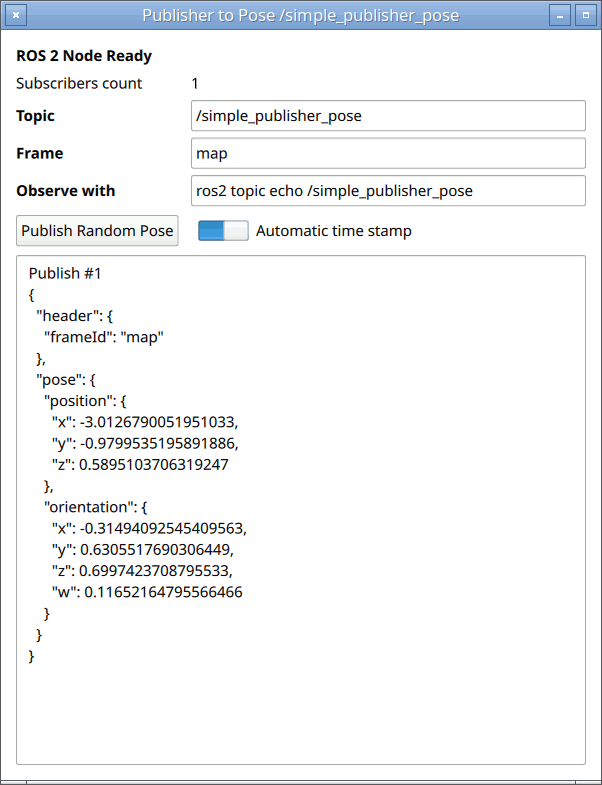
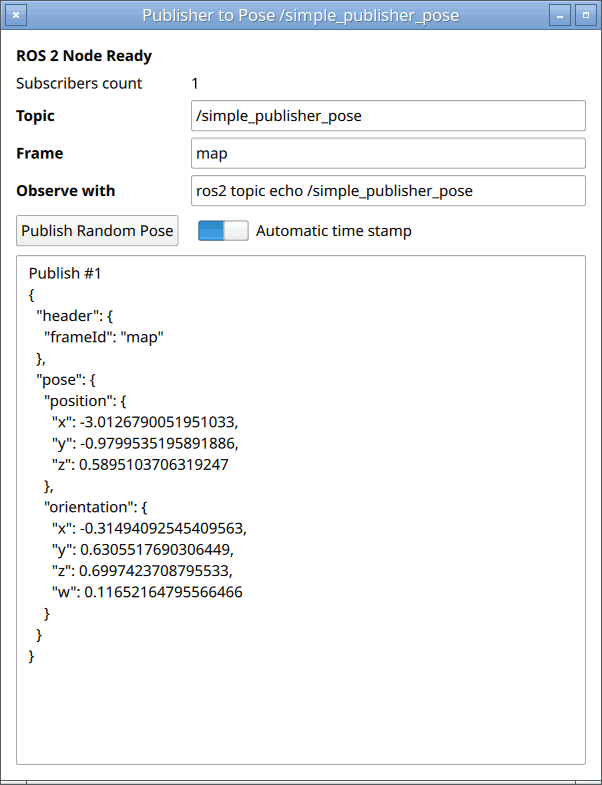
Simple Publisher is the smallest useful Qt ROS2 application: it wraps one PoseStampedPublisher in a Node and publishes a randomly generated geometry_msgs/PoseStamped every time you press a button. It is the natural starting point for learning how the bridge turns ROS 2 topics into QML types.
Running the example
- Source your ROS 2 environment, then launch Qt Creator from the same shell so it can find the generated QML modules.
- Open
examples/simple_publisher/CMakeLists.txtin Qt Creator, then build and run. - Watch the published messages from a separate, ROS-sourced terminal:
ros2 topic echo /simple_publisher_pose
Pair this example with Simple Subscriber to see both ends of a topic in two Qt windows.
Declaring a Node and a publisher
Everything ROS-facing lives inside a Node. A publisher is declared as a child of the node; the node owns the underlying rclcpp publisher and tears it down automatically:
import QtRos2.GeometryMsgs

Node {
    id: rosNode
    nodeName: "simple_publisher_node"

    PoseStampedPublisher {
        id: posePublisher
        topic: topicField.text
        autoStamp: autoStampSwitch.checked
    }
}
A few things worth noting:
- The
topicis bound to a text field, so it can be edited live — the publisher re-advertises on the new topic when the binding changes. Nodeexposes aninitializedproperty. The example keeps the Publish button disabled untilrosNode.initializedis true, so the application never tries to publish before the ROS 2 context is ready.posePublisher.subscriberCountreports how many subscribers are currently connected — a convenient way to confirm the topic is wired up before you publish.
Publishing with a JavaScript object literal
Message value types are constructible from plain JavaScript objects, so you never have to build a message imperatively. Nested fields map directly to nested objects, and field names use Qt's camelCase spelling (frameId, not frame_id):
posePublisher.publish({
    header: {
        frameId: frameField.text
        // header.stamp is intentionally omitted — see below
    },
    pose: {
        position:    { x: 1.0, y: 2.0, z: 0.5 },
        orientation: { x: 0.0, y: 0.0, z: 0.0, w: 1.0 }
    }
})
Automatic timestamps
PoseStampedPublisher is a stamped publisher, which means its message carries a std_msgs/Header. When autoStamp is enabled (the default), the publisher fills header.stamp from the ROS 2 node clock at publish time — not from Qt's clock — so downstream nodes and TF see a consistent ROS time source. That is why the snippet above leaves header.stamp unset. The example exposes a switch so you can turn autoStamp off and supply your own stamp when you need to.
Files:
Images:
See also Simple Subscriber and Qt ROS2 geometry_msgs QML Types.
© 2026 The Qt Company Ltd. Documentation contributions included herein are the copyrights of their respective owners. The documentation provided herein is licensed under the terms of the GNU Free Documentation License version 1.3 as published by the Free Software Foundation. Qt and respective logos are trademarks of The Qt Company Ltd. in Finland and/or other countries worldwide. All other trademarks are property of their respective owners.