
Qt Interface Framework - Smart Plug (MQTT)
Controlling a smart plug over MQTT and selecting the broker at runtime.
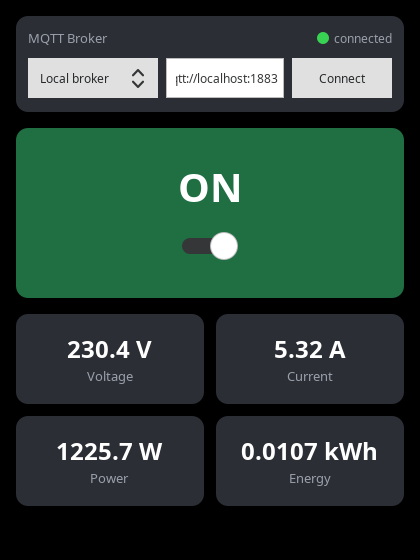
This example shows how to use the Qt Interface Framework with the backend_mqtt template to talk to a smart plug over MQTT. The application can switch the plug on and off and displays its power metering (voltage, current and accumulated energy). It also lets the user choose which MQTT broker to connect to at runtime.
The interface
The plug is described by a single QFace interface. The writable on property switches the relay, while current, voltage and energy are read-only measurements. The config_mqtt annotation maps every property to a topic below the smartplug prefix (for example smartplug/on) and marks them optional, so the backend reports itself as initialized as soon as it is connected - even before the device has published anything.
module Example.If.SmartHome 1.0;

/**
 * \brief A power plug that can be switched on and off and reports its power metering.
 *
 * The properties are mapped to MQTT topics below the \c smartplug topic prefix, e.g.
 * \c smartplug/on or \c smartplug/current. Only the \c on state is mandatory: the backend
 * reports itself as initialized once it is connected to the broker and has received the
 * plug state, so the UI can use \c isInitialized to reflect the connection. The metering
 * values are optional and stream in as they are published.
 */
@config_mqtt: { topic_prefix: "smartplug", default_server: "mqtt://localhost:1883", mandatory: false }
interface SmartPlug {
    /**
     * \brief Whether the plug's relay is switched on.
     *
     * Writing this property publishes the new state and switches the plug on or off.
     */
    @config_mqtt: { mandatory: true }
    bool on;

    /**
     * \brief The instantaneous current draw, in Ampere.
     */
    readonly real current;

    /**
     * \brief The RMS line voltage, in Volt.
     */
    readonly real voltage;

    /**
     * \brief The accumulated energy consumption, in kilowatt-hours.
     */
    readonly real energy;
}
From this interface the ifcodegen generates a QML frontend module and, with the backend_mqtt template, an MQTT backend plugin:
qt_ifcodegen_add_qml_module(smartplug_frontend
    IDL_FILES example-smartplug.qface
    TEMPLATE frontend
)

qt_ifcodegen_add_plugin(smartplug_backend_mqtt
    IDL_FILES example-smartplug.qface
    TEMPLATE backend_mqtt
)
Using the plug in QML
The generated SmartPlug type is used like any other Interface Framework feature. Binding to its properties drives the UI, and assigning to on publishes the command:
SmartPlug {
    id: plug
}
Choosing the broker
The broker is not hard-coded. An InterfaceFrameworkConfiguration item provides the connectionUrl service setting for the module; changing it at runtime makes the MQTT backend reconnect to the new broker:
InterfaceFrameworkConfiguration {
    id: brokerConfig
    name: "Example.If.SmartHome"
    serviceSettings: ({ "connectionUrl": root.brokerUrl })
}
The BrokerBar component lets the user pick a preset or type a custom URL and feeds the result back into that configuration.
Running the example
The application is only the MQTT client. To see it do something you need a broker and a device publishing the plug's data:
- Start an MQTT broker on
localhost, for examplemosquitto. - Start the bundled
smartplug-simulationhelper. It simulates a real plug: it reacts tosmartplug/onand publishes changingsmartplug/current,smartplug/voltageandsmartplug/energyvalues. Pass--urlto point it at a different broker (--helplists the options). - Start the
smartplugapplication. Toggle the switch and watch the metering update.
© 2026 The Qt Company Ltd. Documentation contributions included herein are the copyrights of their respective owners. The documentation provided herein is licensed under the terms of the GNU Free Documentation License version 1.3 as published by the Free Software Foundation. Qt and respective logos are trademarks of The Qt Company Ltd. in Finland and/or other countries worldwide. All other trademarks are property of their respective owners.
