
Toy Customizer
A 3D customization example demonstrating interactive toy selection and real-time appearance adjustments using Qt Quick 3D.
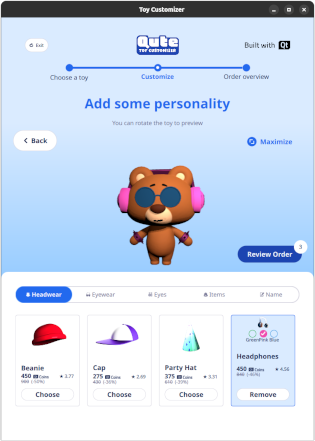
Toy Customizer is an interactive 3D application built with QML that allows users to personalize toy characters by attaching 3D accessories and facial features that are positioned on the toy in real time. It demonstrates how to combine Qt Quick 3D scenes with standard Qt Quick Controls for an intuitive user interface.
Running the Example
You can run the example from:
- Qt Creator
Open the Welcome mode and select the example from Examples. For more information, see Qt Creator: Tutorial: Build and run.
- Qt Extension for Visual Studio Code
Run the Qt: Open Qt examples command from the Command Palette, and select the example from the list. For more information, see Qt Extension for Visual Studio Code: Tutorial: Build and run.
Overview
The example presents a 3D toy model rendered in real time using Qt Quick 3D. The user interface lets users choose between different toys, attach various 3D accessories and facial items, and adjust the colors of those accessories while viewing the result in the 3D view.
The layout adapts to both portrait and landscape orientations, and the example can also be run on the WebAssembly (WASM) platform; for more information, see Qt for WebAssembly.
The example highlights:
- Using
PrincipledMaterialto define physically based materials for the toy models. - Combining 2D QML controls with a 3D scene.
- Organizing components with reusable QML files for better structure.
- Allowing users to rotate the toy in the 3D preview by dragging on the 3D scene.
- Adding short entrance and dancing animations for the toys on the first page using Timeline and TimelineAnimation.
Application structure
The main QML file, Main.qml, defines the main application window and manages navigation between six pages.
- First page: toys walk into view and perform short dance animations in sequence.
- Gallery page: a grid of toys is displayed and the user can select one.
- Confirm page: shows more details about the selected toy and asks for confirmation.
- Customize page: the user selects accessories and a name for the toy.
- Order overview page: summarizes the current order before completion.
- Final page: confirms that the order is complete and lets the user start a new order.
Assets
The assets are downloaded at build time if they are not already present. After the download completes, the compressed archive is extracted. On subsequent builds, if any of the extracted asset files have changed, the archive is extracted again to ensure that all required assets are available and to avoid runtime failures. If a build fails due to asset issues or an updated asset package, performing a clean build removes both the downloaded archive and the extracted files so the next build can start from a fresh state.
Note: This example downloads some assets from an internet server during the CMake configuration step.
Animations
The first page has a View3D. A Texture is used as an HDR light probe that provides image-based lighting for the 3D toys. There are PerspectiveCamera and SpotLight nodes added to frame the animated toys and highlight their walking and dancing motions on the scene.
There is a Skin component that drives the character’s skinned mesh, while a parent Node acts as a wrapper for positioning and transforming the toy character in the scene. The walking and dancing are controlled by a Timeline that is played by a TimelineAnimation. The animation data is defined using KeyframeGroup and Keyframe elements, or loaded from binary data via keyframeSource, which provides the keyframes for the character’s motion.
The example also uses a shared PrincipledMaterial to define the physically based look of the animated characters, including base color, roughness, culling mode, and opacity. The material uses texture maps for the base color and normal data, which are provided as URLs from the model and bound to Texture objects for loading. AnimationModel.qml acts as the data model for the animated toys, storing texture and mesh sources as well as additional metadata such as eye positions and rotations for each toy.
Responsive UI
The UI is designed to be responsive across different window sizes and orientations. In the toy gallery page (ToyGalleryPage.qml), the toy grid automatically adjusts its number of columns according to the available width so that toy cards remain clearly visible and maintain a consistent look and feel in both portrait and landscape modes.
On other pages, different layouts are used for portrait and landscape views: items are arranged side by side in landscape, while a single‑column layout is used in portrait so that content stacks vertically. LayoutItemProxy is used to position items within these layouts without duplicating UI definitions.
|
|
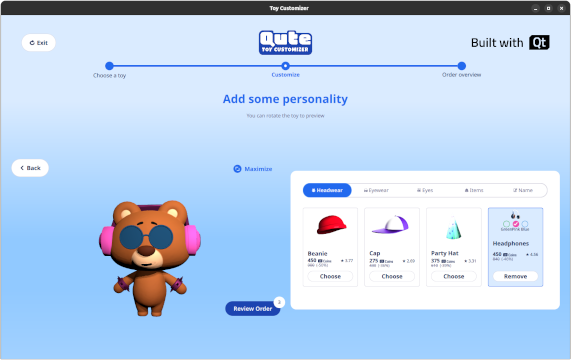
Because some design values such as item sizes, margins, and fonts are specified for a different base resolution, the example uses ApplicationConfig.qml to scale these values according to the actual screen resolution. This file also centralizes typography settings, font families, and window geometry constants derived from the original design specifications.
Interactive 3D View

In the customize page (ToyCustomizePage.qml), a 3D view displays the toy together with any selected accessories. The toy is represented by a root Node with separate body parts, each modeled as its own Node. The 3D view is interactive through OrbitCameraController.qml, which lets the user rotate the toy and inspect the attached accessory 3D models from different angles, while a DragHandler handles the rotation gestures.
Source files
See also All Qt Examples, Qt Quick Controls Examples, and Qt Quick 3D Examples and Tutorials.
© 2026 The Qt Company Ltd. Documentation contributions included herein are the copyrights of their respective owners. The documentation provided herein is licensed under the terms of the GNU Free Documentation License version 1.3 as published by the Free Software Foundation. Qt and respective logos are trademarks of The Qt Company Ltd. in Finland and/or other countries worldwide. All other trademarks are property of their respective owners.
