
OAuth 2.0 Authorization Code Flow Client
Example of how to authorize a generated OpenAPI client with Qt Network Authorization.
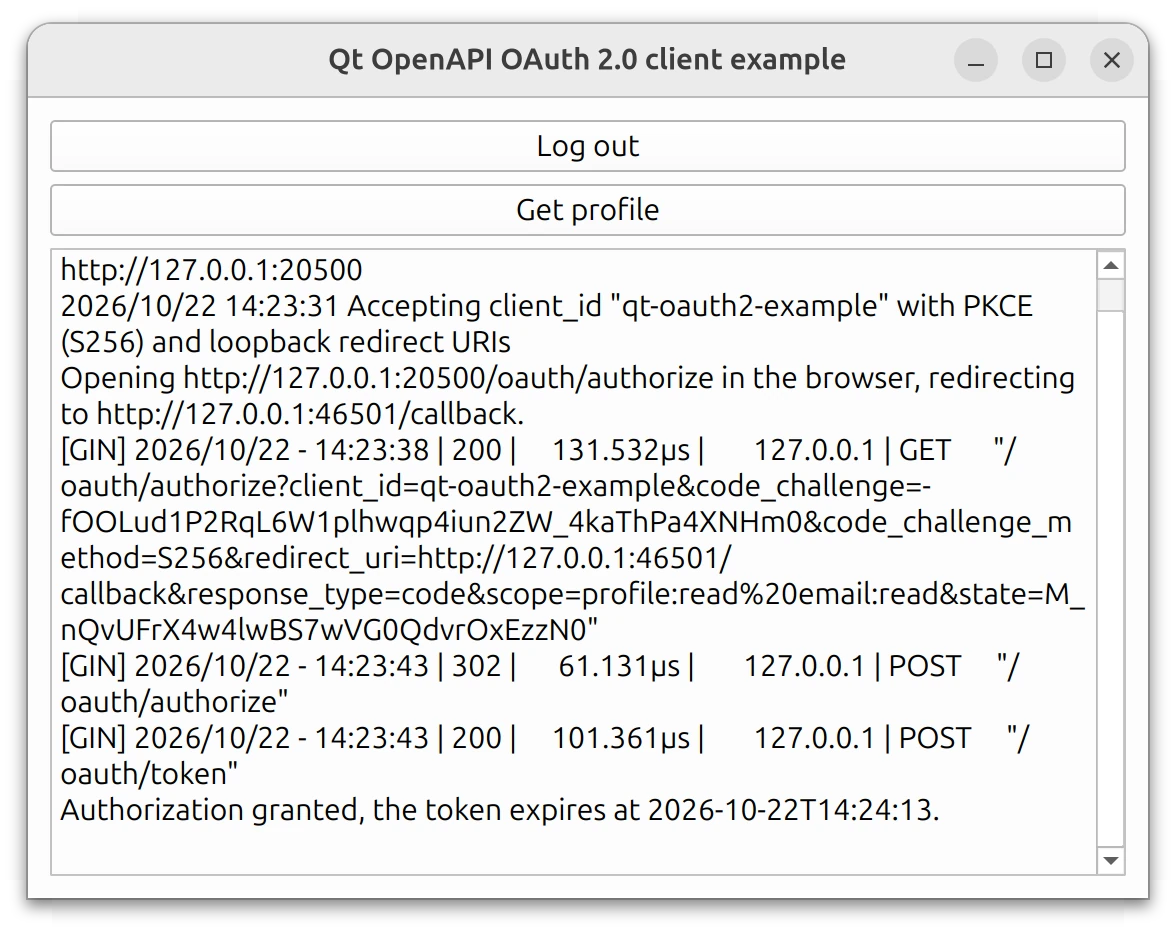
Generated Qt OpenAPI clients do not implement OAuth 2.0 themselves. When the specification protects an operation with a security scheme of type oauth2, the generated API only expects an access token, which it sends as a Bearer token. Obtaining and refreshing that token is up to the application.
This example uses Qt Network Authorization for this purpose. It generates a client from oauth2client.yaml, runs the authorization code flow with QOAuth2AuthorizationCodeFlow and then requests the profile of the logged-in user.
So that the example runs without an account or a client registration, it ships its own small authorization and resource server, written in Go. The API routes of the server are generated from the same specification with the go-gin-server generator of the upstream OpenAPI Generator. The application starts the server automatically.
Running the Example
You can run the example from:
- Qt Creator
Open the Welcome mode and select the example from Examples. For more information, see Qt Creator: Tutorial: Build and run.
- Qt Extension for Visual Studio Code
Run the Qt: Open Qt examples command from the Command Palette, and select the example from the list. For more information, see Qt Extension for Visual Studio Code: Tutorial: Build and run.
Note: Building the demo server requires Go. If Go is not found when the example is configured, the application is still built, but you have to start the server yourself with go run . in the server directory before pressing Log in.
Application functionality
The application has two buttons and a log window. Log in opens the consent page of the demo authorization server in the system browser. After you select Allow, the browser is redirected to the local reply handler, and the flow exchanges the authorization code for tokens. Log in then changes to Log out, which removes the tokens again. Get profile calls the generated getCurrentUserProfile() operation and prints the result to the log. It is always enabled, so you can also see how the server rejects a request without a valid token. The log also shows the requests that the server receives, including the automatic token refresh that happens about every 30 seconds.
The security scheme in the specification
The specification declares the OAuth 2.0 endpoints and the scopes that the client needs. The application uses these values to configure QOAuth2AuthorizationCodeFlow:
  securitySchemes:
    demo_auth:
      type: oauth2
      flows:
        authorizationCode:
          authorizationUrl: http://127.0.0.1:20500/oauth/authorize
          tokenUrl: http://127.0.0.1:20500/oauth/token
          refreshUrl: http://127.0.0.1:20500/oauth/token
          scopes:
            profile:read: Read the display name and the country of the user
            email:read: Read the email address of the user
refreshUrl has no counterpart in Qt Network Authorization. Refresh requests are always sent to tokenUrl. As is common, this specification uses the same URL for both. The URLs use plain http because the demo server only listens on the loopback interface. A real service must use https. See Qt OpenAPI Security Considerations.
Generating the client and linking Qt Network Authorization
The client library is generated from the specification at configure time with qt_add_openapi_client(). The application additionally links against Qt6::NetworkAuth:
find_package(Qt6 REQUIRED COMPONENTS Core Gui Widgets Network NetworkAuth OpenApi)
qt_add_library(UserProfileApi)
qt_add_openapi_client(UserProfileApi
    SPEC_FILE
        ${CMAKE_CURRENT_SOURCE_DIR}/oauth2client.yaml
)
target_link_libraries(oauth2client PRIVATE
    Qt6::Core
    Qt6::Gui
    Qt6::Widgets
    Qt6::Network
    Qt6::NetworkAuth
    UserProfileApi
)
Configuring the authorization code flow
The ProfileClient class owns the flow, the reply handler and the generated UsersApi:
class ProfileClient : public QObject
{
    Q_OBJECT
public:
    explicit ProfileClient(QObject *parent = nullptr);

    void logIn();
    void logOut();
    bool isLoggedIn() const { return m_loggedIn; }
    void fetchProfile();

signals:
    void loggedIn();
    void loggedOut();
    void message(const QString &text);

private:
    void resetLogin(const QString &reason);

    QOAuth2AuthorizationCodeFlow m_oauth;
    QOAuthHttpServerReplyHandler m_replyHandler;
    QtOpenAPI::UsersApi m_api;
    bool m_loggedIn = false;
};
The constructor sets the endpoints, the scopes, and the client ID on the flow and enables automatic token refresh. The demo server accepts only one client ID, qt-oauth2-example. Client IDs of native applications are public by design, so the example hardcodes it:
    // Endpoints and scopes come from the security scheme in oauth2client.yaml.
    // There is no setter for refreshUrl: refresh requests always go to tokenUrl.
    m_oauth.setAuthorizationUrl(QUrl(u"http://127.0.0.1:20500/oauth/authorize"_s));
    m_oauth.setTokenUrl(QUrl(u"http://127.0.0.1:20500/oauth/token"_s));
    m_oauth.setRequestedScopeTokens({ "profile:read"_ba, "email:read"_ba });
    m_oauth.setClientIdentifier(clientId);
    // Refresh the access token before it expires, as long as the server issued
    // a refresh token. The demo server issues tokens that live for 30 seconds.
    m_oauth.setAutoRefresh(true);
The reply handler listens on the loopback interface on a free port. The demo server accepts any loopback redirect URI, whereas a real authorization server usually requires the exact URI to be registered in advance. For other ways to receive the redirect, such as a private-use URI scheme on mobile platforms, see Choosing a reply handler.
Handing the token to the generated client
The generated client stores a single bearer token. The example connects the tokenChanged() signal to setBearerToken(), so the client always uses the latest token, whether it came from the initial grant or from an automatic refresh:
    // Every new access token, from the initial grant or from a refresh, is
    // handed to the generated client. The client sends it as a Bearer token.
    connect(&m_oauth, &QAbstractOAuth::tokenChanged, &m_api, &UsersApi::setBearerToken);
To complete the authorization, the user must log in on the authorization page. The flow emits authorizeWithBrowser() with the URL of that page, and the example opens it in the system browser with QDesktopServices::openUrl().
When the flow returns to the NotAuthenticated status (for example, because a refresh failed), or when the server responds with HTTP status 401, the example removes the token from the generated client, and the user can log in again.
The example logs failures from two signals: requestFailed() for any failed request, and serverReportedErrorOccurred() for errors that the authorization server reports explicitly:
    connect(&m_oauth, &QAbstractOAuth::requestFailed, this, [this](QAbstractOAuth::Error error) {
        emit message(tr("OAuth request failed with error %1.").arg(int(error)));
    });
    connect(&m_oauth, &QAbstractOAuth2::serverReportedErrorOccurred, this,
            [this](const QString &error, const QString &description, const QUrl &) {
                emit message(tr("Authorization server reported: %1 (%2)").arg(error, description));
            });
Calling the API
Once the application is authorized, calling the generated operation works the same as for any other Qt OpenAPI client. The token is attached automatically:
void ProfileClient::fetchProfile()
{
    m_api.getCurrentUserProfile(this, [this](const QRestReply &reply,
                                             const UserProfile &profile) {
        if (reply.httpStatus() == 401) {
            // The server does not accept the access token any more.
            resetLogin(tr("The access token was rejected, please log in again."));
            return;
        }
        if (!reply.isSuccess()) {
            emit message(tr("getCurrentUserProfile failed with HTTP status %1: %2")
                                 .arg(reply.httpStatus())
                                 .arg(reply.errorString()));
            return;
        }
        const QString email = profile.getEmail().isEmpty() ? tr("not granted")
                                                           : profile.getEmail();
        emit message(tr("Profile of %1 (%2), email: %3, country: %4")
                             .arg(profile.getDisplayName(), profile.getId(), email,
                                  profile.getCountry()));
    });
}
The demo server
The server directory contains the source code of the demo server. Its API routes are generated from oauth2client.yaml, and the OAuth 2.0 endpoints are implemented by hand in server/go/oauth_server.go. The server is meant only for running this example and is not a reference implementation of an authorization server.
Security considerations
The access token and the refresh token are as valuable as the user's account. The example keeps them in memory only. An application that stores the refresh token to log in again without user interaction must protect it accordingly. See Qt OpenAPI Security Considerations and Qt Network Authorization Security Considerations for details.
See also All Qt Examples and ChatGPT RESTful API Client.
© 2026 The Qt Company Ltd. Documentation contributions included herein are the copyrights of their respective owners. The documentation provided herein is licensed under the terms of the GNU Free Documentation License version 1.3 as published by the Free Software Foundation. Qt and respective logos are trademarks of The Qt Company Ltd. in Finland and/or other countries worldwide. All other trademarks are property of their respective owners.
