
Qt Quick 3D - Sky Material Example
Demonstrates procedural sky rendering and image-based lighting with SkyMaterial.
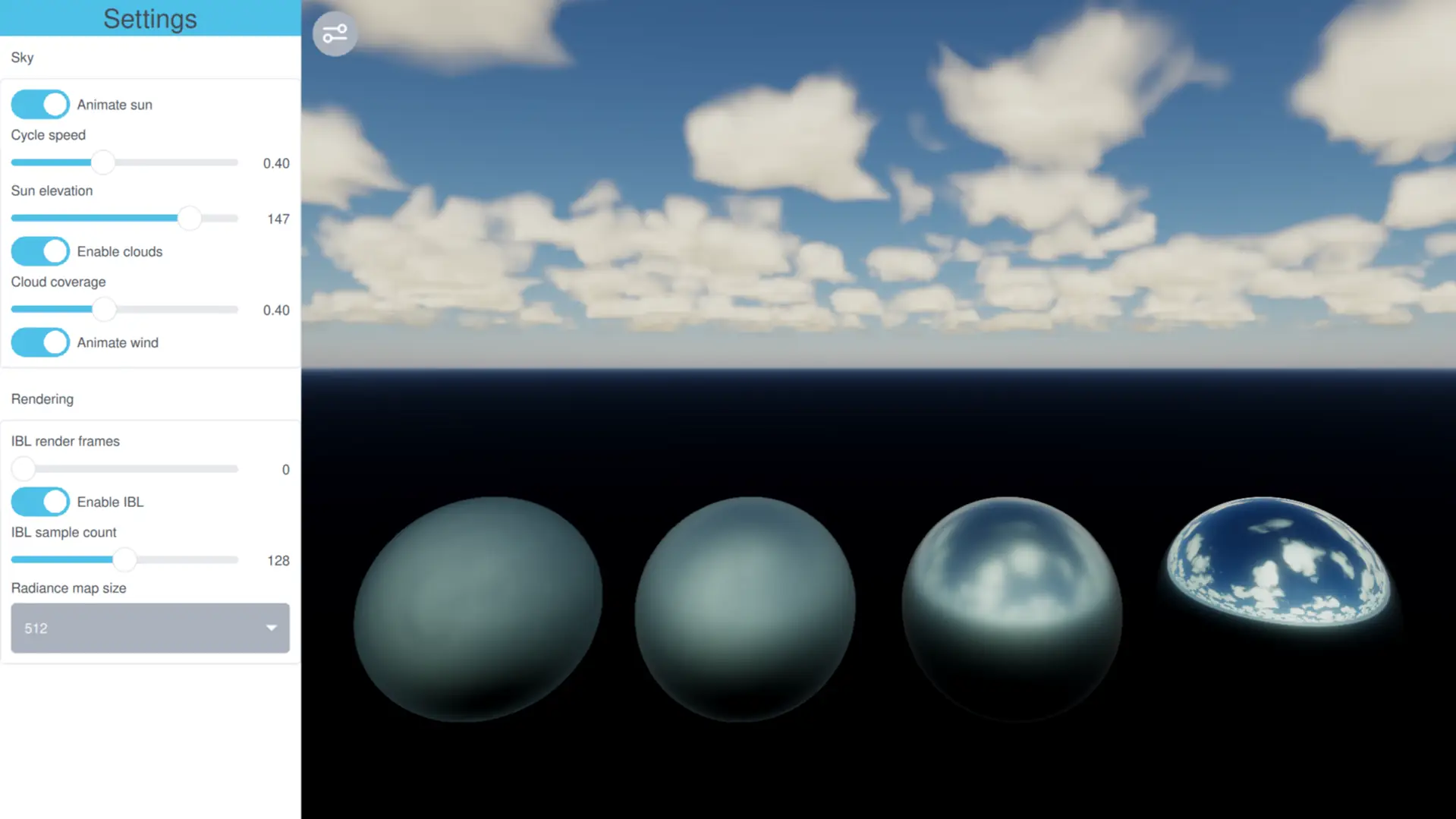
This example shows how to use SkyMaterial to render a procedural sky and use the resulting cubemap as the light probe for image-based lighting (IBL) on the scene's PBR materials.
The AdvancedSky helper is a SkyMaterial subclass implementing a physically-based atmospheric scattering model following Hillaire's "A Scalable and Production Ready Sky and Atmosphere Rendering Technique" (2020), with configurable aerosols, ozone, eye altitude, and ray-marched volumetric clouds.
Setting Up the Scene
The application uses ApplicationWindow with a View3D filling the window. A settings panel overlays the left edge and slides in and out when the toggle button is clicked. The relevant QtQuick3D imports are:
import QtQuick
import QtQuick.Controls

import QtQuick3D
import QtQuick3D.Helpers
Defining the Sky Material
AdvancedSky is declared inside the View3D so it shares the same skyLight Node (the sun):
AdvancedSky {
    id: advancedSky
    skyLight: sun
}
AdvancedSky is a SkyMaterial subclass defined in AdvancedSky.qml. Its QML properties are automatically forwarded as uniforms to the fragment shader.
Image-Based Lighting
Assigning the sky material to SceneEnvironment::skyMaterial uses the procedurally rendered cubemap both as the visible background and as the source for image-based lighting on the PBR materials in the scene:
environment: SceneEnvironment {
    backgroundMode: SceneEnvironment.SkyMaterial
    skyMaterial: advancedSky
    probeExposure: 0.25
    tonemapMode: SceneEnvironment.TonemapModeAces
}
The smoothest sphere in the demo mirrors the procedural sky almost perfectly; the rougher spheres show progressively blurred reflections, produced by SkyMaterial's GGX prefilter chain over the procedural cubemap.
Choosing How the Sky Is Drawn
skyboxMode selects what SkyMaterial produces for the visible background, independently of the IBL cube used for reflections:
SkyMaterial.Cubemapsamples the radiance cubemap (the same cube used for image-based lighting), so for a static sky the cube is rendered once and then sampled cheaply every frame. Background sharpness is capped at radianceMapSize. This is the lowest per-frame cost when only the camera moves.- The
ScreenSpacemodes evaluate the sky shader directly on screen every frame — at full, half, or quarter resolution per axis. They decouple the visible background from the IBL cube, giving a crisp sky for dynamic conditions (a moving sun, animated volumetric clouds) at the cost of a per-frame render. Lower scales trade sharpness for speed.
Switch the "Skybox mode" combo box in the settings panel to compare the options live: the cubemap modes stay cheap but soften as the sun and clouds move, while the screen-space modes track every change sharply.
Managing Frame Budget
iblRenderFrames spreads the IBL prefilter across several frames: the same total iblSampleCount is integrated incrementally, one slice per frame, until convergence. The default value of 0 runs sample accumulation, normalization, and irradiance all in a single frame. Setting it higher amortizes the prefilter cost, keeping the scene responsive when IBL sample counts are high.
Animating the Sun
A FrameAnimation drives the sun back and forth across the horizon when the "Animate sun" toggle is on. Each change in sun position invalidates the IBL accumulator, but with iblRenderFrames set appropriately the prefilter cost is spread across frames and no single frame pays the full cost.
FrameAnimation {
    id: sunAnimator
    running: settingsPane.animateSun

    property real t: 0
    property real lastT: 0
    property int direction: 1

    onTriggered: {
        const min = -180
        const max = 0
        lastT = t
        t += direction * frameTime * settingsPane.sunSweepSpeed
        sun.eulerRotation.x = min + (Math.sin(t) * 0.5 + 0.5) * (max - min)
    }

    function updatePhaseFromSun() {
        const min = -180
        const max = 0
        let norm = Math.max(0.0, Math.min(1.0, (sun.eulerRotation.x - min) / (max - min)))
        t = Math.asin(norm * 2.0 - 1.0)
        direction = lastT < t ? 1 : -1
    }
}
Settings Panel
The settings panel slides in and out over the View3D, toggled by the button in the top-left corner of the viewport. It is divided into two groups.
Sky
Controls for the sky appearance and clouds.
- Animate sun — runs a ping-pong sun sweep across the horizon.
- Cycle speed — sweep speed for the sun animation.
- Sun elevation — manual sun position in degrees (0° = dawn, 90° = noon, 180° = dusk).
- Enable clouds — toggles ray-marched volumetric clouds.
- Cloud coverage — fraction of the sky covered by clouds (0 = clear, 1 = overcast).
- Animate wind — drifts the cloud noise texture each frame, continuously invalidating the IBL accumulator — a useful stress test for the frame budget controls.
Rendering
Controls that map directly to SkyMaterial base-class properties.
- Skybox mode — see skyboxMode.
- IBL render frames — see iblRenderFrames.
- Enable IBL — see enableIBL.
- IBL sample count — see iblSampleCount.
- Radiance map size — see radianceMapSize.
The camera responds to standard WasdController navigation — W/A/S/D plus mouse drag to look around. Tap the viewport to give it keyboard focus.
See also SkyMaterial and SceneEnvironment.
© 2026 The Qt Company Ltd. Documentation contributions included herein are the copyrights of their respective owners. The documentation provided herein is licensed under the terms of the GNU Free Documentation License version 1.3 as published by the Free Software Foundation. Qt and respective logos are trademarks of The Qt Company Ltd. in Finland and/or other countries worldwide. All other trademarks are property of their respective owners.
