
Qt Quick 3D Physics - Queries Example
Demonstrates the scene query methods of PhysicsWorld.
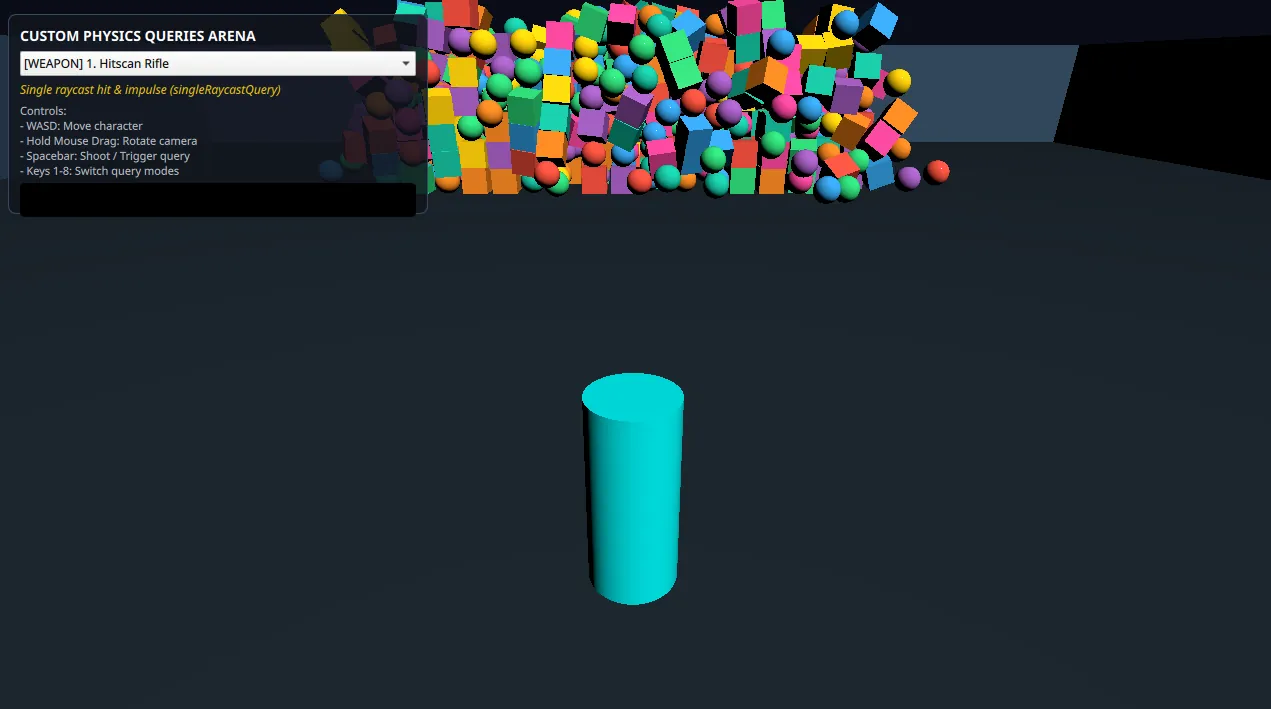
Qt Quick 3D Physics provides a set of synchronous spatial query methods directly on the PhysicsWorld node. These let you evaluate physical intersections, cast rays, test volumetric paths, and find overlapping collision bodies on demand, without waiting for a contact callback.
The example demonstrates all eight query methods in an interactive scene, split into probes that push bodies around and scanners that only report whether the space ahead is clear. Move with WASD, drag with the mouse to look, press 1 to 8 to pick a query, and press Space to run it.
Overview of Query Types
Spatial queries are divided into three shape geometries and three operational modes:
| Query Geometry | Test Mode (bool) | Single Hit Mode (locationHit) | Multi Hit Mode (list<locationHit>) |
|---|---|---|---|
| Raycast (Infinitesimal Line) | testRaycastQuery() | singleRaycastQuery() | multiRaycastQuery() |
| Sweep (Volume Extrusion) | testSweepQuery() | singleSweepQuery() | multiSweepQuery() |
| Overlap (Stationary Volume) | testOverlapQuery() | N/A | multiOverlapQuery() |
Key Query Parameters
All query methods share two filtering parameters:
includeStatic(bool): Includes StaticRigidBody nodes in the query.includeDynamic(bool): Includes DynamicRigidBody nodes in the query.
Note: At least one of includeStatic or includeDynamic must be true. If both are false, the query returns false or an empty list immediately.
Understanding queryHit and locationHit
Overlap queries return queryHit, which carries the body and shape that were hit. Raycast and sweep queries return locationHit, which adds the geometric fields:
| Property | Type | Description |
|---|---|---|
body | PhysicsNode | The physics body hit by the query. |
position | vector3d | World-space coordinates of the exact collision impact point. |
normal | vector3d | Surface normal vector at the impact point (facing outward). |
distance | real | Distance along the query ray or sweep from the origin to the hit position. |
shape | CollisionShape | The specific collision shape that was hit. |
A query that hits nothing returns a hit whose body is null. Because every body in the scene has an associated node, hit.body === null is the reliable test for a miss; the distance of a missed hit is 0 and carries no meaning.
Setup in PhysicsWorld
To run queries you need a running PhysicsWorld. Volume-based queries, meaning sweeps and overlaps, additionally need a CollisionShape to use as the query volume.
        PhysicsWorld {
            id: physicsWorld
            scene: view.scene
            running: true
            gravity: Qt.vector3d(0, -981, 0)
        }

        // Shapes used for Sweep and Overlap queries
        SphereShape { id: querySphereShape; diameter: 200 }
        BoxShape { id: queryBoxShape; extents: Qt.vector3d(200, 200, 200) }
A sweep or overlap query runs the shape at its current scene transform, so the shape's position and rotation define where the query happens. The query shapes here have no parent node, so the example assigns their position directly before each query.
The query shape must be a BoxShape, SphereShape, CapsuleShape or ConvexMeshShape. See Qt Quick 3D Physics Scene Queries for the behavior that all scene queries share, including how they treat trigger bodies and triangle meshes.
Raycast Queries
Raycast queries project an infinitely thin ray from an origin along a direction vector, up to a maximum distance.
All three raycast modes in the example start from the same place. The player's own collider is an ordinary hit candidate, so a ray starting at the player's center would hit the player's own capsule at distance 0 before reaching anything else. To avoid that, the example pushes the origin out in front of the player before casting:
    // The player's own collider is an ordinary hit candidate, so a query starting at
    // the character's center would hit its own capsule at distance 0. Start the query
    // slightly above and in front of the capsule instead.
    function probeOrigin(forwardDir) {
        return player.position.plus(Qt.vector3d(0, 50, 0)).plus(forwardDir.times(150));
    }
Single Raycast
singleRaycastQuery evaluates the line segment and returns the closest body hit. The example uses it for a precise, instant probe: it casts along the player's facing direction, draws a thin tracer out to whatever it hit (or to the full range on a miss), and pushes the body it found.
        case 0: // singleRaycastQuery
            let hit1 = physicsWorld.singleRaycastQuery(origin, forwardDir, maxDist, true, true);

            // hit.body === null is the miss test; distance is 0 on a miss.
            let dist1 = hit1.body ? hit1.distance : maxDist;
            renderTracer(origin, forwardDir, dist1, "#f1c40f", 10, 10, false);

            if (hit1.body) {
                window.pushBody(hit1.body, forwardDir.times(250000));
                statusText.text = "singleRaycastQuery: hit at " + Math.round(hit1.distance) + " cm";
            } else {
                statusText.text = "singleRaycastQuery: missed";
            }
            break;
Note that the impulse is only applied to a DynamicRigidBody. The query also returns the static arena and the player's own character controller, neither of which can take an impulse.
Multi Raycast
multiRaycastQuery pierces through geometry and returns all bodies along the ray path, not just the nearest. The example uses it to push an entire column of bodies at once, so the tracer always spans the full range.
        case 1: // multiRaycastQuery
            let hits2 = physicsWorld.multiRaycastQuery(origin, forwardDir, maxDist, true, true);
            renderTracer(origin, forwardDir, maxDist, "#3498db", 10, 10, false);

            for (let i = 0; i < hits2.length; ++i)
                window.pushBody(hits2[i].body, forwardDir.times(200000));

            statusText.text = "multiRaycastQuery: hit count " + hits2.length;
            break;
Note: Results from multi-hit queries are unsorted. If you need depth order, sort the returned list by hit.distance yourself.
Test Raycast
testRaycastQuery is a boolean line-of-sight check. It returns as soon as any obstacle intersects the ray and never builds hit structures, which makes it the cheapest of the three. The example runs it every frame as a scanner and colors the tracer according to whether the path is clear.
        case 5: // testRaycastQuery
            let isBlocked5 = physicsWorld.testRaycastQuery(origin, forwardDir, scanDist, true, true);
            renderTracer(origin, forwardDir, scanDist, isBlocked5 ? "#ff2d55" : "#00ff66", 10, 10, false);

            statusText.text = isBlocked5 ? "testRaycastQuery: blocked" : "testRaycastQuery: path clear";
            statusText.color = isBlocked5 ? "#ff2d55" : "#00ff66";
            break;
Sweep Queries
Sweep queries cast a 3D volume (CollisionShape) along a direction vector, which is what you want for thick projectiles, wide probes, or checking whether a character fits through a gap.
Single Sweep
singleSweepQuery moves a shape along a vector and reports the first body it touches. The example sweeps a SphereShape, so unlike the raycast it connects with anything within the sphere's radius of the path rather than only what is exactly on the line.
        case 2: // singleSweepQuery
            querySphereShape.position = origin;
            let hit3 = physicsWorld.singleSweepQuery(querySphereShape, forwardDir, maxDist, true, true);

            // A sweep that starts already overlapping a body reports a negative
            // distance, so test body rather than distance to detect a miss.
            let dist3 = hit3.body ? Math.max(hit3.distance, 0) : maxDist;

            // Cylinder matching the swept SphereShape diameter
            renderTracer(origin, forwardDir, dist3, "#e74c3c", 200, 200, false);

            if (hit3.body) {
                window.pushBody(hit3.body, forwardDir.times(300000));
                statusText.text = "singleSweepQuery: hit at " + Math.round(hit3.distance) + " cm";
            } else {
                statusText.text = "singleSweepQuery: missed";
            }
            break;
Multi Sweep
multiSweepQuery sweeps a shape, here a BoxShape, and collects every body along the path. The example renders the swept corridor as a translucent box so the volume being tested is visible.
        case 3: // multiSweepQuery
            queryBoxShape.position = origin;
            let hits4 = physicsWorld.multiSweepQuery(queryBoxShape, forwardDir, maxDist, true, true);

            // Translucent box corridor along the sweep trajectory
            renderTracer(origin, forwardDir, maxDist, "#9b59b6", 200, 200, true);

            for (let j = 0; j < hits4.length; ++j)
                window.pushBody(hits4[j].body, forwardDir.times(250000));

            statusText.text = "multiSweepQuery: hit count " + hits4.length;
            break;
Test Sweep
testSweepQuery reports whether a volumetric corridor is free of obstructions. The example runs it every frame as a clearance scanner, casting the sphere ahead of the player and coloring a ghost volume at the far end by the result.
        case 6: // testSweepQuery
            querySphereShape.position = origin;
            let isBlocked6 = physicsWorld.testSweepQuery(querySphereShape, forwardDir, scanDist, true, true);

            volumeGhost.source = "#Sphere";
            volumeGhost.position = origin.plus(forwardDir.times(scanDist));
            volumeGhost.scale = Qt.vector3d(2, 2, 2);
            ghostMat.baseColor = isBlocked6 ? "#ff2d55" : "#00ff66";
            volumeGhost.visible = true;

            statusText.text = isBlocked6 ? "testSweepQuery: corridor blocked" : "testSweepQuery: corridor clear";
            statusText.color = isBlocked6 ? "#ff2d55" : "#00ff66";
            break;
Overlap Queries
Overlap queries evaluate a stationary region of space using a CollisionShape, without extruding it along a path.
Multi Overlap
multiOverlapQuery returns all bodies currently inside or intersecting the query volume. The example places a sphere some distance ahead of the player and pushes everything inside it outward, using each body's position relative to the sphere's center to compute a direction.
        case 4: // multiOverlapQuery
            let pulseCenter = origin.plus(forwardDir.times(600));
            querySphereShape.position = pulseCenter;

            let overlapHits = physicsWorld.multiOverlapQuery(querySphereShape, true, true);

            volumeGhost.source = "#Sphere";
            volumeGhost.position = pulseCenter;
            volumeGhost.scale = Qt.vector3d(2, 2, 2);
            ghostMat.baseColor = "#e74c3c";
            volumeGhost.visible = true;

            for (let k = 0; k < overlapHits.length; ++k) {
                let body5 = overlapHits[k].body;
                if (!body5)
                    continue;
                let pushDir = body5.position.minus(pulseCenter);
                pushDir = pushDir.length() > 0 ? pushDir.normalized() : Qt.vector3d(0, 1, 0);
                window.pushBody(body5, pushDir.times(350000).plus(Qt.vector3d(0, 100000, 0)));
            }
            statusText.text = "multiOverlapQuery: hit count " + overlapHits.length;
            break;
Test Overlap
testOverlapQuery reports whether any body occupies the given volume. It returns as soon as it finds one and builds no hit data, which makes it the cheapest of the overlap queries. The example uses it as an occupancy check on the space ahead of the player, the kind of test you would run before spawning something there.
        case 7: // testOverlapQuery
            let checkZone = origin.plus(forwardDir.times(500));
            querySphereShape.position = checkZone;
            let isOccupied = physicsWorld.testOverlapQuery(querySphereShape, true, true);

            volumeGhost.source = "#Sphere";
            volumeGhost.position = checkZone;
            volumeGhost.scale = Qt.vector3d(2, 2, 2);
            ghostMat.baseColor = isOccupied ? "#ff2d55" : "#00ff66";
            volumeGhost.visible = true;

            statusText.text = isOccupied ? "testOverlapQuery: volume occupied" : "testOverlapQuery: volume empty";
            statusText.color = isOccupied ? "#ff2d55" : "#00ff66";
            break;
Files:
See also PhysicsWorld and Qt Quick 3D Physics Scene Queries.
© 2026 The Qt Company Ltd. Documentation contributions included herein are the copyrights of their respective owners. The documentation provided herein is licensed under the terms of the GNU Free Documentation License version 1.3 as published by the Free Software Foundation. Qt and respective logos are trademarks of The Qt Company Ltd. in Finland and/or other countries worldwide. All other trademarks are property of their respective owners.
