
UI files
If you create Qt Quick UI Prototype projects or switch between Qt Creator and Qt Design Studio, your projects might contain UI files (.ui.qml). You should edit them in Qt Quick Designer or Qt Design Studio only.
By default, Qt Creator opens UI files in the Design mode. To open them with Qt Design Studio, select Open With > Qt Design Studio in the context menu in the File System or Projects view.
The following features are not supported in .ui.qml files:
- JavaScript blocks
- Other bindings than pure expressions
- Signal handlers
- States in other components than the root component
- Root components that are not derived from QQuickItem or Item
- Referencing the parent of the root component
The following components are not supported:
- Behavior
- Binding
- Canvas
- Shader Effect
- Timer
- Transform
Supported methods
Qt Creator supports most JavaScript functions that are supported by the QML engine, as well as a subset of Qt QML methods.
This section lists the functions that you can use in .ui.qml files.
JavaScript functions
As a rule of thumb, pure functions are supported. They only depend on and modify states of parameters that are within their scope, and therefore always return the same results when given the same parameters. This makes it possible to convert and reformat property bindings without breaking the .ui.qml files.
The following JavaScript functions are supported:
charAt()charCodeAt()concat()endsWith()includes()indexOf()isFinite()isNaN()lastIndexOf()substring()toExponential()toFixed()toLocaleLowerCase()toLocaleStringtoLocaleUpperCase()toLowerCase()toPrecision()toString()toUpperCase()valueOf()
In addition, all functions of the Math and Date objects are supported.
For more information, see List of JavaScript Objects and Functions.
Qt QML methods
Qt Creator supports color methods, helper methods for creating objects of specific data types, and translation methods.
The following color methods are supported:
The following helper methods are supported:
- Qt.formatDate()
- Qt.formatDateTime()
- Qt.formatTime()
- Qt.matrix4x4()
- Qt.point()
- Qt.quaternion()
- Qt.rect()
- Qt.size()
- Qt.vector2d()
- Qt.vector3d()
- Qt.vector4d()
The following translation methods are supported:
- qsTr()
- qsTranslate()
- QT_TRANSLATE_NOOP()
- qsTrId()
- QT_TRID_NOOP()
- QT_TR_NOOP()
Note: Do not mix translation methods in a UI file.
For more information about using the methods, see Qt QML Methods.
Using UI files
Edit the UI files in the Design mode. To use components in code, export them as properties:
Item {
    width: 640
    height: 480

    property alias button: button

    Button {
        anchors.centerIn: parent
        id: button
        text: qsTr("Press Me")
    }
}
The property alias exports the button to the code that uses the form. You can use the  (Export) button in Navigator to export a component as a property:
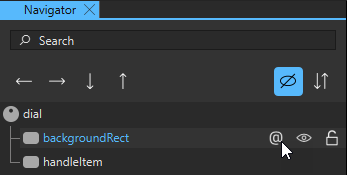
In the UI file where the component is used, you can use the button property alias to implement signal handlers, for example. In the following code snippet, the UI file is called MainForm.ui.qml:
MainForm {
    anchors.fill: parent
    button.onClicked: messageDialog.show(qsTr("Button pressed"))
}
You can also assign properties or define behavior or transitions.
To move from the 2D or Navigator view directly to the implementation of a component in the .qml file, right-click the component and select Go to Implementation in the context menu.
See also How to: Design Qt Quick UIs, Qt Quick UI design, and Designing Qt Quick UIs.
Copyright © The Qt Company Ltd. and other contributors. Documentation contributions included herein are the copyrights of their respective owners. The documentation provided herein is licensed under the terms of the GNU Free Documentation License version 1.3 as published by the Free Software Foundation. Qt and respective logos are trademarks of The Qt Company Ltd in Finland and/or other countries worldwide. All other trademarks are property of their respective owners.
